



Last updated: May 24, 2026
What is AI? Practical explanation for entrepreneurs
You've tried ChatGPT, read an article about AI, and now you're wondering: what is this actually, and what can I do with it in my business? Here's the explanation without jargon, with concrete examples for SMEs. AI (artificial intelligence) uses machine learning to spot patterns in data, making it practical for tasks like answering customer questions, writing quotes, and analyzing sales trends. Generatieve AI tools like ChatGPT and Claude can draft emails, summarize documents, and even generate product descriptions in seconds. For Dutch SMEs, the question isn't whether AI will change how you work, but which processes to automate first and how to do it safely under AVG and NIS2 rules.
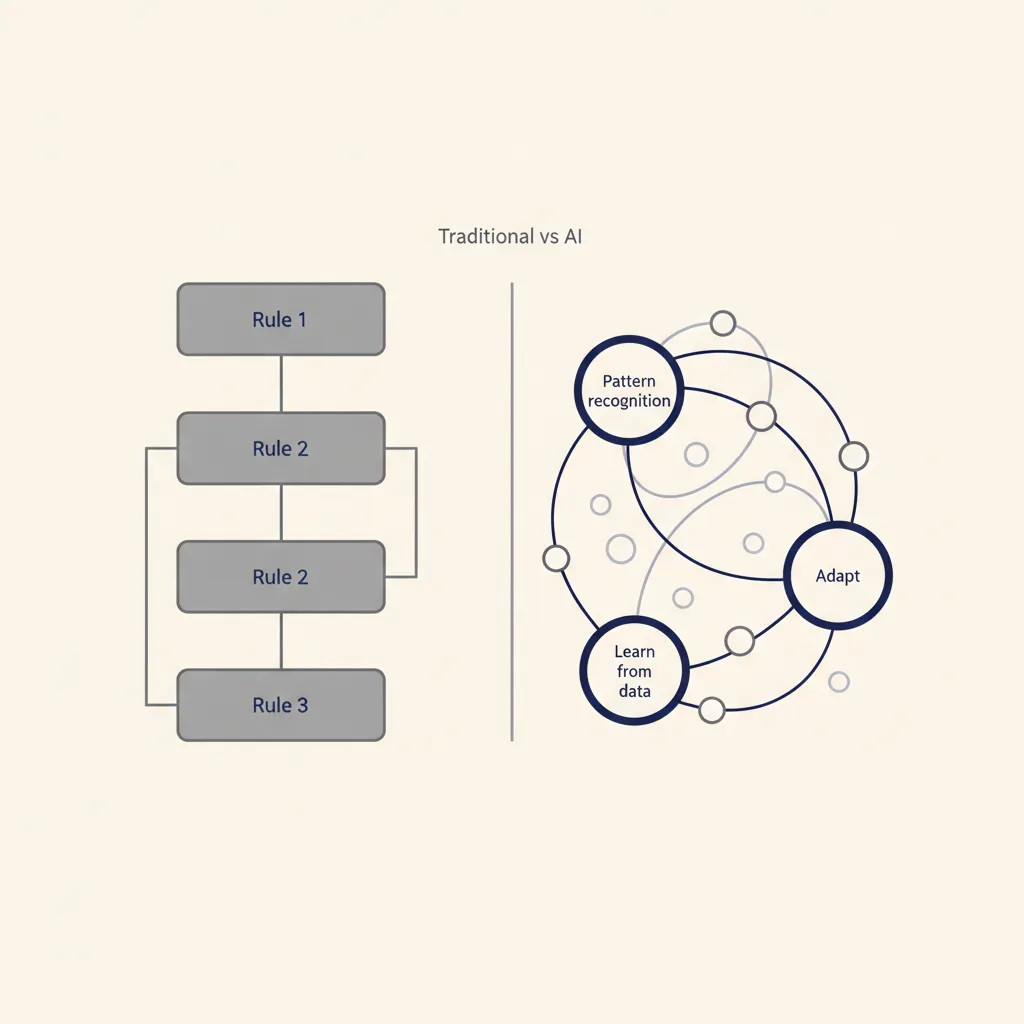
What is AI exactly, and how does it differ from regular software?
Traditional software follows fixed rules you program in advance. If this happens, do that. AI learns patterns from examples instead. You feed it thousands of customer emails, and it figures out which ones need urgent replies. You show it invoices, and it learns to extract amounts and due dates without you writing extraction rules for every possible format.
This makes AI useful for tasks that vary: answering customer questions, recognizing images, translating text, or spotting fraud. But it also makes AI less predictable. A rule-based system does exactly what you told it, every time. An AI model might get 95% right and surprise you with the other 5%.
Machine learning: software that learns from examples
Machine learning is the engine behind most practical AI. You train a model on historical data (past orders, support tickets, sensor readings), and it finds patterns. Once trained, it can predict outcomes for new data: which leads will convert, which machine part will fail next week, which email subject lines get opened.
Dutch SMEs use machine learning for demand forecasting in webshops, predictive maintenance in manufacturing, and credit-risk scoring in B2B sales. The model doesn't need to understand why a pattern exists, it just spots correlations you'd miss manually.
Generative AI: ChatGPT, Claude, and why they're breaking through now
Generative AI creates new content: text, images, code, even video. Tools like ChatGPT and Claude are large language models (LLMs) trained on billions of documents. You give them a prompt, they generate a response. Microsoft Copilot and Google Gemini work the same way, integrated into Office and Workspace.
Why the sudden breakthrough? Three things converged: massive compute power (cloud GPUs), huge training datasets (the entire web), and transformer architecture (a 2017 research paper that made models much better at understanding context). The result: AI that can draft a quote, summarize a 50-page contract, or write product descriptions in your brand voice, all in under a minute.
For SMB owners, this means you can now automate knowledge work that used to require a human: writing, summarizing, translating, answering questions. The catch: you need clean input (garbage in, garbage out) and you have to check the output, because these models sometimes confidently generate nonsense.
Four concrete applications for SME entrepreneurs
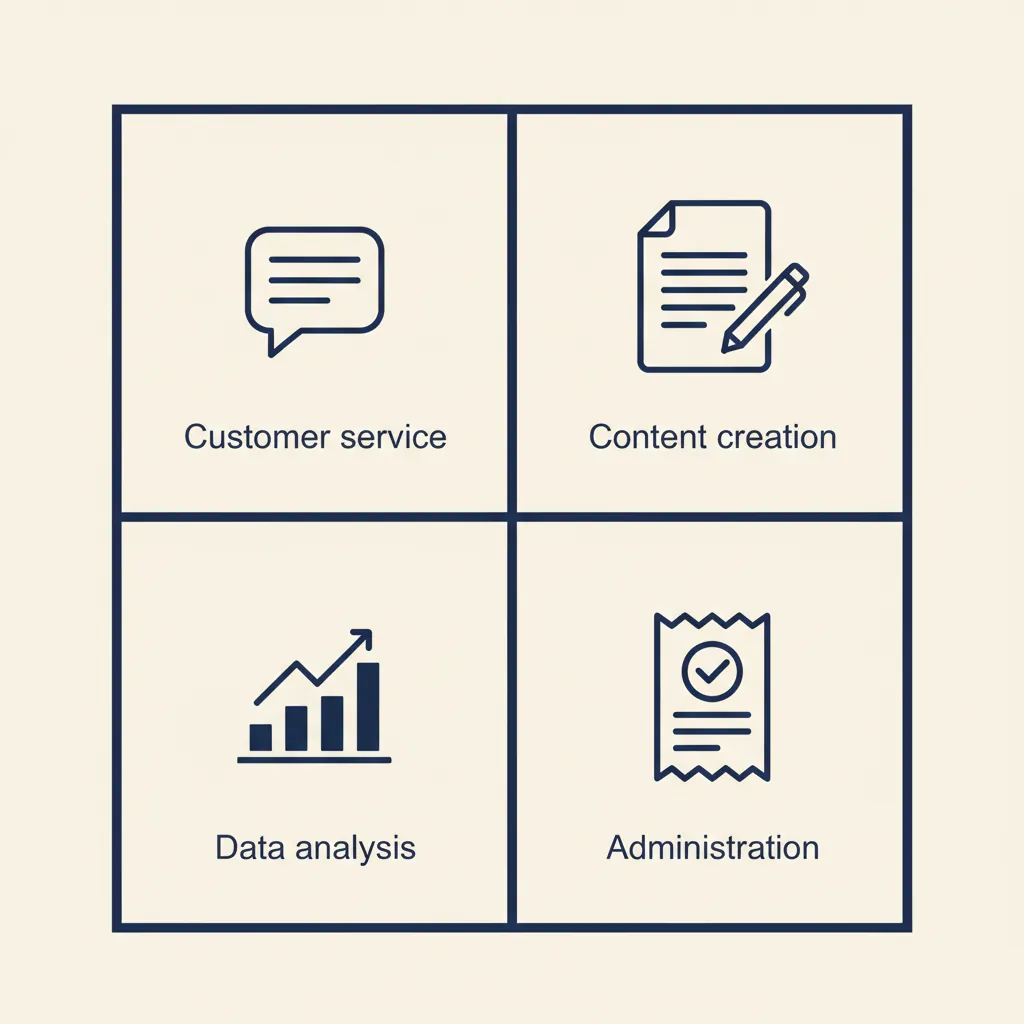
AI saves time on repetitive tasks. For a broader overview of AI for business, see our pillar guide; here's where Dutch SMBs see results today.
Customer service: chatbots and email handling
A chatbot on your website can answer common questions 24/7: "Where is my order?", "What are your opening hours?", "Do you ship to Belgium?" You train it on your FAQ, product pages, and past support tickets. When a question is too complex, it hands off to a human.
For email, an AI agent can draft replies to routine inquiries (price requests, availability checks, return instructions) and queue them for your approval. One Dutch e-commerce client we work with cut first-response time from 8 hours to 8 minutes this way, handling 60% of inbound mail without human touch.
Tools that integrate with Dutch platforms: chatbots for Shopify and WooCommerce, email assistants that connect to Outlook and Gmail. If you run customer support in Teamleader or Simplicate, you can build an AI agent that reads tickets and suggests replies.
Content and communication: quotes, product descriptions, social posts
Writing takes time. AI can draft a first version in seconds. Use cases we see in our business automation work: generating quotes from a template and customer data, writing product descriptions for a webshop with 500+ SKUs, summarizing meeting notes into action points, drafting LinkedIn posts from a blog outline.
The output isn't always perfect, you'll edit tone and details, but it cuts drafting time by 50-70%. For a consultancy that sends 20 quotes a week, that's 3-4 hours saved. For a webshop adding new products daily, it's the difference between launching on time or not.
Data analysis: spotting patterns you'd miss manually
AI can analyze sales data, customer behavior, and operational metrics faster than any human. Example: an AI model spots that customers who buy product A within 7 days of signing up have 3x higher lifetime value. Or it flags that machine downtime always spikes on Thursdays, pointing to a maintenance-schedule issue.
Dutch SMBs use this for churn prediction (which customers are about to leave), inventory optimization (which products to restock when), and pricing (which discounts actually drive margin). Tools like Microsoft Power BI and Tableau now have built-in AI features; you don't need a data scientist to get started.
Administration: receipts, invoices, timesheets
AI can read invoices, extract line items, and push them into your accounting software. It can categorize expenses, match purchase orders to delivery notes, and flag anomalies (duplicate invoices, missing approvals). For Dutch SMBs running Exact Online, Moneybird, or Snelstart, this means fewer manual bookings and faster month-end close.
Timesheet automation is another win: an AI agent reads your calendar and Slack messages, suggests how you spent your day, and fills in your timesheet in the format your invoicing tool expects. For consultancies and agencies billing by the hour, that's 30-60 minutes saved per person per week.
The ROI here is straightforward: if your team spends 5 hours a week on admin and you automate half of it, you've bought back 2.5 hours. At a loaded cost of €50/hour, that's €125/week or €6,000/year per person.
Running into this at your own business? We'll spend 30 minutes with you for free, no sales pitch. Book a free intro call
AVG, NIS2, and safety: what you need to arrange before you start
AI tools process company data and customer information. That triggers AVG (GDPR) obligations: you need a processing agreement with the vendor, a documented purpose, and a retention policy. If you're using a free tool like the public version of ChatGPT, be aware: OpenAI may use your input to train future models. For business use, switch to ChatGPT Team or Enterprise, which offers a no-training guarantee.
Since October 17, 2024, NIS2 (the EU cybersecurity directive) applies to many Dutch SMBs in critical sectors: logistics, manufacturing, food, healthcare, digital infrastructure. NIS2 requires you to document access controls, incident response, and supply-chain security. If you're using AI to process sensitive data (customer records, financial data, health information), you must ensure the tool meets these standards.
Practical checklist before you deploy an AI tool:
- Does the vendor offer a Data Processing Agreement (DPA) that covers AVG Article 28?
- Where is your data stored? EU-hosted is simplest for compliance; US-hosted requires Standard Contractual Clauses or adequacy decisions.
- Does the vendor use your data for training? If yes, can you opt out?
- Can you delete data on request? (AVG right to erasure.)
- Does the tool log who accessed what, when? (NIS2 audit trail requirement.)
For Dutch SMBs, SafeGPT and Microsoft Copilot (on a business plan) are common choices because they're EU-compliant by default. When we build custom AI agents for clients, we host them on EU servers and sign a DPA as part of the delivery.
If you're unsure whether NIS2 applies to your business, check the NCSC (Dutch National Cyber Security Centre) guidance or ask your accountant. The penalty for non-compliance can reach €10 million or 2% of global turnover, whichever is higher, so this isn't optional.
Where most SMBs go wrong (and how to avoid it)
The biggest mistake isn't picking the wrong tool, it's automating a broken process. If your team has no clear rules about who approves quotes or which tone of voice to use in customer emails, an AI agent won't magically fix that. It will just execute the chaos faster.
In the projects we deliver for Dutch SMBs, we see the same pattern: 8 out of 10 automation failures trace back to unclear workflows, not the technology. Before you automate, write down the current process. Who does what, in which order, with which exceptions? If you can't explain it to a junior employee in 10 minutes, you can't explain it to an AI either.
Second mistake: expecting perfection. AI models are probabilistic. They'll get most things right and occasionally surprise you. That's fine for drafting emails or summarizing documents (you review the output). It's not fine for tasks where a single error has serious consequences: sending invoices, approving payments, or making medical decisions. For high-stakes workflows, use AI to assist humans, not replace them.
Third mistake: using a generic tool when you need custom logic. ChatGPT is great for one-off tasks (write this email, summarize that report). But if you're doing the same task 50 times a week, you need a workflow. That's where tools like n8n, Make, or Zapier come in: you build a multi-step automation that connects your CRM, your email, your accounting software, and an AI model. Our business automation work focuses on these end-to-end workflows, not one-off prompts.
When a ready-made tool is enough: customer-service chatbots (many good SaaS options), content generation (ChatGPT, Jasper, Copy.ai), meeting transcription (Otter.ai, Microsoft Teams). When you need custom: multi-system workflows (quote to invoice to accounting), proprietary knowledge bases (a custom GPT trained on your internal docs), or compliance-heavy processes (AVG-compliant document handling). If you're not sure which category your use case falls into, that's exactly where our AI consultancy helps: we map your process, recommend build vs. buy, and show ROI before you commit.
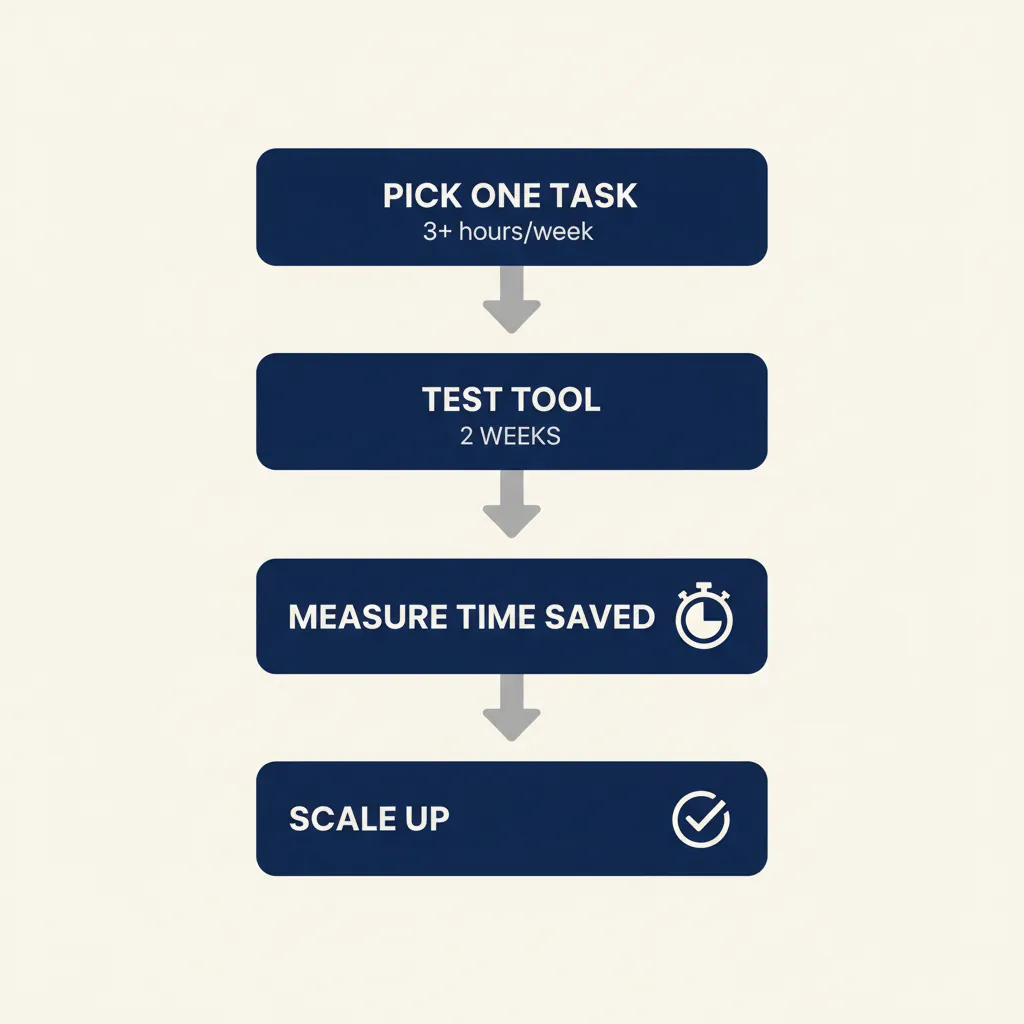
Where do you start? A step-by-step plan without hype
Pick one recurring task that costs your team 3+ hours per week. Examples: answering the same customer questions, writing quotes, processing invoices, scheduling meetings, summarizing reports. Make sure it's a task with clear input and output, not something that requires deep judgment.
Test a tool for two weeks. If it's content generation, try ChatGPT Team (€25/user/month). If it's a chatbot, try Intercom or Zendesk AI. If it's workflow automation, try n8n (self-hosted or cloud) or Make. Track the time saved: how many hours did the tool handle, how many hours did you spend reviewing its output?
Measure the result. If you saved 2 hours per week and the tool costs €50/month, your payback is instant (2 hours × €50 loaded cost = €100/week = €400/month saved). If you saved 30 minutes and spent 2 hours fixing mistakes, the tool isn't ready yet.
Scale only after the pilot works. Add more users, automate a second task, or connect the tool to other systems. For Dutch SMBs, integration with existing software is key: your AI solution should talk to Exact Online, AFAS, Moneybird, Snelstart, Teamleader, or whichever tools you already use. Most modern platforms offer APIs or Zapier connectors; if yours doesn't, you may need custom integration work.
When to hire help: if the task involves multiple systems (CRM + email + accounting), if you need custom logic (different rules for different customer types), or if compliance matters (AVG, NIS2, sector-specific regulations). A consultant or developer can build it right the first time, saving you weeks of trial and error. We deliver these workflows end-to-end for SMB clients, first version live in 2 to 4 weeks, GDPR-compliant and hosted where you want it.
Start small, measure the outcome, and build from there. AI isn't a magic solution, but it's a powerful tool for tasks that follow patterns. Want to know which processes in your business are most suitable? That's exactly what our AI consultancy helps with: we map your workflow, show ROI, and recommend the fastest path to results.
For a related angle, see our post on AI for professional services: practical SMB guide.
Frequently asked questions
What is the difference between AI and machine learning?
AI is the broad concept of machines performing tasks that normally require human intelligence. Machine learning is the method most practical AI uses: training a model on historical data so it can predict outcomes for new data. Think of machine learning as the engine that powers most AI tools you'll actually use in business.
Which AI tools are AVG-compliant for Dutch businesses?
Tools that offer a Data Processing Agreement (DPA), EU hosting, and a no-training guarantee are safest. ChatGPT Team, Microsoft Copilot (business plan), and SafeGPT meet these criteria. Avoid free consumer tools like public ChatGPT for business data, as vendors may use your input for training. Always check where data is stored and whether you can delete it on request.
How much does it cost to implement AI in an SME?
A SaaS tool like ChatGPT Team costs €25/user/month; a chatbot platform runs €50-200/month depending on volume. Custom workflow automation (connecting your CRM, email, and accounting) typically costs €2,000-8,000 to build, with payback in 3-6 months if you're saving 5+ hours per week. Start with a small pilot (under €500) to prove ROI before committing to larger projects.
Can I use AI without technical knowledge?
Yes, for simple tasks. ChatGPT, Microsoft Copilot, and ready-made chatbots require no coding. For multi-step workflows (quote to invoice to accounting), you'll need help: either a no-code platform like Zapier (which has a learning curve) or a consultant who builds it for you. Most Dutch SMBs start with a consultant-built pilot, then train internal staff to maintain it.
Which tasks are suitable to automate with AI?
Tasks that are repetitive, follow patterns, and have clear input/output: answering common customer questions, drafting quotes and emails, categorizing expenses, summarizing documents, extracting data from invoices. Avoid automating tasks that require deep judgment, have serious consequences if wrong (payments, legal decisions), or change rules frequently.
What is NIS2 and does it apply to my business?
NIS2 is an EU cybersecurity directive effective October 17, 2024, requiring companies in critical sectors (logistics, manufacturing, food, healthcare, digital infrastructure) to document access controls, incident response, and supply-chain security. Many Dutch SMBs with 50+ employees or €10M+ revenue now fall under NIS2. Check the NCSC guidance or ask your accountant; penalties reach €10M or 2% of turnover for non-compliance.
Sources
Curious what AI can do for your business?
We listen, think along, and quickly deliver something that works. No obligations, no pressure.