



Last updated: July 1, 2026
AI for business: a practical guide for Dutch SMEs
You've heard AI can save time and cut costs, but most advice is written for enterprise IT departments with six-figure budgets. Dutch SMEs need a different approach: one that starts with the tools you already use, respects GDPR rules, and pays back in weeks, not quarters. In practice, we see that process automation with AI agents for business makes the difference between a tool that disappears in a drawer and a workflow that saves your team 8 hours a week.
What AI for business means (and what it doesn't)
AI for business is not a magical black box that suddenly understands your company. It's software that recognizes patterns, reads and writes text, and makes decisions based on rules you've set. In an SME context that means: scanning documents and extracting data from them, reading emails and drafting replies, generating quotes from CRM data, or posting invoices automatically in your accounting package.
The difference between a generic chatbot, workflow automation with AI steps, and a custom AI agent comes down to how much context the tool has. A chatbot answers questions based on a knowledge base. Workflow automation (via n8n, Make or Zapier) runs steps you've configured, with AI as one link in the chain. An AI agent is given a goal and decides for itself which steps are needed to reach it, often across multiple tools at once.
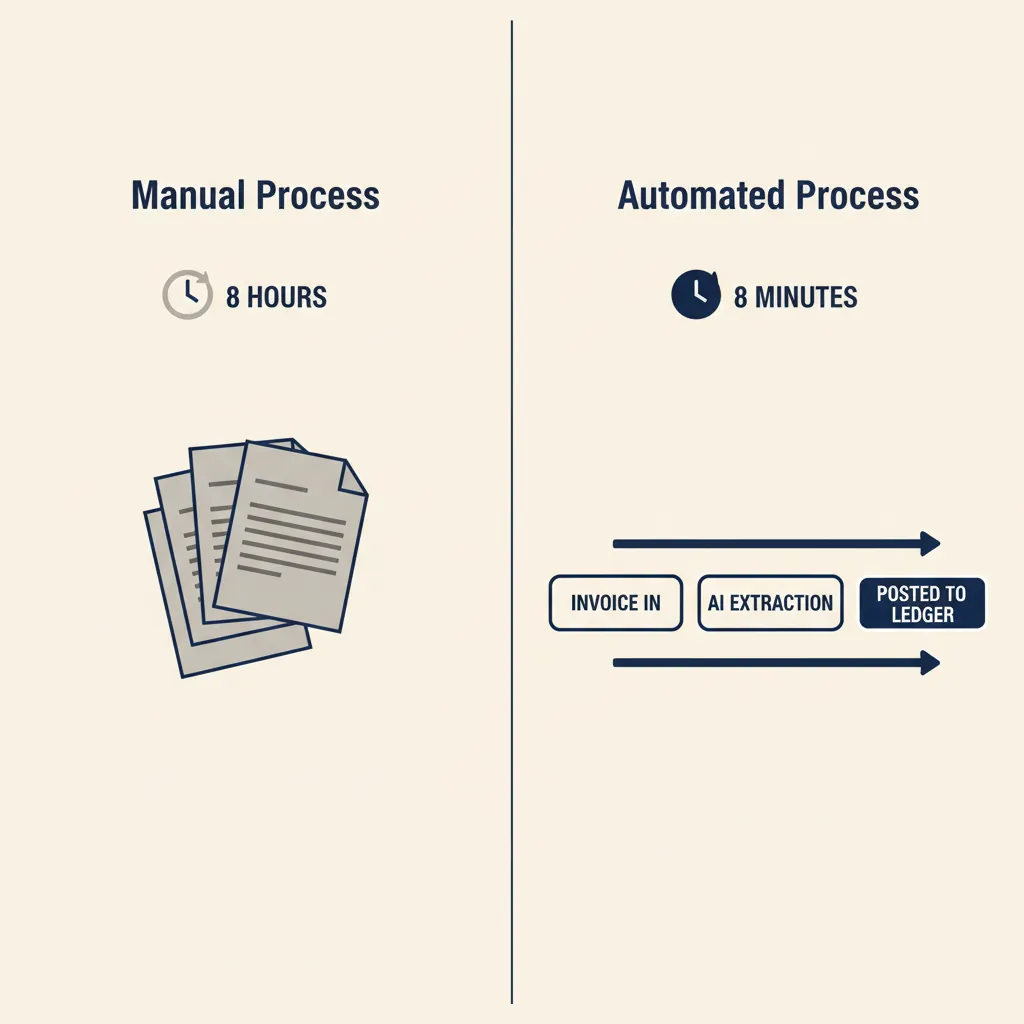
For most Dutch SMEs, AI doesn't start with an agent that makes decisions on its own, but with one workflow that replaces a manual process. Picture this: an invoice arrives by email, the AI reads the PDF, pulls out the amount and supplier, and prepares a booking line in Exact Online or Moneybird. You check it and click 'post'. That saves you 15 minutes per invoice, and you still stay in control.
What this means for you: Start with one process you currently do by hand and ask yourself: which step could a machine do faster than a person?
Concrete AI use cases Dutch SMEs are using now
Below are four use cases we most often build in our business automation projects for SME clients. Each example names the tools we use and the Dutch back-office software it integrates with.
| Use case | Time saved | Tools | What we build |
|---|---|---|---|
| Customer service (email) | 8h → 8min reply time | n8n + custom GPT + knowledge base | Auto-tagging + draft reply |
| Bookkeeping (invoices) | ~3 hrs/week | n8n + GPT Vision + Exact/Moneybird | OCR extraction + draft posting |
| Quotes (CRM → PDF) | 30 → 2 min/quote | n8n + GPT + Pipedrive/HubSpot | Template fill + PDF + send |
| Email triage (info@ inbox) | ~2 hrs/week | n8n + AI agent + Slack/Teams | Type/urgency detection + routing |
Customer service: AI agents that read, categorize, and draft replies
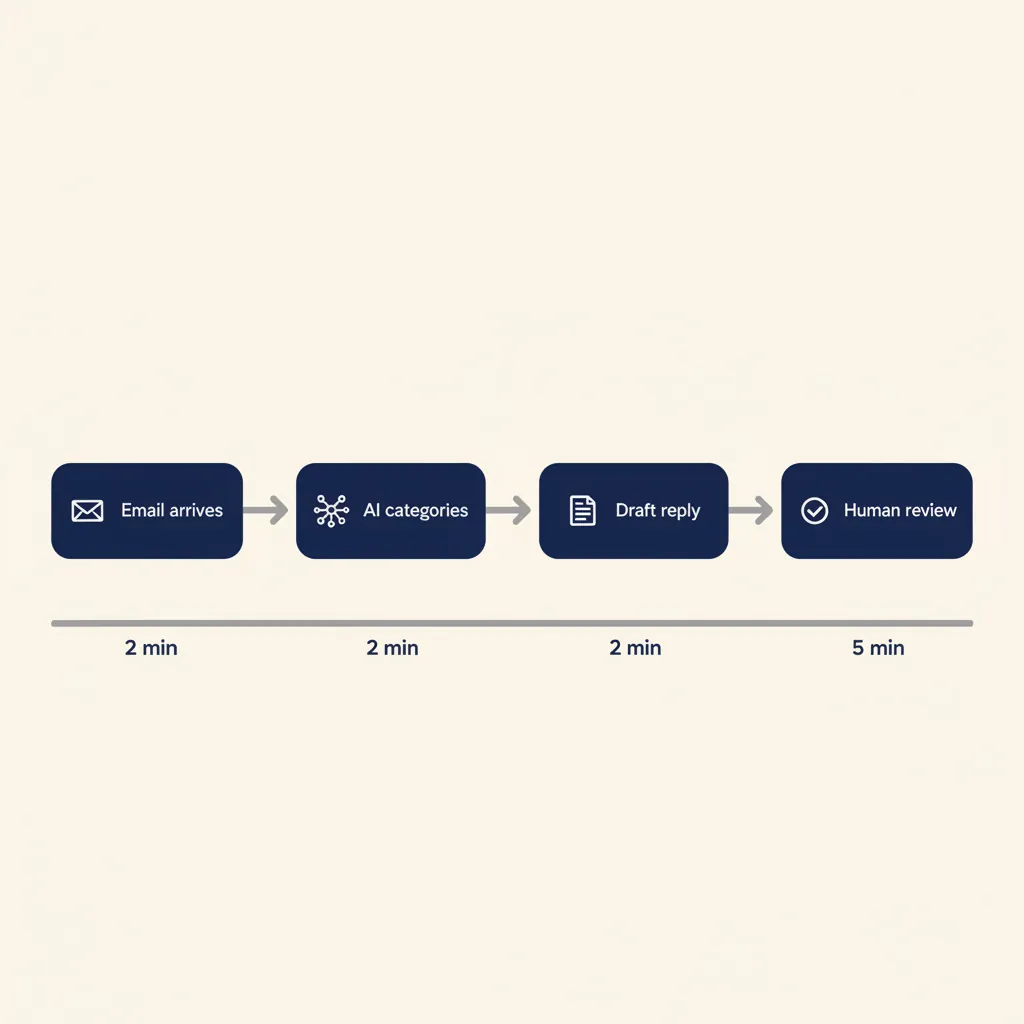
You receive 40 customer questions a day by email. Right now, someone reads each message, decides whether it's a return, a question about delivery time or a complaint, and types a reply. With an AI agent (built on GPT or Claude, connected via n8n or Make) this is what happens:
- An email arrives in your support inbox
- The AI reads the text and determines the category (return, delivery time, technical question)
- The AI looks up the answer in your knowledge base or product catalogue
- The AI drafts a reply in your tone of voice
- You or a colleague reviews and sends, or it goes out automatically when confidence is high enough
Result: reply time drops from 8 hours to 8 minutes. Your team spends its time on complex questions instead of copying standard answers.
Bookkeeping: scan invoices and post them automatically in Exact Online or Moneybird
Every week, 20 purchase invoices come in by email or through a shared folder. Someone opens each PDF, copies the amount and supplier into AFAS, Exact Online or Moneybird, and links the cost account. With AI automation:
- The invoice PDF is scanned by an OCR tool (such as Docparser or a GPT Vision step)
- The AI extracts the supplier, invoice number, amount and VAT
- The workflow checks whether the supplier already exists in your system
- The data is offered as a draft booking in Exact Online or Moneybird
- You review and post it definitively
This saves 10 minutes per invoice. At 20 invoices a week that's more than 3 hours you win back.
It sounds simple, but in practice the real work isn't in the OCR itself. It's in OCR tuning for your specific suppliers (every supplier has a different invoice layout), the mapping to the right ledger accounts, duplicate-invoice detection and an approval flow for amounts that fall outside the norm. For a construction firm that processes 30 subcontractor receipts a week, the saving climbs to 3 or 4 hours per week, and you avoid typos in amounts or VAT codes that would otherwise cause trouble with the tax authorities. That's where experience with Exact Online and AFAS quickly pays off: that knowledge determines whether the workflow keeps running on the first out-of-the-ordinary invoice or grinds to a halt.
Quotes: from CRM data to PDF in one click
Your sales team records customer details and product requirements in Pipedrive or HubSpot. Then someone opens a Word template, copies the data over, adjusts prices, and exports to PDF. Error-prone and slow. With AI and workflow automation:
- The salesperson clicks 'Generate quote' in the CRM
- The workflow pulls the customer details and product lines
- The AI fills a quote template (with your house style and terms)
- The PDF is generated and emailed automatically to the customer, with a CC to the salesperson
From 30 minutes to 2 minutes. And no more typos in customer names or amounts. A professional services firm that produces 10 quotes a week wins back 5 to 6 hours per week this way, with a tone of voice that stays consistent because the AI uses previously approved quotes as examples. That's how we automated the quote process at Mix-Fix Coffee: from a manual step that slowed down the sales flow to a workflow that prepares the quote the moment the details are in the CRM.
Email triage: who needs to read this, and what's the deadline?
Your general info@ inbox receives 60 messages a day: job applications, quote requests, invoices, spam. Someone sorts them by hand and forwards them to the right colleague. AI can take this over:
- An incoming email is read by an AI agent
- The agent determines the type (application, quote request, invoice, complaint)
- The agent detects urgency (a deadline, an angry tone, a contract reference)
- The email is forwarded automatically to HR, sales, accounting or support, with a label and a priority
Your team only sees the messages that are relevant to them, sorted by urgency.
Keeping CRM and accounting in sync without double entry
The fifth use case is less visible but saves just as many hours: keeping your CRM and your accounting in sync. Right now, someone enters the same customer twice — once in Pipedrive, Teamleader or HubSpot when the deal comes in, and again in Exact Online, AFAS or Moneybird when the invoice needs to go out. Double work, and a source of wrong customer names and forgotten invoices.
- A deal is marked 'won' in the CRM
- A workflow automatically creates a customer in your accounting system (if it doesn't exist yet)
- The invoice is created and prepared, with the right project code and cost centre
- On an error or duplicate match, your admin team gets an alert instead of something quietly going wrong
For an IT agency with 20 new customers a month this saves 2 to 3 hours per month, and more importantly: you prevent forgotten invoices and typos in customer names that cost time to correct later. This kind of end-to-end integration falls under business automation, and it's often the first step that brings the most peace of mind, because it removes a structural friction point between sales and admin.
What this means for you: Start with the process that costs you the most hours per week, not the one that sounds coolest. Measure how much time you spend now, have the first version built by someone with integration experience, and then measure again. Without that experience you run a big risk that the automation stalls on the first exception or that the AI model makes errors you only notice weeks later.
How do you choose where to start?
Five use cases sounds like five projects, but that's not how you should approach it. Almost every successful AI project at Dutch SMEs starts with exactly one process. The question is which process. Two criteria help you choose: how many hours does it cost per week now, and how structured is it already?
Start with the process that costs the most hours and runs the most predictably. Posting invoices and creating quotes score high on both: they happen often, take noticeable time, and follow a recognizable pattern. Email triage also costs time but is more erratic — start with that only once your team has been through building a workflow before. Answering customer questions with a custom GPT delivers the biggest time saving, but takes the most preparation because your knowledge base has to be in order first.
A practical order we follow with many clients: for each candidate process, write down how many hours per week it costs, how often exceptions occur, and how bad an error is. A process that costs 4 hours per week, has few exceptions and where an error is cheap to fix — that's your starting point. That way, with the first saving you immediately build the business case for the next project, without a big budget up front. For the broader strategy behind this, our guide to automation for SMEs is a good next step, and if you specifically want to get started with autonomous agents, read on about AI agents for SMEs.
What this means for you: Don't pick the coolest process, pick the one with many hours, few exceptions and cheap errors. That's where AI pays off fastest and where your team gains trust the quickest.
Integrating with Dutch tools: AFAS, Exact Online, Moneybird and Mollie
AI only delivers value once it talks to the systems you use today. Most Dutch SMEs run on AFAS, Exact Online, Snelstart or Moneybird for accounting, and Mollie for payments. All of these tools have APIs you can connect workflows to — the power is that you don't have to learn new software. You keep working in AFAS or Exact, and the AI layer runs in the background. For companies that have worked with the same tools for years, that's crucial.
An example with Mollie: you receive a payment, the webhook triggers a workflow, and the AI matches the payment to an open invoice in Exact Online. The invoice is settled and your customer gets a confirmation email. No more manual reconciliation. For AFAS users, you can automate time entries: employees fill in their hours in a simple form or app, and a workflow posts them in AFAS under the right project and cost centre. That saves a project manager 1 to 2 hours per week that would otherwise go to checking and entering all the timesheets.
VAT filing is another pain point that lends itself well to automation. You build a workflow that pulls your revenue and VAT from Moneybird or Snelstart each month, checks the figures for anomalies (a sudden drop, for instance) and prepares a draft return for your bookkeeper. That way you prevent forgotten invoices and wrong VAT codes. Note: every API has its own pitfalls — rate limits, authentication flows, data transformations. Let the first integration be built by someone who has connected the package before, and the rest becomes a matter of repetition. Which automation platform fits best depends on your stack; our comparison of n8n vs. Make for SMEs helps you make that choice.
What this means for you: Choose AI that integrates with your existing accounting and payment software, not a separate island. The integration layer is where most of the work sits — and where experience with Dutch packages makes the difference between a demo and a workflow that runs for months.
Running into this at your own SME? We're happy to spend 30 minutes thinking it through with you for free, no sales pitch. Book a free intro call
Why most SME AI projects fail (and how to avoid it)
We see three patterns that make AI automation stall at Dutch SMEs. One: you buy a generic AI tool without first mapping the underlying process. The bottleneck rarely sits in the tool, almost always in the fact that the source process (who is allowed to approve what, which data is leading) was never written down. The fix: draw the current process on paper before you choose a tool.
Two: you expect the AI to get to know your company on its own. That doesn't happen. If you want an AI agent that draws up quotes according to your pricing logic and terms, you have to write that logic down first and put it into the tool. A model can recognize patterns, but it can't guess what your internal agreements are. The fix: build a knowledge base or instruction set before you unleash the AI on real customer data.
Three: you build the AI in a silo, separate from the tools your team uses every day. The result: nobody opens the AI tool, and after three months the project is dead. The fix: integrate the AI into the workflow your team already follows. If your bookkeeper opens Exact Online every morning, make sure the AI suggestions appear there, not in a separate dashboard.
There's a fourth pitfall specific to custom GPTs and knowledge-base projects: document quality. If you train an AI model on outdated manuals or inconsistent answers, it gives bad advice. In practice, 8 out of 10 of these projects fail because the knowledge base wasn't cleaned up before the model dived into it — not because the model falls short. There's also often no owner: someone has to be responsible for updating prompts, monitoring errors and rolling out improvements. Without an owner the workflow goes stale and the team stops using it.
A short checklist before you start your first AI project:
- Map the current process, step by step. Where does it go wrong now and where does it cost the most time?
- Clean up your data. Remove duplicate customers from your CRM, correct wrong VAT rates in your accounting and update outdated documents.
- Start small. Automate one sub-process (for example, only purchase invoices, not all invoices) and measure the result.
- Appoint an owner who tests the workflow every week, fixes errors and gathers feedback.
- Document your prompts and settings, so that in six months you know how it works when you want to change something.
The most important lesson: AI amplifies your process, it doesn't replace a bad process. If you're already making mistakes or have unclear steps, AI only makes it go wrong faster. That's exactly why many of the common mistakes with AI at SMEs have nothing to do with technology and everything to do with preparation.
That's why at our AI consultancy we always start with a process inventory: which steps do you take now, where does the time go, and which step can a machine take over without the quality dropping? Only then do we choose the tool and build the integration.
What this means for you: An AI project succeeds or fails in the preparation, not in the technology. Invest a day in writing out your process before you buy a tool.
GDPR, NIS2 and security: using AI without legal risk
If you send customer data through an AI model, you are processing personal data. That means GDPR applies. In practice: you need a data-processing agreement with your AI vendor, you need to know where the data is physically stored (preferably in the EU), and you need to be able to explain why the AI made a particular decision if a customer asks.
The Dutch Data Protection Authority stresses that you may only process the data that is truly needed for the purpose. So don't send an entire customer database to an AI model if you only want to categorize invoices. Limit the input to invoice number, amount and supplier.
NIS2, the new European cybersecurity directive in force since October 2024, also affects many SMEs working in critical sectors or that are part of a supply chain. If you use AI to automate processes, you must be able to demonstrate that you've taken measures against data breaches and unauthorized access. Concretely: log what the AI reads and writes, limit access to the AI tool to employees who really need it, and make sure you store your API keys and passwords securely.
Practical steps to work GDPR-compliant with AI:
- Choose an AI vendor that stores data in EU regions (OpenAI, Anthropic and Google all offer this)
- Sign a data-processing agreement (most business AI services have a standard DPA)
- Log which data you send to the AI and keep those logs for 30 days
- Write a simple instruction for your team: which data is and isn't allowed through the AI
- Test whether you can explain why the AI proposed a particular action (GDPR transparency requirement)
If your AI vendor can't tell you where your data is physically stored, walk away. That's a red flag.
What this means for you: GDPR compliance for AI is not a legal maze, but it does require you to consciously choose which data you share and with whom. Do that up front, not afterwards.
Custom AI agents vs. standard tools: when to choose what?
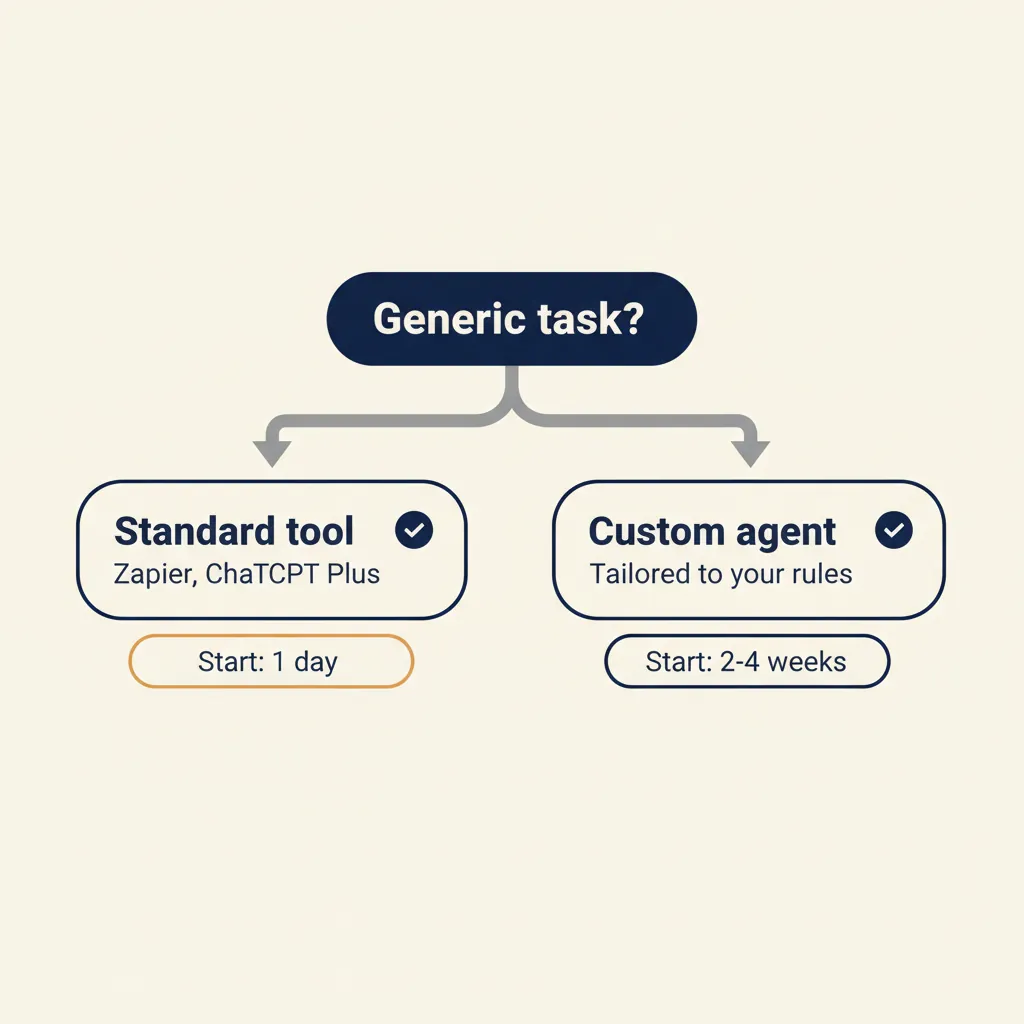
Use a standard tool (such as Zapier AI, ChatGPT Plus or Google Gemini for small businesses) when the task is generic and you're willing to adapt your process to the tool. Examples: summarizing emails, typing up meeting notes, rewriting social media posts. These tools work almost out of the box and are quickly productive, provided you have someone who sets up the prompts well and checks the output.
Build a custom GPT or AI agent when you want the tool to know your product catalogue, pricing logic, compliance checklist or internal jargon. Examples: generating quotes with your specific discount rules, answering technical questions based on your manuals, or checking purchase invoices against your internal approval matrix. Building a reliable custom GPT takes more than writing a ChatGPT prompt: you have to curate the knowledge base, prevent hallucinations by grounding retrieval in fixed sources, and monitor when the model drifts. That's where experience with AI tuning quickly pays off.
The cost-benefit trade-off: standard tools are quick to deploy, but they hit a ceiling. If you notice you have to make the same manual corrections to ChatGPT's output every day, that's the signal you need a custom build. Custom agents take more preparation and specialist hours, but save more time structurally because they do exactly what you need.
A decision rule: use a standard tool if the task costs few hours per week and you're happy with around 80% accuracy. Build custom if the task costs several hours per week, errors are expensive (in quotes or contracts, for example), or you want to keep a competitive edge by working faster or more accurately than others in your sector.
For companies that want to start with custom work but don't immediately need a full custom platform, we build custom GPTs: an AI assistant trained on your knowledge, grounded in fixed sources to prevent hallucinations and integrated into your existing tools.
What this means for you: Start with a standard tool to learn how AI fits into your process. Switch to a custom build as soon as you know which step delivers the most gain and where a generic tool falls short, and then bring in a partner who has built the stack dozens of times early on.
What does AI cost for an SME (and when does it pay back)?
The question 'what does AI cost' has no fixed answer, but it does have a fixed calculation method. You work out the payback period by multiplying the current time investment by your internal hourly rate and weighing that against the build and maintenance cost of the workflow. So alongside build cost, always count maintenance and monitoring, because a workflow that stalls after three months has no ROI left. The tooling costs themselves (n8n, AI API credits) are usually limited; the real investment sits in the specialist hours needed to set up the workflow reliably. If you want to calculate this step by step, our explanation of calculating the ROI of automation gives you a concrete formula.
Three scenarios make it tangible. Invoice processing: you currently process 30 invoices per week, each taking 5 minutes of manual work. That's 2.5 hours per week, or 10 hours per month. Automating it frees that time for work that does require human judgment and prevents typos in amounts or VAT codes. The payback lands in the first months, provided the OCR model is well tuned to your suppliers and the mapping to ledger accounts is correct.
Quote process: you produce 10 quotes per week, each taking 30 minutes. That's 5 hours per week, or 20 hours per month. Automation saves 60 to 70% of that time — 12 to 14 hours per month — provided your approval rules and discount logic are written down in advance. Otherwise the workflow keeps stalling on exceptions that were never documented.
Customer service: you receive 50 customer questions a day, of which 30% are standard (track-and-trace, opening hours, return policy). A custom GPT answers those 15 questions automatically, each saving 3 minutes. That's 45 minutes a day, or 15 hours per month. The payback lands at one to two months, including the coaching to bring your team along — because without adoption even the best automation delivers nothing.
An important caveat: these calculations assume a well-designed process. If you first have to clean up your documentation or train your team, add ten to twenty hours of setup time. You'll still earn that investment back in three to six months. For SMEs with 10 to 50 employees, the sweet spot is therefore: start with one process that currently costs five to ten hours per week, automate it, and use the saving to finance the next project.
What this means for you: Calculate the costs per process, not per tool. Factor in maintenance and adoption, because that determines whether your ROI still exists after month three.
AI for business works when you start small, pick a process that already costs you hours per week, and build the AI into tools your team actually uses. If you're not sure where to start, map one workflow end to end and ask yourself: which step could a machine do faster? The companies already seeing results with AI didn't start with a grand strategy, but with one concrete process they automated, measured and then expanded together with a specialist.
Frequently asked questions
How do I size up the investment for AI implementation?
The investment depends on three factors: whether you pick a standard tool or a custom build, how many systems the AI has to integrate with (AFAS, Exact Online, CRM) and the volume of data and exceptions. Standard tools have a low monthly fee and are productive within days; custom work takes more preparation but fits your process exactly. Calculate payback by multiplying the time the process currently takes by your hourly rate and weighing that against build and maintenance cost. For processes that currently take several hours a week, a serious automation usually pays back within one to two quarters, provided it keeps running reliably in production.
Can I use AI without an IT department?
An in-house IT department is not required, but you do need someone with experience in process design, API integrations and AI tuning. Many SMEs without an IT department use AI through no-code platforms like n8n, Make or Zapier, or have a custom GPT built that runs inside their existing tools. You do not need a developer on staff, but for a reliable implementation you will almost always bring in a specialist or automation partner, especially for AFAS or Exact integrations and for AI models that stay error-prone without validation and monitoring.
How long does it take for an AI automation to pay for itself?
Calculate payback by multiplying the hours per week the process currently takes by your hourly rate and weighing that against build and maintenance cost. Standard tools usually pay back within a few weeks because the barrier is low; custom solutions take more preparation but save more time structurally. Important: alongside build cost, factor in maintenance and monitoring, because an automation that stalls after three months has no ROI left.
Which AI tools integrate with AFAS, Exact Online or Moneybird?
Platforms like n8n, Make and Zapier have ready-made connectors for Exact Online and Moneybird. For AFAS you often build a custom API integration. AI models like GPT and Claude can read and write data to your accounting package through these platforms, for example to post invoices automatically or generate quotes. Every API has its own pitfalls (rate limits, authentication flows, data transformations), so let the first integration be built by someone who has connected the package before.
Is ChatGPT GDPR-proof for business use?
ChatGPT Enterprise and OpenAI's business API offer GDPR compliance: data is stored in EU regions, a data-processing agreement is available, and your data is not used to train the model. The free version of ChatGPT is not GDPR-proof for business data containing personal information. Always check whether your vendor offers a DPA (Data Processing Agreement).
What is the difference between a chatbot and an AI agent?
A chatbot answers questions based on a fixed knowledge base and follows a script. An AI agent is given a goal (for example, 'answer this customer question and update the CRM') and decides for itself which steps and tools are needed to reach that goal. Agents can drive multiple systems and make decisions; chatbots follow predefined paths.
Which AI process is best to start with?
Start with the process that costs the most hours per week and runs the most predictably, not the one that sounds coolest. Posting invoices and creating quotes score high: they happen often, take noticeable time and follow a recognizable pattern. For each candidate process, write down how many hours it costs, how often exceptions occur and how bad an error is. A process with many hours, few exceptions and cheap errors is your starting point, and with the first saving you immediately finance the next project.
What does AI cost for an SME with 10 to 50 employees?
The tooling costs (n8n, AI API credits) are usually limited; the real investment sits in the specialist hours needed to set up the workflow reliably, plus maintenance and monitoring. Calculate payback by multiplying the current time investment by your internal hourly rate and weighing that against build and maintenance cost. For a process that currently takes five to ten hours per week, a good automation usually pays back within one to three months, provided you also count the setup time for cleaning up data and bringing your team along.
Sources
Curious what AI can do for your business?
We listen, think along, and quickly deliver something that works. No obligations, no pressure.