



Last updated: July 1, 2026
SME Automation: Practical Guide for Dutch Business 2026
You've heard that automation is only for large companies with large budgets. That was true five years ago. Today, Dutch SMEs save 10 to 20 hours per week by automating invoices, quotes and admin with tools that cost less than part-time help and integrate with the software you already run. Automation is no longer reserved for enterprise IT: process optimization and digitalization are now within reach for any SME that wants to cut manual work.
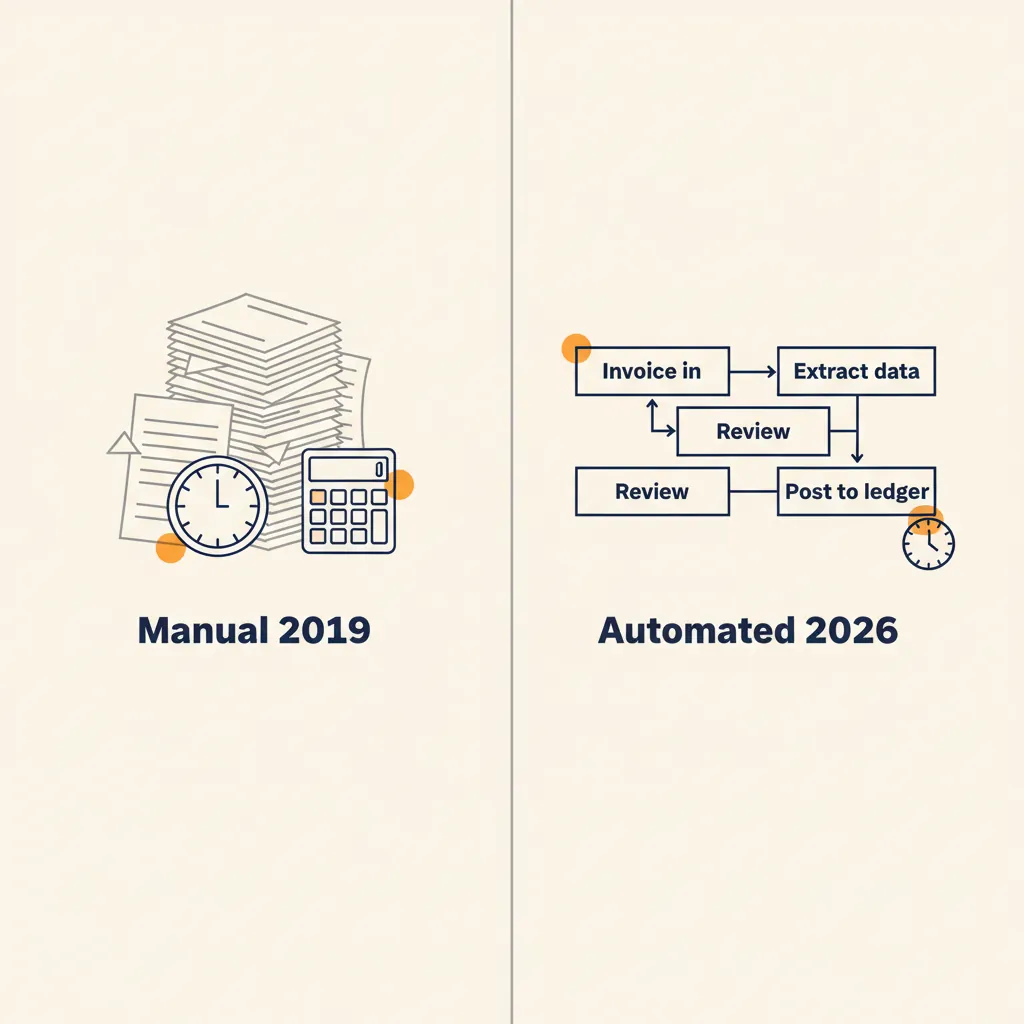
This article shows which processes to tackle first, which tools fit Dutch SME software like AFAS and Exact Online, what automation really costs, which subsidies you can use, and how to prevent a pilot from stalling after three months. No theory, but an honest picture of what is achievable and where expertise pays for itself quickly. Think of it as the foundation guide that the rest of our articles on office automation, ROI calculation and tool choices build on.
Why automation is now within reach for SMEs
Five years ago an automation project quickly cost €50,000 and you needed an in-house IT department to keep it running. Today you pay €20 to €300 per month for platforms like n8n, Make or Zapier and can have a first working workflow live within weeks. So the barrier has dropped sharply, but that doesn't mean automation comes "ready out of the box": a reliable workflow still requires analysis of your process, knowledge of API integrations and someone who maintains it when AFAS, Exact or an AI model changes.
That shift comes from three developments. First, cloud platforms have matured: AFAS, Exact Online, Moneybird and Mollie all offer APIs that let you exchange data automatically. Second, low-code platforms like n8n and Make make building workflows more accessible, although designing a reliable automation remains specialist work: you need to know which trigger fits, how to set up error handling and where you can or can't trust an AI model. Third, AI models like GPT and Claude are available via API, which lets you read invoices, sort emails and generate quotes, provided you set up your prompts, validation and human checks properly. Otherwise you get hallucinations in your admin.
The result: 84% of Dutch SMEs plan to invest more in AI and automation over the next three years. That's not hype, it's a response to labor shortages and rising wage costs. If you now want to get the same output with three people that you previously got with four, you have to take manual tasks out of the process.
Why now, and not next year? Two reasons. The first is that the labor market isn't loosening up: suitable administrative staff are scarce and expensive, and that will stay that way for the time being. Every hour of repetitive work you automate today is an hour you won't have to hire tomorrow at a rising rate. The second reason is that the tools are at a tipping point: the combination of affordable workflow platforms and AI models that understand text and documents makes processes feasible that two years ago still required custom software. Whoever sets up the first processes now also builds the internal reflex to look at new tasks by default through the lens of "can this be automatic?" That advantage compounds.
There's also a downside that needs to be said honestly: the low barrier makes it easy to build something that looks good but falls over in production. A demo that works on ten neat invoices says nothing about the hundredth invoice from a new supplier with a different layout. The difference between a nice proof of concept and an automation you dare to rely on for months lies in the invisible 20 percent: error handling, logging, an approval step for edge cases and someone who steps in when an API changes. That exact 20 percent is where most DIY projects come unstuck.
What this means for you: you don't need an in-house IT department or a six-month budget to get started, but don't count on "an afternoon of clicking" either. A first serious workflow takes several days of process analysis and building plus someone who knows the connectors and exceptions. With an automation partner alongside you it runs stably in production; do it purely DIY and you run a big risk of an automation that stalls at the first exception.
Which processes are best to automate (and which not)
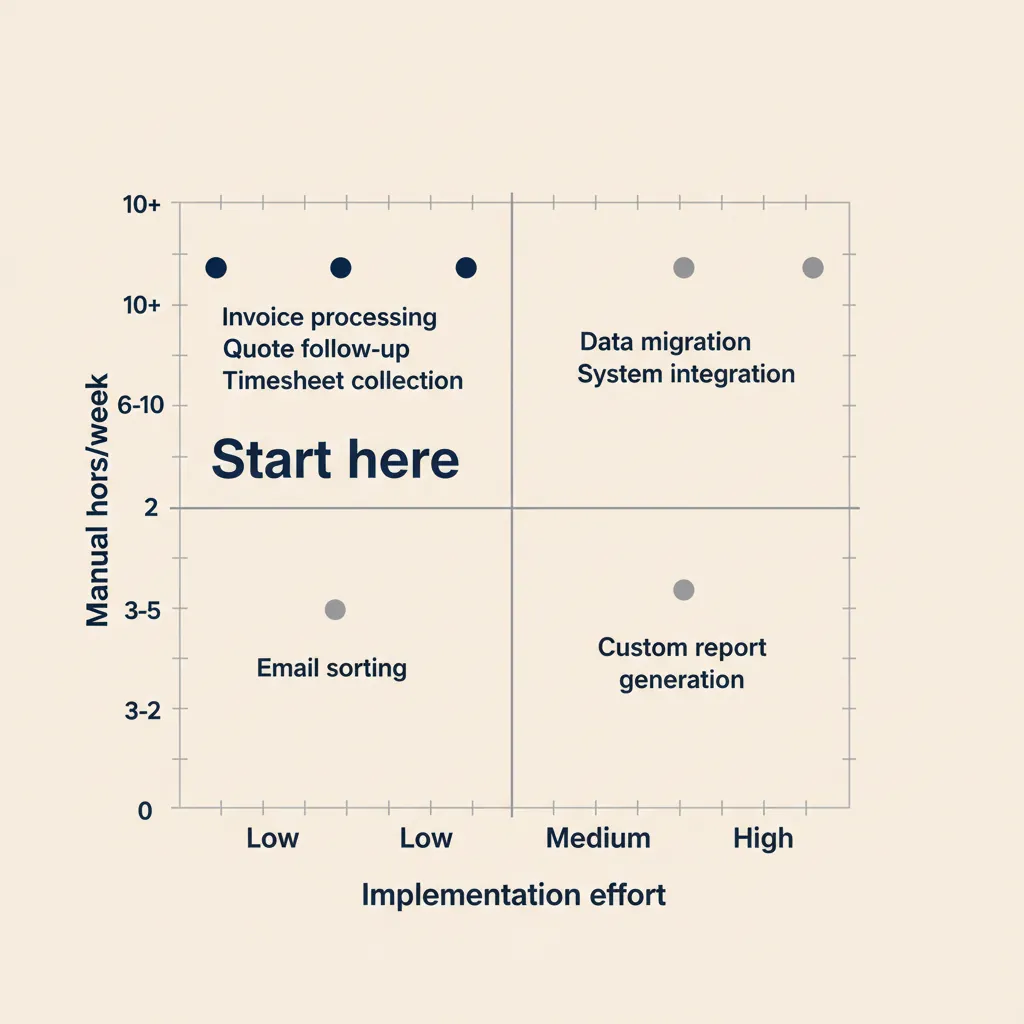
Not every process is worth automating. The fastest payback shows up with tasks that meet four conditions: they cost a lot of time, they happen often, they're error-prone and they have few exceptions. If one of those four is missing, the return drops quickly. A task you do once a quarter is rarely worth automating, even if it takes an hour each time. A task you do twenty times a day but always slightly differently costs you more in exception logic than it saves.
A handy way to prioritize is the simple score "hours per week × frequency ÷ number of exceptions". You don't have to calculate it exactly; it's about the ranking. List your top five time-sinks, estimate for each process how many hours it costs and how predictably it runs, and you'll see which rise to the top. In almost every SME the same three candidates then surface. Want to see what's possible in practice first? Browse our workflow automation examples for SMEs.
For most SMEs those are three processes:
| Process | Time saved | Setup cost | Tools | Payback |
|---|---|---|---|---|
| Invoice processing & bookkeeping | ~15 hrs/week | €2,000-€4,000 + €50/mo | n8n/Make + OCR + Exact/AFAS | 2 months |
| Quotes & timesheet tracking | 4-8 hrs/week | €2,000-€4,000 | n8n + template + email | 3-4 months |
| Customer service (custom GPT) | ~8 hrs/week | €3,000-€5,000 | Custom GPT + knowledge base | 3-4 months |
Invoice processing and bookkeeping
You receive purchase invoices by email, someone prints them or saves them, retypes the amounts into Exact Online or Moneybird, and forwards them to the bookkeeper. That costs 30 minutes to an hour per invoice if you count all the steps. With OCR technology and a workflow in n8n or Make, you have the invoice read automatically, booked into your accounting software and the PDF archived according to the GDPR retention period. Sounds simple; in practice the work lies in an OCR model that handles your suppliers, mapping to the correct ledger accounts, duplicate-invoice detection and an approval flow for deviating amounts. That's where experience with Exact and AFAS pays for itself quickly, because a wrongly booked invoice costs more than the entire automation.
For a construction firm that processes twenty purchase invoices a week this means 15 hours a week saved. At an hourly rate of €35 that's €27,000 per year. The automation itself costs you €2,000 to €4,000 to have a specialist set up plus €50 per month in tool costs. Payback: two months.
Quotes and timesheet tracking
Drawing up quotes costs time because you keep copying the same information from old quotes, adjusting prices manually and emailing the PDF. Automate that by linking a form to a template in Google Docs or Word, having the variables filled in automatically and sending the quote with a follow-up email after a week. The same applies to timesheet tracking: collect timesheets from a form, validate them automatically for completeness and book them through to your invoicing system.
With business service providers we see this process save 4 to 8 hours a week. The bottleneck is rarely the tool, almost always the fact that the source process (who is allowed to approve what, which discounts are and aren't allowed) was never written down. First write on paper how the process runs now; in our projects, exceptions surface time and again that no one internally had at hand: discounts for strategic customers, splits between contractor and subcontractor, or billable hours only the director may approve. An outside pair of eyes speeds up that discovery, because we know exactly which questions to ask.
At Mix-Fix Coffee we tackled exactly this: quotes, delivery routes and sales orders that used to be drawn up by hand now run largely automatically. What stood out is that the biggest gain wasn't in PDF generation, but in removing the retyping between systems and aligning how a quote comes about. Once that process was unambiguous, the automation became almost a formality. If you only want to tackle the office side, our article on office automation for SMEs goes deeper into exactly this type of administrative workflow.
Customer service and email
Customers send questions by email, someone reads them, looks up the answer in a knowledge base or old ticket and types a reply. That costs 10 to 20 minutes per email. With a custom GPT trained on your frequently asked questions and product information, you have draft answers generated that an employee only needs to approve. Or you let simple questions such as track-and-trace or invoice copies be handled fully automatically. Building a reliable custom GPT is not the same as writing a ChatGPT prompt: you have to curate the knowledge base, prevent hallucinations by grounding retrieval in fixed sources, and monitor when the model drifts.
For a webshop with 50 customer questions a week that saves 8 hours. Setting up such a custom GPT, trained on your own content and connected to your systems, costs €3,000 to €5,000 with a payback of three to four months, including the guidance to bring your team along. Without adoption, even the best automation delivers nothing. If you want to go beyond draft answers and have tasks handled truly independently, AI agents for SMEs come into view: they can not only draft answers, but also take steps such as looking up an order or scheduling an appointment.
Which processes you should (not yet) automate
Just as important as knowing what to automate is knowing what to stay away from. There are three categories where automating often costs more than it delivers. The first is work with many real exceptions and judgment calls: a complaint from an angry customer, a negotiation over a big deal, or a decision with legal or financial consequences. You can have AI do the preparation, but the decision belongs to a human. If you do fully automate that, you shift the risk onto a model you can't hold accountable.
The second category is work that happens too rarely. A process you run four times a year costs you more in building, testing and maintenance than you'll ever earn back. Put that on a "later" list and first tackle the daily time-sinks. The third category is processes that still change constantly internally. If you automate a way of working that will be different again next month, you build something you'll immediately have to rebuild. Stabilize the process first, then automate.
One final warning: don't automate a bad process. If a workflow is now messy, illogical or full of manual workarounds, automation only speeds up the chaos. Use the moment of automating precisely to simplify the process. Often that cleanup delivers just as much time savings as the automation itself.
What this means for you: choose the process that costs you the most time now, runs predictably and is stable, and start there. Do the process analysis yourself or together with a partner, and only release the first live version after someone with integration experience has covered the edge cases. You'll see within weeks whether it works, and then you tackle the next one.
Running into this in your own SME? We'll happily spend 30 minutes with you for free, no sales pitch. Book a free intro call
The Dutch SME automation stack: which tools fit together
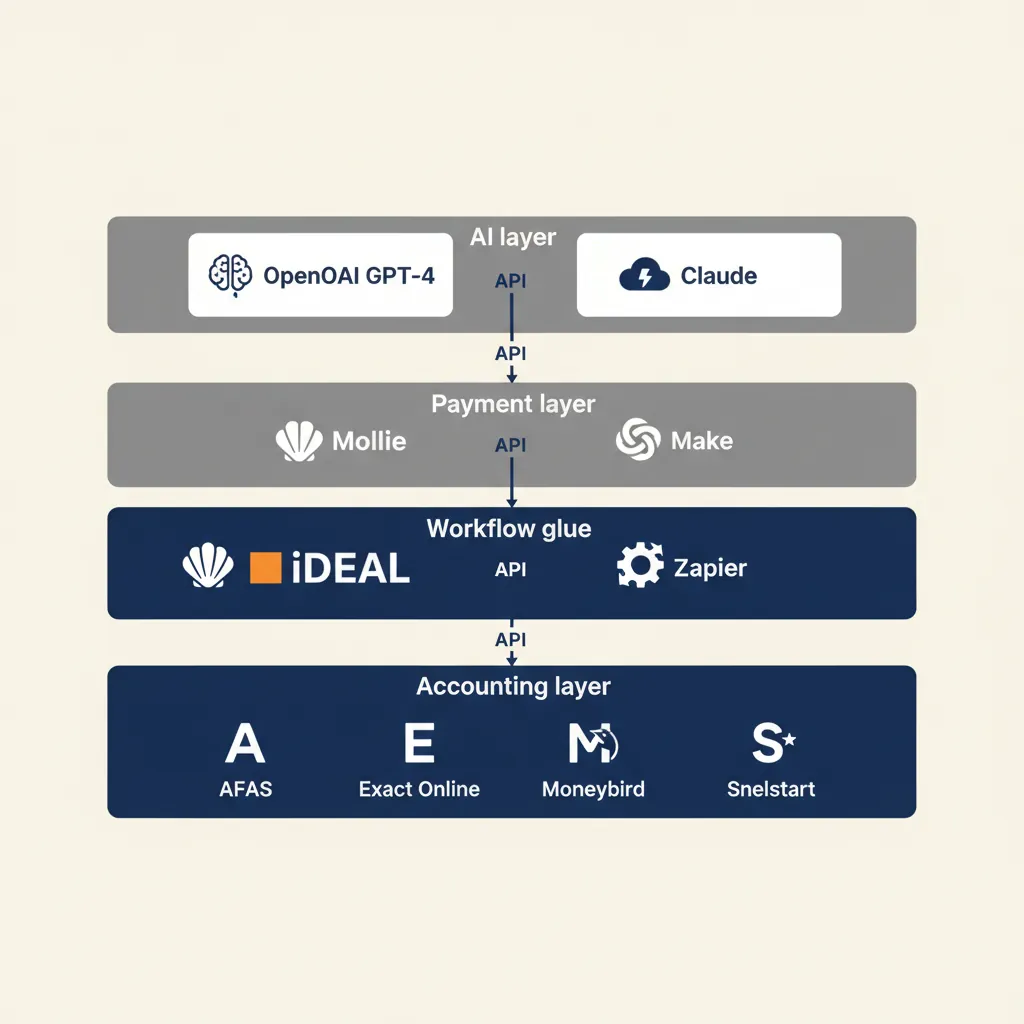
A realistic automation architecture for Dutch SMEs looks like this: an accounting layer such as AFAS, Exact Online, Moneybird or Snelstart, a payment layer such as Mollie or iDEAL, a workflow layer such as n8n, Make or Zapier, and an AI layer such as OpenAI GPT or Claude for document processing and email drafts.
Those layers talk to each other via API integrations. That sounds technical, but it simply means system A can send data to system B without a manual step in between. Exact Online has an API that lets n8n create a new invoice. Mollie has an API that lets Make query a payment status. Google Workspace has an API that lets Zapier send an email. Those integrations are available, but "available" doesn't mean plug-and-play: authentication, rate limits, error handling and data transformations have to be set up per integration. An experienced builder knows which API works reliably and which is notorious for silent failures.
Why cloud-first is almost always better than on-premise: with cloud tools you pay per month, you get updates automatically and you don't need a server you have to secure yourself. On-premise solutions such as Windows Server 2022 with Hosted Exchange are only worthwhile if you have specific compliance requirements that mandate data staying in your own data center. For most SMEs that isn't the case.
Vendor lock-in is a real concern: if you build everything in one platform and that platform raises the price or shuts down, you're stuck. That's why we recommend building your automation in open platforms like n8n that you can self-host or migrate. You then retain ownership of your workflows and data. That also fits the GDPR requirement to be able to demonstrate where personal data is stored and how long you keep it.
What this means for you: choose tools that talk to each other via APIs and that you can replace without having to rebuild your entire automation. Start with the software you already have and add a workflow layer like n8n or Make to it. Involve someone with integration experience early, otherwise you build a stack that looks right on paper but falls over in production the moment a vendor changes its API.
Comparing tools: n8n vs Make vs Zapier for SMEs
The workflow layer is the heart of your automation, and three names dominate there: n8n, Make and Zapier. Broadly speaking they do the same thing (a trigger sets a series of steps in motion), but they differ strongly in pricing model, hosting and how much technical control you get. You don't notice the wrong choice right away; it only comes back in your monthly bill or the moment you want to build a complex integration that just doesn't fit.
| n8n | Make | Zapier | |
|---|---|---|---|
| Pricing model | Per execution; free self-hosted | Per operation/task | Per task |
| Hosting | Self-hosted or cloud | Cloud only | Cloud only |
| Learning curve | Steeper, more control | Visual, moderate | Lowest, least control |
| GDPR/data control | Strong (self-hosting possible) | Moderate | Moderate |
| Strongest at | Volume, custom work, cost control | Visual building, many connectors | Getting started fast, low volume |
In short: Zapier is the easiest to start with and has the most ready-made integrations, but charges per task. If you run a lot of volume, the bill climbs fast. Make sits in between: visually pleasant, reasonably priced, strong in workflows with many steps. n8n gives you the most control and the lowest costs at volume, especially if you self-host, but requires more technical knowledge and maintenance. For Dutch SMEs that work with personal data, the option to self-host n8n is also a real GDPR advantage: your data never leaves your own environment.
The practical rule of thumb we use: start with Make or Zapier if you want to quickly validate a simple flow and the volume is low. If your process is stuck at hundreds or thousands of executions per month, or you want maximum control over where data is stored, then n8n is almost always cheaper in the long run. So the choice doesn't depend on which tool is "the best", but on your volume, your data needs and how much you want to manage yourself. We worked this comparison out further in our separate articles n8n vs Make for SMEs and n8n vs Zapier for SMEs, including concrete calculation examples per pricing model.
What this means for you: don't let yourself be held hostage by the tool you happened to come across first. Choose based on volume and data needs, and make sure you build in a way you can migrate later. If you're in doubt, start with a cheap validation and move to a more scalable setup once the process proves itself.
What most automation agencies get wrong (and how to avoid it)
With SME clients we help with business automation we see the same pattern over and over: the agency sells the tool or the AI model before the process is mapped. The result: the automation works technically, but doesn't fit how your team works, so nobody uses it.
An example: an automation agency builds a quote generator that pulls prices from a spreadsheet and generates a PDF. Technically perfect. But in practice it turns out that quotes often get custom discounts that aren't in the spreadsheet, or that the salesperson first needs sign-off from the director before the quote can go out. That approval rule was described nowhere, so the automation doesn't work.
The bottleneck in quote automation is almost never the software, it's the undefined approval rules. The same applies to invoice processing: who may approve invoices over €1,000? What happens if the supplier is unknown? What do you do with credit notes? If those rules aren't on paper, you build an automation that stalls at the first exception.
Our rule at SW Automation: write down who does what, who approves and what the exceptions are BEFORE you pick a platform. That sounds dull, but it saves you weeks of frustration and a lot of money. We start every automation project with a process description of no more than two pages. Only once that's right do we choose the tool.
What this means for you: first invest in a process description before you spend money on software. For simple workflows you can do that yourself; for automations that touch multiple systems (accounting, CRM, payments, AI) it pays to bring in someone who knows the standard pitfalls. That way you avoid having to build a new version three months later.
Costs, ROI and financing: what automation really costs for SMEs
Real costs for an SME automation project: low-code platforms like n8n cost nothing if you self-host, up to €500 per month for the cloud version with support, Make costs €9 to €299 per month depending on the number of tasks, Zapier costs €20 to €600 per month. Implementing a typical SME workflow such as invoice processing or quote generation costs €2,000 to €8,000 one-off in specialist hours. Maintenance costs 10 to 20 percent per year, so €200 to €1,600 per workflow. That maintenance is not a luxury: APIs change, AI models get updated and tax rules shift. Without someone actively monitoring and patching, your workflow quietly fails within a year and you only notice when you've missed three weeks of invoice bookings.
Payback calculation with a concrete example: invoice processing now costs you 6 hours a week. At an hourly rate of €35 that's €10,920 per year. Automation costs €3,500 to set up and €600 per year in tool costs. Total first-year costs: €4,100. First-year savings: €10,920. Net benefit: €6,820. Payback: four months.
Dutch financing options you can use: WBSO for custom development hours, giving you back 32 to 40 percent of the labor costs via the Belastingdienst. MIT subsidy for innovation projects, where you can get up to 50 percent of the costs reimbursed if your automation is new to your business. Qredits and Borgstelling MKB-kredieten for financing if you want to spread the investment. More information is available on the central government page for SME support.
If you want to do this calculation for your own processes, we worked out the full formula with benchmarks and the costs most calculators forget in the article on calculating the ROI of automation. Handy when you need to build the business case internally.
What this means for you: a first automation project pays for itself in months, not years, provided it's still running after month three. So alongside build costs, always factor in maintenance and monitoring. If you do custom development, you can get back part of the labor costs via WBSO, including external development hours through an automation partner.
Subsidies and WBSO for automation projects
Many SME entrepreneurs don't know that part of the cost of an automation project can be reclaimed. For projects in which you develop something new (rather than switching on an existing tool), there are concrete schemes in the Netherlands that significantly lower your effective investment. They don't apply automatically and the exact conditions and rates change each year, so treat this as a starting point and not as tax advice.
The best known is the WBSO, the R&D Promotion Act. This is an innovation deduction that compensates part of the labor costs of development work through a reduction in the payroll tax you have to pay. If you build a custom workflow or AI integration that is new to your business and involves technical development, that work may qualify. Important: it concerns development hours, even when they are made by an external party, provided they are applied for and substantiated correctly. The scheme is administered by RVO; there you'll find the current conditions and rates.
In addition there is the MIT scheme (SME innovation stimulation for regions and top sectors), which can reimburse innovation projects, and there are financing forms like Qredits and the Borgstelling MKB-kredieten (BMKB) if you want to spread the investment rather than subsidize it. The difference is fundamental: WBSO and MIT lower your costs, while Qredits and BMKB help you finance the investment and pay it back later. For most first automation projects WBSO is the most relevant entry point, because it touches development work you'd carry out anyway.
Practical advice: keep a time log of the development work from day one and document what is technically new about the solution. That makes any application much easier and prevents you from having to reconstruct afterwards what you built. If you're unsure whether your project qualifies, have it assessed by a subsidy advisor or check with RVO before you start; applying afterwards is harder than setting it up in advance. The current schemes and conditions are on the central government page for SME support.
What this means for you: don't count subsidies as a certainty in your business case, but don't leave them on the table either. A well-documented development track can, via WBSO, bring back a noticeable part of the costs, which further shortens the payback period. Arrange the paperwork in advance, not afterwards.
From pilot to production: how to prevent it from stalling
Most automations don't fail during the build, but in the months after. A pilot runs, everyone is enthusiastic, and then attention shifts to the next project. Six months later it turns out the workflow quietly stopped because an API changed, a password expired or an AI model started responding slightly differently, and nobody noticed until the admin fell behind. Getting from pilot to durable production is a discipline of its own, and it determines whether your automation still delivers value after year one.
It starts with monitoring and logging. Every serious workflow must record what it does and raise an alarm when something goes wrong: an invoice that couldn't be booked, an integration that fails, an AI output that falls outside the expected range. Without those alerts you only discover problems when a customer or your bookkeeper complains. So set up a simple error alert from the start, for example a message to an email or team channel as soon as a run fails.
Second: build in a human fallback step. A good automation handles the standard cases independently and presents edge cases to a human, instead of guessing. An invoice from an unknown supplier, an amount that deviates sharply from earlier invoices, or a customer question the model isn't sure about: those belong in a queue for human review, not blindly booked through. That way you keep both the speed of automation and the reliability of a human.
Third: maintenance and ownership. Appoint someone responsible for the workflow, internally or via your automation partner. APIs change, tools release updates, tax rules shift. Budget 10 to 20 percent of the build cost per year for maintenance; that's not a setback but a normal item, comparable to maintaining any other business asset. Without an owner, maintenance becomes nobody's job, and then it's only a matter of time before the first silent failure.
Finally the human side: adoption. The best automation delivers nothing if your team works around it because it doesn't match how they work. Bring your people along, let them watch over the first few weeks, and actively gather feedback on where the workflow chafes. Often the last 10 percent of improvement lies in small adjustments that only become visible once it's really in use. An automation your team trusts gets used; one it doesn't trust gets ignored.
What this means for you: with every automation, reserve room from the start for monitoring, a human fallback step, maintenance and adoption. That's not the boring finishing touch, it's exactly the difference between a nice demo and a saving that also lands in your bank account in year two and three.
Start small and scale up
Choose one process that costs you 4 hours or more per week now. Write down on paper how it runs now: who does what, in which order, with which exceptions. Then choose a tool that integrates with the software you already use. Have the first version built by someone with integration experience, test it two to three weeks in production with logging and monitoring on it, and measure how much time you actually save.
You'll see ROI in weeks, not quarters, and you'll then know exactly which process to tackle next. SME automation is no longer a big IT project, but it's also not a "do-it-yourself-in-an-afternoon" job. It's a series of focused projects where you can do a lot yourself for the first step (process analysis and prioritization), and bring in a partner who has built the stack dozens of times for the steps after that (integration with AFAS or Exact, AI tuning, monitoring and maintenance). That way you combine the speed of low-code with the reliability of a thoughtful implementation, and the savings still stand in year two.
If you want to take a step back and first answer the broader question of what AI can mean for your business at all, read our pillar on AI for business. If you're ready for the next step beyond individual workflows, AI agents for SMEs shows how you not only automate tasks but also have them carried out independently.
Frequently asked questions
Do you need an IT department to automate?
An in-house IT department isn't required, but you do need someone with experience in process design, API integrations and AI models. Low-code platforms like n8n, Make and Zapier make building more accessible, but the quality of an automation depends on how well the underlying process is thought through and how error handling, monitoring and maintenance are set up. For most SMEs, an external specialist or automation partner is faster and cheaper than training someone in-house, especially for AI integrations and connections to AFAS or Exact.
How long does it take to set up a first automation?
Lead time for a first working workflow is usually two to four weeks. A simple invoice-to-Moneybird flow can be technically live in days, but that version skips the exceptions, monitoring and testing you actually need in production. A quote generator with an approval flow takes one to two weeks to build plus testing. The biggest time investment goes into mapping exceptions and approval rules, and that's exactly where an experienced builder pays for themselves, because they know which questions to ask.
Can I combine automation with my current accounting software like Exact or Moneybird?
Yes. AFAS, Exact Online, Moneybird and Snelstart all have APIs that let automation tools like n8n, Make and Zapier exchange data. You don't have to switch to different software; you add a workflow layer that connects your systems. Important: every API has its own pitfalls (rate limits, authentication flows, data transformations), so let the first integration be built by someone who has connected the package before.
What are the GDPR risks of automation and how do you avoid them?
If your automation processes personal data such as customer names or email addresses, you must sign a processing agreement with the tool provider and document where that data is stored and how long you keep it. Preferably choose European providers or tools you can self-host, so you have more control over where data ends up. Keep invoices and quotes for the statutory retention period of seven years.
When does custom work pay off versus a standard SaaS tool?
Use a standard SaaS tool if your process fits within that tool's standard workflow and you save less than 10 hours per month. Choose custom work if your process deviates from the standard, you save more than 10 hours per month, or you need specific integrations that standard tools don't offer. Custom work costs more upfront but gives you full control and no monthly per-user license fees.
What subsidies or financing are available for SME automation in the Netherlands?
You can apply for WBSO on custom development hours and get back 32 to 40 percent of the labor costs. The MIT scheme reimburses up to 50 percent of the costs if your automation is new to your business. Qredits and Borgstelling MKB-kredieten help if you want to spread the investment. More information is available on the central government page for SME support.
How do you prevent an automation from stalling after a few months?
Most automations don't fail during the build but in the months after, because an API changes, a password expires or an AI model starts responding differently and nobody notices. So set up monitoring and error alerts from the start, build a human fallback step for edge cases, and appoint an owner responsible for maintenance. Budget 10 to 20 percent of the build cost per year for maintenance. Finally, take care of adoption: an automation your team doesn't trust gets ignored.
Sources
Curious what AI can do for your business?
We listen, think along, and quickly deliver something that works. No obligations, no pressure.