



Last updated: May 13, 2026
AI for professional services: practical SMB guide
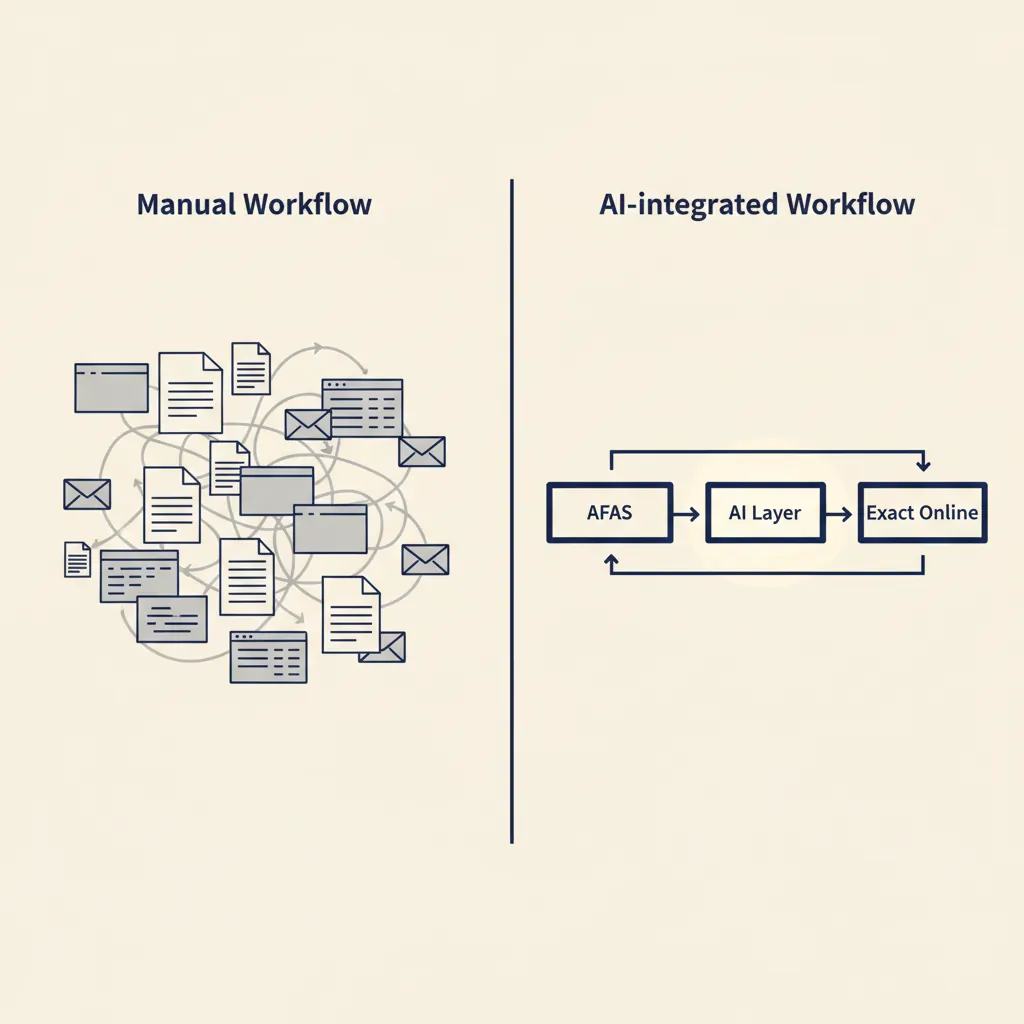
You've tried ChatGPT, maybe even paid for an account, but you still don't know how to use AI to draft quotes faster, automate client communication, or save hours on reports. This guide shows which AI tools work for Dutch professional services firms, how to integrate them with AFAS or Exact, and where to start without getting stuck on compliance or vendor lock-in, as part of a broader overview of AI for businesses. AI for professional services (zakelijke dienstverlening) only delivers real value when you connect it to your existing processes and automate repetitive tasks. Machine learning and automation work best on structured workflows: invoicing, time tracking, client reporting, contract review. Start with one task you do at least five times a week, measure the time saved, then scale.
Which AI tools work for professional services (and which don't)
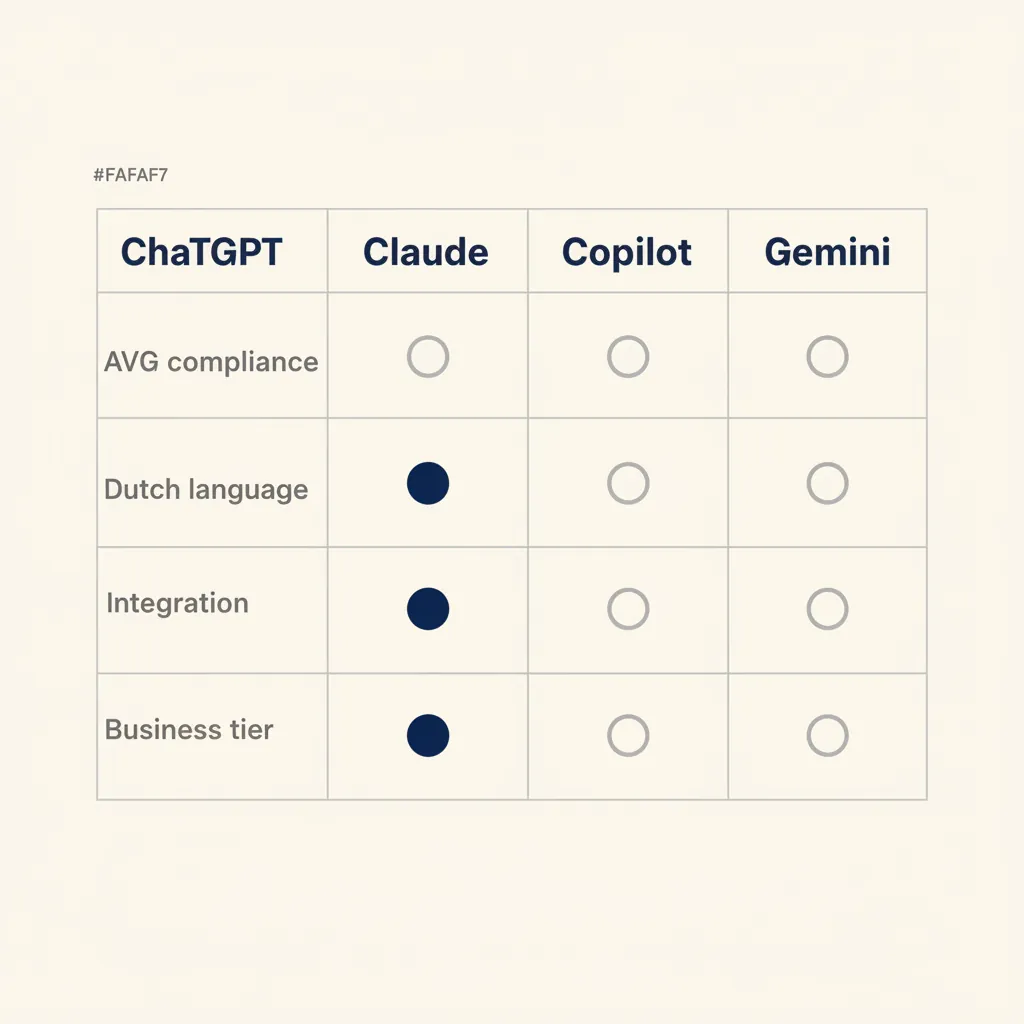
ChatGPT, Claude, Google Gemini, and Microsoft Copilot all claim to boost productivity, but they serve different use cases. ChatGPT excels at drafting client emails and summarizing meeting notes. Claude handles long documents well, making it useful for contract review or policy analysis. Copilot integrates directly into Microsoft 365, so if your team lives in Word and Excel, it's the path of least resistance. Gemini ties into Google Workspace but lags behind on Dutch language nuance.
Free accounts don't meet GDPR requirements for business use. When you paste client data into a free ChatGPT session, that data may be used to train the model. Business plans (ChatGPT Team, Claude Pro for Teams, Copilot for Microsoft 365) include data processing agreements and EU-based storage options. For Dutch SMEs handling client information, a paid account is not optional, it's a compliance requirement under the AVG (Dutch GDPR).
ChatGPT vs Claude vs Copilot: what fits your workflow
Pick ChatGPT when you need fast turnaround on emails, proposals, or brainstorming. It's the most versatile general-purpose tool. Choose Claude when you're working with long contracts, technical documentation, or policy files; it can process documents up to 100,000 words in a single prompt. Use Copilot if your team already runs on Microsoft 365 and you want AI embedded in Word, Excel, and Teams without switching tools.
GDPR compliance and data storage: where your data ends up
Under the AVG, you're responsible for where client data is processed. ChatGPT Team and Claude Pro for Teams both offer EU data residency options. Microsoft Copilot processes data within your existing Microsoft 365 tenant, so if your tenant is EU-hosted, you're covered. Google Gemini's data processing terms are less transparent for EU SMBs; check the data processing addendum before uploading sensitive files. Always verify that your plan includes a signed data processing agreement (DPA) and that the vendor commits to EU storage.
Paid vs free: why business accounts are necessary
Free accounts train on your inputs. Business accounts don't. That's the line. If you paste a client quote, a contract draft, or financial data into a free tool, you've likely violated your own privacy policy. Business plans cost €20 to €30 per user per month but include the DPA, priority support, and higher usage limits. For a five-person team, that's €100 to €150 monthly, a fraction of the cost of a data breach fine or lost client trust.
The real value of AI tools shows up when you connect them to the software you already use, not when you copy-paste between browser tabs.
Integrating AI with your existing software (AFAS, Exact, Moneybird, Snelstart)
AI on its own saves you five minutes. AI connected to your ERP, CRM, or accounting system saves you five hours. We build these workflows end-to-end using n8n, Make, or Zapier, depending on the complexity and the client's technical comfort. A typical integration pulls data from one system, sends it to an AI model for processing, and writes the result back into another tool or sends it via email.
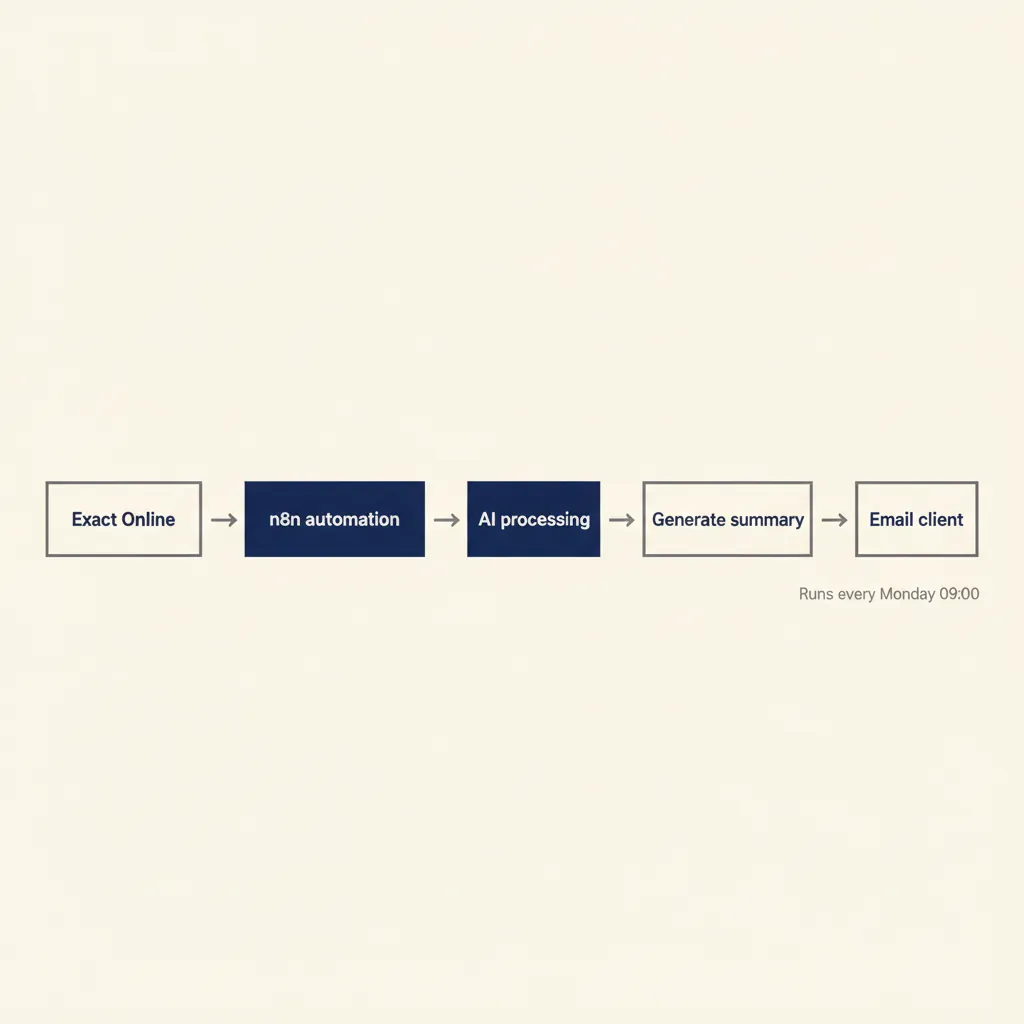
Example: an accounting firm uses Exact Online to track client hours and project expenses. At the end of each month, they manually export a CSV, summarize the hours per project, and write a client report in Word. We automated this with n8n: every Friday, the workflow pulls the week's time entries from Exact, groups them by project, sends the summary to an AI model to draft a progress paragraph, and emails the report to the client. What took 90 minutes now takes zero, and the client gets updates weekly instead of monthly.
Another example: a consultancy running AFAS wanted to follow up on quotes that hadn't been answered in seven days. We built a workflow that checks AFAS every morning, finds open quotes older than a week, generates a polite follow-up email using the quote details, and drops it in the consultant's Outlook drafts folder for review. The consultant spends 30 seconds per email instead of five minutes, and no quote falls through the cracks.
For Moneybird or Snelstart users, the same logic applies. Pull invoice data, summarize outstanding payments, generate a reminder email. Or pull supplier invoices, extract line items with AI, and route them to the right approver in Slack or email. The integration is where the ROI lives, not the AI tool itself. In our business automation work, we see that clients who automate one end-to-end workflow save more time than clients who use ten disconnected AI tools.
What most service providers get wrong with AI implementation
Three mistakes show up in almost every failed AI project. First, starting with a complex process instead of a single repeatable task. A client once asked us to automate their entire client onboarding flow, from first contact to signed contract, before they'd documented the steps or tested AI on any part of it. We said no. Start with one task: drafting the welcome email, extracting data from the intake form, or generating the contract from a template. Test it for two weeks. Then add the next step.
Second, no clear owner for the AI workflow. If "the team" is responsible, no one is. Assign one person to monitor the workflow, handle exceptions, and refine the prompts. That person doesn't need to be technical, but they do need to care whether it works. In the projects we deliver for Dutch SMBs, we hand over the workflow with a one-page runbook and a single point of contact on the client side. When that person leaves or loses interest, the workflow breaks within a month.
Third, expecting AI to fix a broken process. If your quote approval process is unclear (who signs off, what triggers a discount, when does legal review it), AI won't solve that. It will automate the confusion. Write down the process first. Make a flowchart. Test it manually. Then automate. We've seen clients spend €5,000 building an AI workflow for a process that didn't work in the first place. The automation ran perfectly and delivered the wrong result every time.
Start small, assign an owner, and document the process before you automate it. Those three rules prevent 80% of AI implementation failures.
Running into this at your own business? We'll spend 30 minutes with you for free, no sales pitch. Book a free intro call
Concrete use cases by sector: accounting, consulting, administration
Accountants spend hours preparing VAT returns from Exact Online exports. A workflow we built pulls the VAT transactions, groups them by rate and category, cross-checks totals, and generates the pre-filled form for the Belastingdienst (Dutch tax authority) portal. What took three hours now takes 45 minutes, and the accountant spends that time reviewing exceptions instead of copying numbers.
Consultants waste time writing client reports from time-tracking notes. One client used Simplicate to log hours and project updates but wrote reports manually in Word every two weeks. We automated it: the workflow pulls the hours and notes, asks an AI model to draft a summary per project, formats it as a PDF, and emails it to the client. The consultant reviews and sends. Time per report dropped from 40 minutes to eight.
Administration offices process supplier invoices daily. A typical flow: invoice arrives by email, someone downloads it, checks the line items, forwards it to the budget owner for approval, then sends it to the bookkeeper. We built a workflow that reads the invoice PDF, extracts the total and line items, checks the budget code in a Google Sheet, sends an approval request in Slack, and files the approved invoice in the accounting system. The office saves six hours per week across three people.
Marketing agencies draft social posts and ad copy from client briefs. A workflow reads the brief, generates three headline options and two body variants, drops them in a Notion page for the account manager to review, and schedules the approved version in the social tool. The agency went from 30 minutes per post to ten, and the account manager spends the saved time on strategy instead of copywriting.
These examples share a pattern: one repeatable task, clear input and output, measurable time saved. That's the formula. Our AI agents handle multi-step tasks like these across different tools, so you don't need to babysit each workflow.
Calculating ROI and starting without a big investment
Calculate payback time before you build. Count the hours a task takes now, multiply by your hourly rate, subtract the monthly tool cost and one-time build cost. Most SMB automations pay back in four to twelve weeks. Example: a consultant spends two hours per week on client reports, bills at €100 per hour. That's €800 per month in time. The workflow costs €50 per month in tool subscriptions and €1,200 to build. Payback: 1,200 ÷ 800 = 1.5 months. After six weeks, the workflow is pure profit.
Start without a big investment by testing with no-code tools first. n8n offers a free self-hosted plan if you have basic server access. Make and Zapier both have free tiers (100 to 750 tasks per month). Build a simple version of the workflow, run it manually for four weeks, measure the time saved, then decide whether to invest in a paid plan or custom build. We see clients waste money when they skip the test phase and go straight to a custom solution for a process they've never documented.
Here's a step-by-step plan. First, pick one task you do at least five times per week. Second, write down every step: where the data comes from, what you do with it, where it goes. Third, test the AI part manually (copy-paste into ChatGPT or Claude, see if the output is useful). Fourth, build the workflow in a no-code tool and run it alongside your manual process for two weeks. Fifth, measure: how much time did it save, how many errors, how much tweaking did it need? Sixth, if the ROI is clear, scale it or build the next workflow. If not, refine or drop it.
Most SMB service providers save four to eight hours per week on their first workflow. That's one extra billable day per month. The ROI is there if you start with the right task and measure honestly.
Conclusion
AI for professional services works when you connect it to the tools you already use and start with one repeatable task. Measure the time saved, refine the process, then expand to the next workflow. Don't start with a complex end-to-end process, don't skip the GDPR compliance step, and don't expect AI to fix a process you haven't documented. Pick ChatGPT for general drafting, Claude for long documents, Copilot if you live in Microsoft 365. Integrate with AFAS, Exact, Moneybird, or Snelstart using n8n, Make, or Zapier. Calculate payback time before you build, test manually first, and assign one person to own the workflow. The ROI shows up in weeks, not months, if you follow that plan.
For a related angle, see our post on AI for accountants: tools and workflows for SME firms.
Frequently asked questions
Does ChatGPT meet GDPR requirements for business use?
Free ChatGPT accounts do not meet GDPR (AVG) requirements because your inputs may be used to train the model. ChatGPT Team and Enterprise plans include a data processing agreement (DPA) and EU data residency options, which are mandatory for Dutch SMEs handling client data.
Can I connect AI to AFAS or Exact Online?
Yes. We integrate AI with AFAS, Exact Online, Moneybird, and Snelstart using n8n, Make, or Zapier. A typical workflow pulls data from your ERP or accounting system, sends it to an AI model for processing (summarizing, drafting, extracting), and writes the result back or sends it via email.
How much does it cost to implement AI in my service business?
Tool subscriptions run €20 to €50 per user per month for business AI plans, plus €20 to €100 per month for workflow automation platforms (n8n, Make, Zapier). A custom-built workflow typically costs €1,000 to €3,000 one-time, depending on complexity. Most SMB automations pay back in four to twelve weeks.
Which AI tool is best for Dutch accountants?
ChatGPT Team or Claude Pro for Teams are both good choices. ChatGPT is faster for drafting client emails and summaries; Claude handles long documents (contracts, audit reports) better. Both offer EU data residency and signed DPAs required under the AVG. Copilot works if you're already on Microsoft 365 and want AI embedded in Excel and Word.
How long before AI automation pays for itself?
Most SMB workflows pay back in four to twelve weeks. Calculate payback by counting the hours saved per month, multiplying by your hourly rate, and dividing the one-time build cost by that monthly saving. Example: saving eight hours per month at €100/hour (€800) with a €1,200 build cost pays back in 1.5 months.
Can I put confidential client data into an AI tool?
Only if you use a business plan with a signed data processing agreement (DPA) and EU data residency. Free accounts (ChatGPT, Claude, Gemini) may use your inputs to train the model, which violates GDPR. Business plans (ChatGPT Team, Claude Pro for Teams, Copilot for Microsoft 365) include the DPA and do not train on your data.
Sources
Curious what AI can do for your business?
We listen, think along, and quickly deliver something that works. No obligations, no pressure.