

Last updated: May 9, 2026
AI Applications for Business: 4 SME Use Cases
You have read that AI boosts efficiency and cuts costs, but most articles stop at chatbots and vague benefits. This piece shows which AI applications Dutch SMEs are deploying right now, which tools they use, and what it delivers in hours per week. Research suggests that 82% of Dutch SMEs are exploring AI implementation, with process automation at the top of the list. The challenge is not whether AI works, it is knowing where to start and which workflows to automate first.
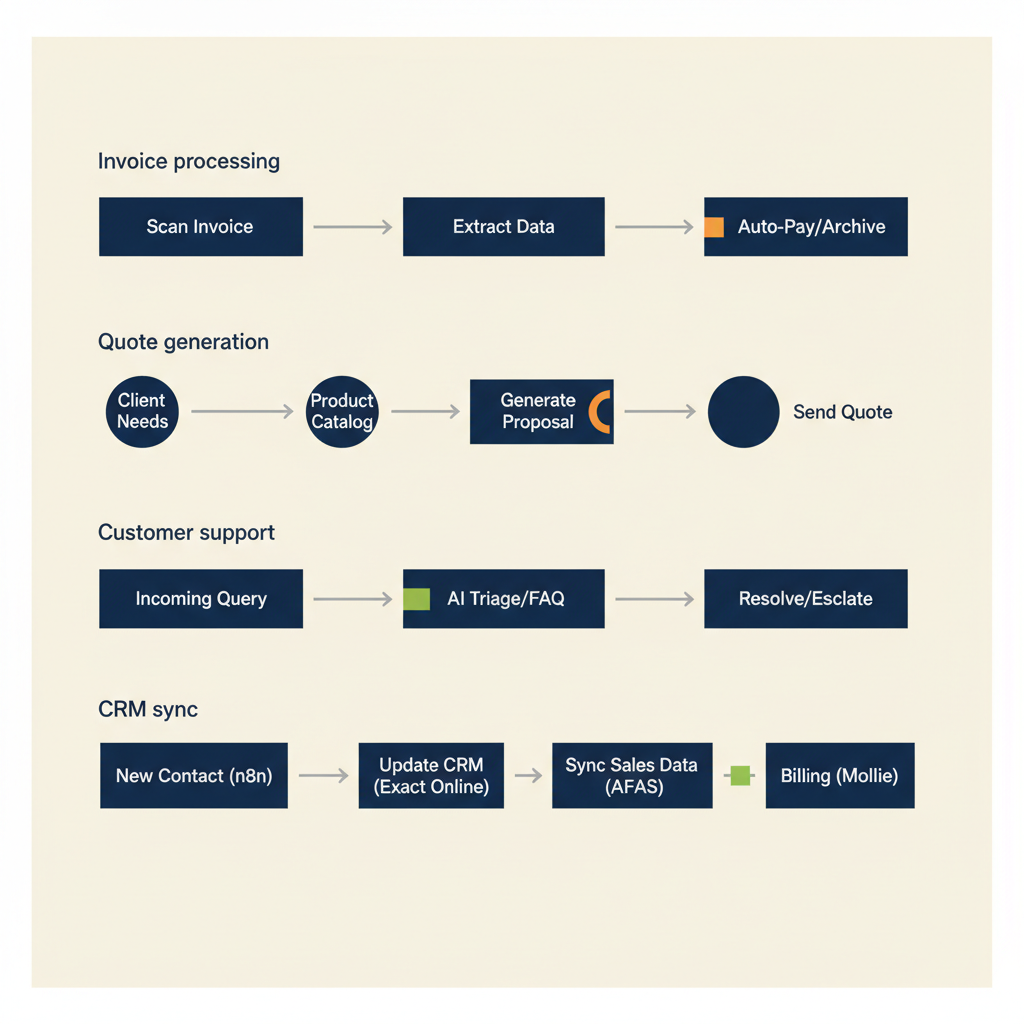
Four AI applications that save hours immediately
Most Dutch SMEs start with four processes: processing invoices, drafting quotes, answering customer questions, and syncing data between your CRM and accounting system. These workflows eat 5 to 15 hours per week in a typical 10-person company, and every one of them can run on autopilot once you connect the right tools.
| AI application | Time saved | Tools | Payback |
|---|---|---|---|
| Invoice processing | 3-4 hrs/week | n8n + OCR + Exact/Moneybird | 1-2 months |
| Quote generation | 5-6 hrs/week | n8n/Make + GPT + CRM | 2-3 months |
| Customer questions (custom GPT) | 10-15 hrs/week | Custom GPT + knowledge base | 1-2 months |
| CRM-accounting sync | 2-3 hrs/week | n8n + CRM + Exact/AFAS | 2-3 months |
Automatically process and book invoices and receipts
Your team takes a photo of a receipt or forwards an invoice email. An n8n or Make workflow extracts the supplier name, amount, VAT rate, and date using GPT Vision or Claude, then pushes the line into Moneybird, Exact Online, or Snelstart. The workflow checks whether the supplier exists in your system, creates a new contact if needed, and books the expense to the correct ledger code. For Dutch SMBs running Moneybird, the same logic applies: the API accepts JSON payloads, so you can post invoices without opening the web interface.
One e-commerce client we worked with cut invoice processing from 6 hours per week to 20 minutes by automating the flow from Gmail to Moneybird. The workflow flags invoices over €500 for manual review, everything below that threshold posts automatically.
Generate quotes from CRM data and past examples
You store customer details in Pipedrive, HubSpot, or AFAS. When a sales rep marks a deal as 'quote requested', an AI agent pulls the contact record, reads the notes, and drafts a quote by combining your standard terms with project-specific line items. The agent uses a custom GPT trained on your past quotes, so the tone and structure match your brand. The draft lands in your CRM as a PDF attachment, ready for review.
For Dutch service businesses, this pattern saves 2 to 4 hours per week. The workflow integrates with Exact Online or AFAS to pull product codes and hourly rates, so pricing stays consistent across the team.
Answer customer questions with a custom GPT on your knowledge base
You upload your support docs, onboarding guides, and FAQ pages into a custom GPT. Customers ask questions via email or a web form, and the GPT drafts a reply by retrieving the relevant section from your knowledge base. A human reviews the draft before it goes out, or you configure the agent to send low-risk answers automatically. Building a reliable custom GPT is not the same as writing a ChatGPT prompt: you have to curate the knowledge base, ground the model in fixed sources to prevent hallucinations and monitor when its output drifts.
This approach works best when your documentation is clean and up to date. In the projects we deliver for Dutch SMBs, we see that 8 out of 10 failures trace back to document quality, not the model. If your knowledge base is scattered across Word files and old email threads, the GPT will hallucinate or give vague answers. Clean your docs first, then train the agent.
Keep CRM and accounting in sync without double entry
Every time a deal closes in your CRM, the workflow creates a customer record in your accounting system, copies the contact details, and sets the payment terms. When an invoice is paid via Mollie or another payment provider, the workflow marks the invoice as settled in both systems. No one types the same address twice.
For Dutch SMEs running Exact Online, this pattern eliminates the weekly ritual of exporting a CSV from your CRM and importing it into Exact. The workflow runs every 15 minutes, so your books stay current without manual intervention.
These four workflows form the foundation of most AI implementations we build. Pick the one that costs your team the most hours, automate it, measure the time saved, then move to the next. We design and build these as business automation projects for Dutch SMEs — typically with the first version live in 2 to 4 weeks, GDPR-compliant logging and monitoring included so it still runs reliably in month six.
Running into this at your own business? We'll spend 30 minutes with you for free, no sales pitch. Book a free intro call
Integration with Dutch tools: AFAS, Exact Online, Moneybird, and Mollie
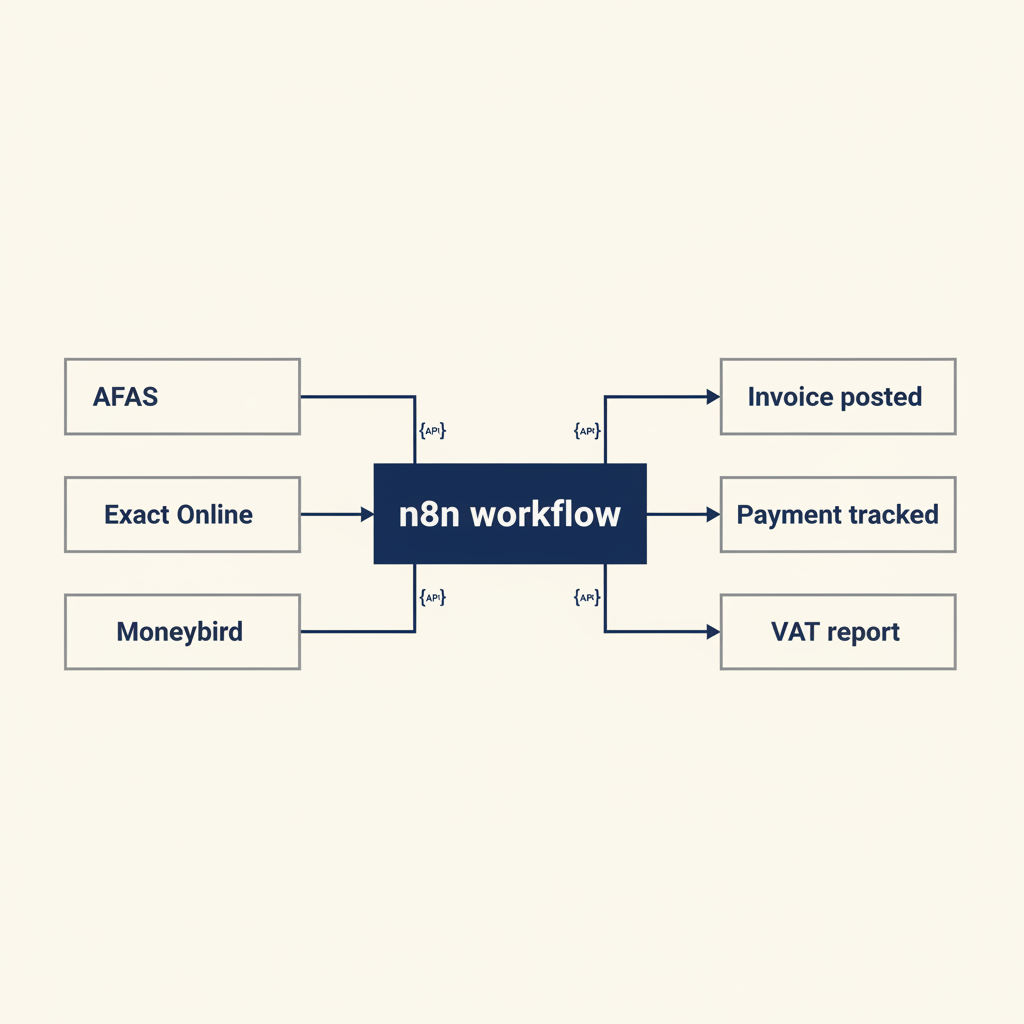
AI delivers value when it talks to the systems you already use. Dutch SMBs typically run AFAS, Exact Online, Moneybird, or Snelstart for accounting, and Mollie or iDEAL for payments. Every one of these platforms offers an API, so you can connect an AI workflow without switching software.
Here is how the integration works in practice. Your n8n or Make workflow listens for a webhook from Mollie when a payment completes. The workflow looks up the invoice in Exact Online by matching the payment reference, marks the invoice as paid, and sends a thank-you email via your CRM. The entire chain runs in seconds, and no one opens Exact manually.
For AFAS users, the same logic applies. AFAS exposes REST and SOAP APIs for customer records, invoices, and projects. You can build a workflow that reads time entries from AFAS, generates an invoice draft using GPT, and emails it to the customer for approval. Once approved, the workflow posts the final invoice back into AFAS and triggers a payment link via Mollie.
Another common pattern: VAT filing. Dutch businesses file quarterly VAT returns with the Belastingdienst (tax authority). A workflow can pull your sales and purchase ledgers from Moneybird or Snelstart, calculate the VAT owed, and generate a pre-filled form. You review the numbers and submit. This cuts VAT prep from 2 hours to 15 minutes every quarter.
The key is to map your current process before you automate. Write down every step: who does what, which system holds the data, where approvals happen. Then identify the repetitive parts (data entry, copying fields, sending standard emails) and hand those to the AI agent. The strategic decisions (which customer gets a discount, whether to approve a large expense) stay with your team.
If your accounting system does not have a public API, you can often export data to Google Sheets or Airtable and run the workflow there. It is not as elegant as a direct API connection, but it still saves hours compared to manual work.
What most consultants get wrong with AI implementation
Many agencies sell you a chatbot or a dashboard without mapping your process first. They assume the bottleneck is the tool, when in reality the bottleneck is that no one has written down who approves what, or which version of a document is the source of truth. The AI amplifies your process, so if the process is unclear, the AI will be unreliable.
Here is a checklist for your first AI project. Before you write a single line of code or configure a workflow, answer these questions:
- Which manual task costs your team the most hours per week? (Pick one, not five.)
- Where does the input data live? (Email, CRM, spreadsheet, paper form?)
- What is the desired output? (A booked invoice, a sent email, an updated CRM record?)
- Who needs to review or approve the output before it goes live?
- What happens when the AI makes a mistake? (Flag it, roll back, notify a human?)
- Who owns this workflow after launch? (One person must be responsible for fixing it when it breaks.)
If you cannot answer all six questions, you are not ready to build. Spend a day documenting the current process, then come back to automation.
Another mistake: assuming the AI will learn your process by osmosis. It will not. You must give it examples, edge cases, and explicit rules. For a quote-generation agent, that means uploading 20 past quotes, writing a prompt that explains your pricing logic, and testing the output on real customer requests before you hand it to the sales team.
Finally, do not skip the pilot phase. Run the workflow in parallel with your manual process for two weeks. Compare the outputs, log every error, and tune the prompts or logic. Only switch to full automation once the error rate drops below 5%. Launching too early destroys trust, and your team will go back to doing it manually.
When you follow this checklist, your first AI project will deliver measurable time savings within a month. When you skip it, you will spend three months building something no one uses.
GDPR, NIS2, and AI: what you must arrange before going live
Dutch MKB businesses must comply with the AVG (GDPR) and, since October 2024, often with NIS2 as well. If your AI workflow processes personal data (customer names, email addresses, payment details), you need a data processing agreement with your AI provider. OpenAI, Anthropic, and Google all offer standard DPA templates that meet AVG requirements. Download the template, check that it covers your use case, and file it with your other processor agreements.
Next, decide where your training data lives. If you upload customer support emails into a custom GPT, that data sits on OpenAI's servers. Make sure your privacy policy tells customers that you use AI tools to process their questions, and give them a way to opt out. The Dutch Data Protection Authority (Autoriteit Persoonsgegevens) has published guidance on AI and GDPR, and the short version is: transparency and purpose limitation. Tell people what you are doing, and do not use their data for anything beyond the stated purpose.
For high-risk processing (profiling, automated decisions that affect someone's rights), you may need a Data Protection Impact Assessment (DPIA). Examples: an AI that scores job applicants, or an agent that decides whether to approve a loan. If your workflow simply drafts an email or books an invoice, a DPIA is usually not required. When in doubt, consult a privacy lawyer or your data protection officer.
NIS2 adds cybersecurity obligations for many MKB companies, especially in logistics, healthcare, and digital infrastructure. If NIS2 applies to you, document your AI workflows as part of your risk management plan. Log who has access to the API keys, how you store training data, and what happens if the AI provider has an outage. The NCSC (National Cyber Security Centre) offers a NIS2 toolkit that walks you through the requirements.
Finally, keep audit logs. When an AI agent posts an invoice or sends an email on your behalf, log the action with a timestamp and the input data. If a customer disputes a charge or a regulator asks how you processed their data, you need a paper trail. Most workflow tools (n8n, Make, Zapier) store execution logs for 30 to 90 days; export and archive them if you need longer retention.
Compliance sounds tedious, but it protects you. A single AVG fine can cost more than your entire automation budget, and NIS2 penalties start at tens of thousands of euros. Spend a day setting up the agreements and logs, then automate with confidence.
Costs and ROI: what AI costs for a business with 10 to 50 employees
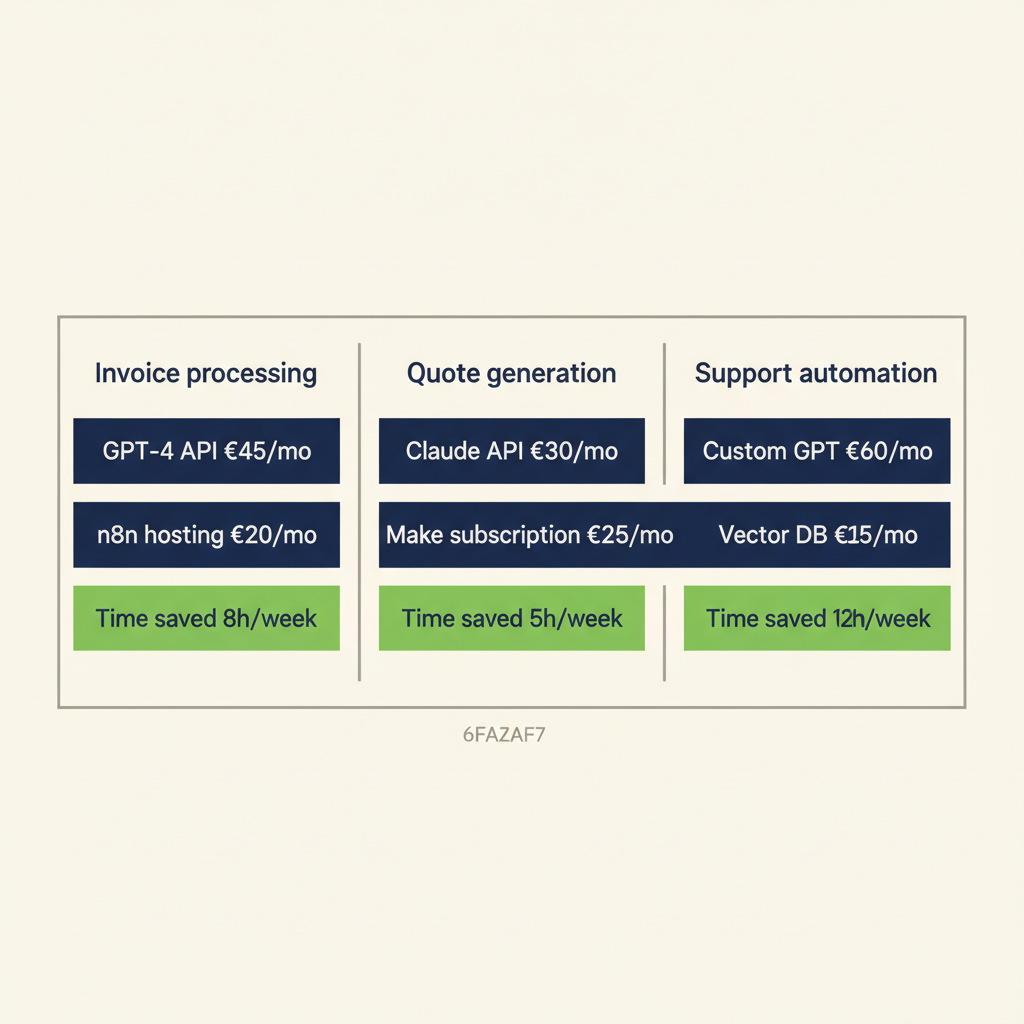
Calculate payback by multiplying the hours per week the process currently takes by your internal hourly rate, then weigh that against build and maintenance cost. Tooling fees (n8n, AI API credits) are usually modest; the real investment sits in the specialist hours required to set the workflow up reliably and the budget for ongoing maintenance and monitoring. A workflow that quietly fails after three months has no ROI left.
First, invoice processing. You currently spend 6 hours per week manually entering invoices into Moneybird. The workflow saves 5.5 hours per week, so you recover 22 hours per month, provided the OCR is tuned for your suppliers and the mapping to ledger accounts is correct. Payback typically lands inside the first month.
Second, quote generation. Your sales team spends 4 hours per week drafting quotes. A custom GPT trained on your past quotes cuts drafting time to 30 minutes per week, saving 3.5 hours, provided your approval rules and discount logic are written down first. Otherwise the workflow keeps stalling on undocumented exceptions.
Third, customer service. You answer 50 support emails per week, each taking 10 minutes. A custom GPT on your knowledge base drafts replies, and a human reviews them before sending. Drafting time drops to 3 minutes per email, saving roughly 6 hours per week (24 hours per month), including the coaching needed to get adoption from your team.
These numbers assume you already use a CRM, accounting system, and email platform. If you need to buy those first, add their subscription costs to the calculation. Most Dutch SMBs already run Exact, Moneybird, or AFAS, so the marginal cost of adding AI is the workflow tool, the API usage, and the implementation hours.
The hidden cost is setup time. Doing it yourself takes serious time and you risk a workflow that breaks on the first edge case. For businesses that want to move faster, our business automation service delivers a tested workflow with handover, including monitoring so the automation keeps running long after the launch week.
One more angle: the cost of not automating. If your team spends 15 hours per week on manual data entry, that is 60 hours per month of internal capacity that could go toward growth, customer service, or product work. The real question is not whether you can afford to automate, it is whether you can afford not to, and whether the version you ship will still be running in year two.
AI applications for businesses deliver value when they fit your current process and tools. Start with one bottleneck (invoices, quotes, or customer questions), connect it to the systems you already use, and measure how many hours you save. That way, you build a business case step by step without a large implementation project. Focus on repetitive, high-volume tasks first, document your process before you automate, and make sure one person owns each workflow after launch. When you follow that pattern, your first AI project pays for itself in weeks, and you gain the confidence to automate the next process. If you want help choosing where to start or mapping your workflows, our AI consultancy walks you through the decision in a single session.
Frequently asked questions
What is the difference between an AI chatbot and an AI agent?
A chatbot answers questions by retrieving information from a knowledge base or running a fixed script. An AI agent takes action across multiple tools: it can read your CRM, draft a quote, send an email, and update your accounting system without human input at every step. Chatbots are reactive, agents are autonomous.
Which AI tools integrate with AFAS or Exact Online?
n8n, Make, and Zapier all support AFAS and Exact Online via REST API connectors. You can trigger workflows when a new invoice is created, push customer records from your CRM into AFAS, or pull time entries from Exact for automated invoicing. OpenAI and Anthropic APIs work alongside these workflow tools to generate text, extract data from documents, or draft emails.
Do I need a DPIA if I use ChatGPT for customer service?
If you only use ChatGPT to draft replies that a human reviews before sending, and you do not make automated decisions that affect someone's rights, a DPIA is usually not required. If the AI sends replies automatically or makes decisions (approve a refund, reject an application), you may need one. Check with a privacy lawyer or your data protection officer to be sure.
How do I size up the investment for a custom GPT?
Monthly cost depends on volume (number of queries, length of answers) and the model you choose. The bigger investment is the one-off setup: cleaning the knowledge base, designing prompts, grounding retrieval on fixed sources, and testing. For an SMB with 50 customer questions per day the payback period typically lands inside one to two months, provided you also budget for maintenance and monitoring so the model does not quietly drift.
Can I deploy AI without a developer on staff?
An in-house developer is not required, but you do need someone with experience in process design, API integrations and AI tuning. Low-code platforms like n8n, Make and Zapier make building more accessible, but the quality of an AI workflow depends on how well the underlying process is mapped and how error handling, monitoring and maintenance are set up. For most SMEs, hiring an external specialist or automation partner is faster and cheaper than training someone in-house, especially for AI integrations and connections to AFAS or Exact.
How do I avoid vendor lock-in with AI implementation?
Use open standards and self-hosted tools where possible. n8n can run on your own server, so you control the data and workflows. For AI models, use OpenAI or Anthropic APIs directly instead of a proprietary platform; that way, you can switch providers by changing one configuration line. Store your training data (documents, past emails, knowledge base) in a format you own, like Markdown or JSON, not locked inside a vendor's database.
Sources
Curious what AI can do for your business?
We listen, think along, and quickly deliver something that works. No obligations, no pressure.