



Last updated: July 1, 2026
AI Agents for SMBs: Cost, ROI, and Practical Use Cases
You've probably heard that AI agents can take over tasks, but what does that mean for an SMB without an IT department? According to research by Vodafone Business, 79% of companies already deploy AI agents for productivity gains. In this article, you'll learn what an AI agent actually does, how it differs from a chatbot, what it costs, and which processes you can genuinely automate without a six-month implementation project. The focus is on autonomous, agentic AI that does the work on its own for Dutch SMBs.
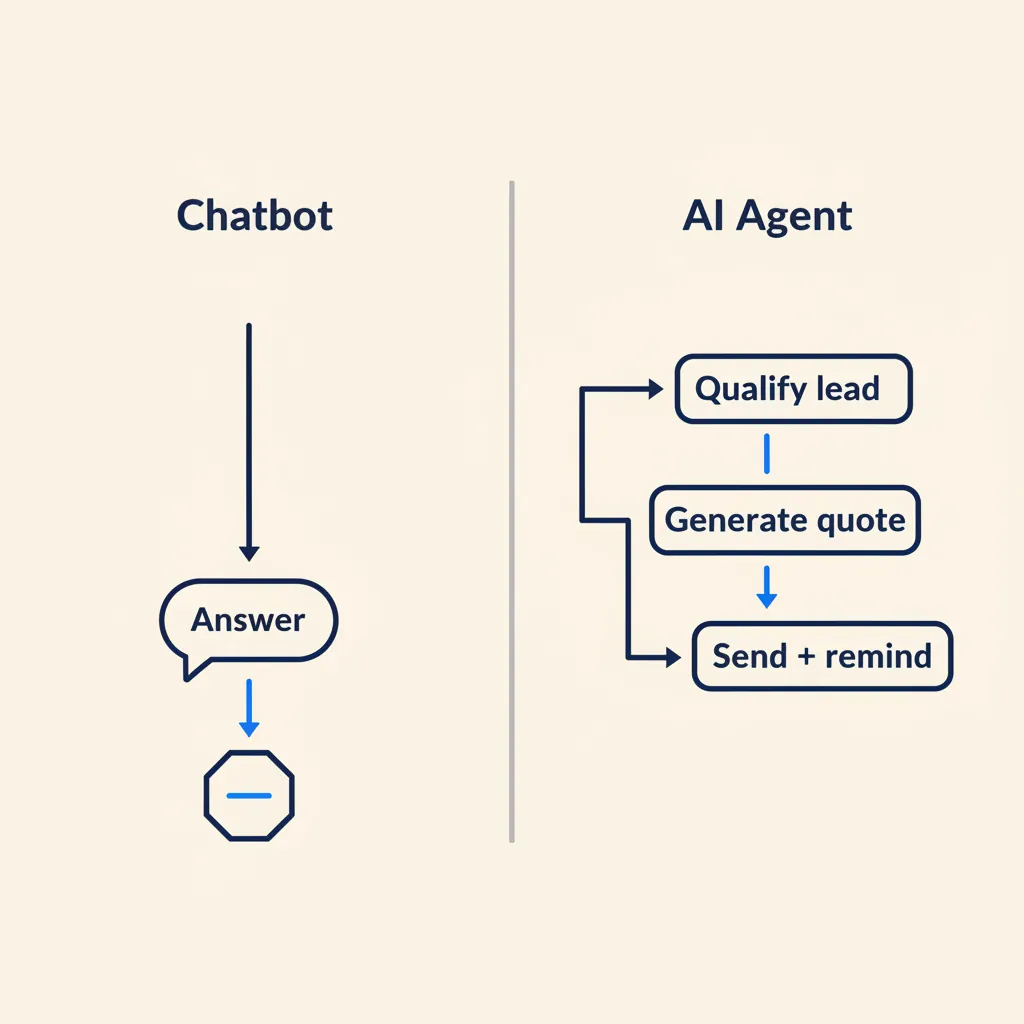
What is an AI agent (and why is it not a chatbot)?
A chatbot answers questions. An AI agent carries out tasks. That difference sounds small, but in practice it's enormous. A chatbot reacts to what you ask: you type "What's the status of my order?" and get an answer. An AI agent takes initiative: it sees a lead come in, checks whether the company meets your criteria, creates a quote in your system, sends it to the customer, and sets a follow-up task in your CRM. All without you watching.
Chatbot vs. AI agent: reactive vs. proactive
The difference is autonomy. A chatbot waits for input and gives output. An AI agent has a goal, plans steps, and executes them across multiple tools. Think of the difference between an assistant who tells you how to do something and an assistant who just does it. For SMBs that means: a chatbot saves you time in customer service, an agent takes over entire processes.
What an agent can do: tasks across multiple tools and decision points
An AI agent works across systems. It retrieves data from your CRM, checks stock in your webshop, creates an invoice in Moneybird, and sends it by email. It can make decisions: if a customer exceeds a certain order value, it escalates to an account manager. If stock drops below 10 units, it automatically places a purchase order. That's not science fiction; those are workflows you can build today with tools like n8n, Make, or custom agents.
What this means for you: If you have a process that consists of multiple steps and currently runs by hand, an AI agent is probably a better fit than a chatbot. We explore the distinction between a reactive chatbot and an autonomous agent further in AI agent vs. chatbot.
When you need an agent (and when a workflow is enough)
Not every process needs an AI agent. There's an important difference between a workflow and an agent. A workflow is deterministic: if A happens, do B. Tools like n8n and Make offer multi-step logic with loops and conditions, but you define every route in advance. An agent, by contrast, is given a goal and decides for itself which steps are needed, and can interpret what a human means.
Use a simple workflow when the steps are always the same: new invoice in Exact Online, send a notification to Slack, done. Choose an agent when interpretation is required: a customer emails an unclear question, the agent has to understand what they mean, find the right knowledge base article, and write a personal reply. In practice you often use both: an n8n workflow triggers the agent, retrieves data from AFAS or Moneybird, hands it to the agent, and writes the result back to your CRM. The agent does the thinking, the workflow does the integration.
For SMBs the rule is: start with workflows for repetitive tasks (processing receipts, turning tracked hours into invoices). Add an agent as soon as you run into exceptions you now resolve by hand. If you have to manually correct three invoices every week because a field is missing, that's the moment for an agent that can derive that field or ask for it. An agent with GPT or Claude can interpret an unexpected field or ask a colleague for input instead of crashing — that saves manual fixes and nighttime alerts.
What this means for you: Automate predictable, always-the-same steps with a workflow. Deploy an agent in the places where a human currently has to think or resolve exceptions.
Which AI agent platforms are there (n8n, Make, Zapier, Copilot)?
The four platforms you'll encounter most often are n8n, Make.com, Zapier, and Microsoft Copilot. They differ in pricing model, hosting options, and how easily they connect to Dutch tools like AFAS, Exact Online, and Moneybird. Your choice determines whether you have an agent live quickly, how much you pay at scale, and whether you can meet GDPR and NIS2 requirements.
n8n: self-hosted control and unlimited executions
n8n is open source and self-hosted. The Community Edition is free and offers unlimited workflows and executions, but you have to run a server yourself. That means full control over your data, which matters for GDPR and NIS2. The paid plans start at around $20/month (Starter, billed annually) for 2,500 executions per month in the cloud version, and go up to $667/month (Business) for 40,000 executions, SSO, Git version control, and multiple environments.
For SMBs, n8n is attractive if you have a technical partner who handles the hosting or if you have an in-house IT staff member. The learning curve is steeper than Zapier, but you don't pay per execution when you run self-hosted. n8n has native nodes for many APIs, but for AFAS or Exact you often have to use an HTTP request node together with those tools' API documentation.
Make.com: visual builder with AI modules (watch the credit costs)
Make (formerly Integromat) has a drag-and-drop interface that is visually clearer than n8n. Since 2025, Make works with a credit system: standard modules cost 1 credit, while AI modules can cost several credits per run depending on tokens and file size. If you use your own OpenAI or Claude API key, it stays at 1 credit per run.
Make has pre-built connectors for many tools, but here too you often have to use the HTTP module for Dutch accounting software. Pricing starts free (limited operations) and rises through paid tiers. The credit model can turn out surprisingly expensive if you make a lot of AI calls without your own API key. If you want a deeper comparison between these two, read n8n vs. Make for SMBs.
Zapier: fastest setup, highest cost at scale
Zapier is the easiest to get started with: thousands of pre-built integrations, no code needed. The free tier gives you 100 tasks per month and 2-step Zaps. Paid plans start at $19.99/month (Pro, annually) for 750 tasks and multi-step Zaps, and the Team tier costs $69/month (annually) for 2,000 tasks and 25 users.
Zapier gets expensive fast once you ramp up volume. For an SMB running 10,000 tasks per month, you'll quickly pay hundreds of euros. Zapier does have native integrations for many tools, but AFAS and Exact often require webhooks or the HTTP module. For quick wins and proofs of concept, Zapier is ideal; for production scale, you're better off looking at n8n or Make.
Microsoft Copilot: for companies already inside Microsoft 365
Microsoft Copilot agents run within the Microsoft 365 ecosystem. If you already use Teams, SharePoint, and Outlook, you can build agents that pull data from those tools, generate reports, and drive workflows. Copilot is less flexible for integrations outside Microsoft, but for companies that lean heavily on Office it's a logical choice. The pricing sits within your Microsoft 365 license or as an add-on. For SMBs that aren't fully inside Microsoft, Copilot is too limited; for those who already use Microsoft, it saves you an extra platform.
| Platform | Price (from) | Dutch tools | GDPR/self-hosted | Learning curve |
|---|---|---|---|---|
| n8n | Free (self-hosted) / $20/mo (cloud) | HTTP node for AFAS, Exact, Moneybird | Self-hosting possible, full control | Moderate to high |
| Make.com | Free tier / paid from ~€50/mo | HTTP module, credit costs for AI | Cloud (EU servers available) | Low to moderate |
| Zapier | $19.99/mo (Pro, 750 tasks) | Webhooks, HTTP module | Cloud (US servers, GDPR-compliant) | Low |
| Microsoft Copilot | Part of Microsoft 365 license | Limited outside the Microsoft ecosystem | Microsoft cloud, GDPR-compliant | Low (within Microsoft) |
What this means for you: Choose n8n if you want control and unlimited executions, Make for visual workflows with AI, Zapier for a quick setup, and Microsoft Copilot if you're already fully inside Office. Don't start with the platform, but with the process you want to automate — the platform choice then follows naturally.
5 practical use cases for SMBs (with Dutch examples)
Here are five concrete use cases that match processes you're probably already doing today, but by hand.
| Use case | What the agent does | Time saved | Tools |
|---|---|---|---|
| Lead qualification & CRM updates | Form → KvK enrichment → CRM entry → personalized email | No more manual entry | n8n + KvK API + Pipedrive/AFAS |
| Customer service & ticket routing | Email → fetch Exact/Mollie → reply or escalate to a human | 4-6 hrs/week | n8n + Exact + Mollie + AI agent |
| Quote automation | Request → pricing logic → PDF + reminder after 3 days | Several hrs/week | n8n + template + CRM |
| Invoice processing & approval | PDF in → amount/supplier → approval → posting | 15 min → 2 min/invoice | n8n + OCR + Moneybird/Snelstart |
| Inventory & order processing | Order → stock check → packing slip + track-and-trace + stock update | 10+ hrs/week | n8n + webshop + inventory system |
What this means for you: Choose one process where you currently put in a lot of manual work and where the steps are clear. That's your starting point.
Connecting AI agents to AFAS, Exact Online, and Moneybird
The use cases above stand or fall on the connection to the software you already use. For Dutch accounting and ERP packages like AFAS, Exact Online, and Moneybird, you connect via their API. Platforms like n8n and Make have HTTP nodes to make those API calls; you need your package's API documentation and often a developer or consultant to build the connection. Zapier sometimes has pre-built connectors, but for Dutch tools you often have to build the integration yourself. Below are the three connections Dutch SMBs most often start with.
Quote automation and approval flows (with AFAS)
A construction company working with AFAS receives a request by email or web form. An n8n workflow retrieves the details, checks whether the customer is already in AFAS, fills out a quote template, and sends it to the project manager for approval. As soon as the project manager gives the go-ahead, the quote goes to the customer automatically and the status in AFAS is updated.
For professional service firms that bill hours, the same pattern works: hours tracked in Simplicate or Teamleader flow into a draft invoice in Moneybird, approval via Slack, and delivery to the customer. That saves 2 to 4 hours per week of administration. We've built this pattern in practice for Mixfix, where order and quote processing is largely automated.
Invoice processing and VAT prep (with Exact and Moneybird)
Purchase invoices arrive by email, are read by an agent (OCR + GPT), and the relevant fields (supplier, amount, VAT, cost center) are entered into Exact Online or Moneybird. The agent checks whether the invoice has already been booked and flags duplicates. At the end of the quarter, a workflow generates an overview for the VAT return.
This works especially well for companies that process 50+ invoices per month. Below that threshold, doing it by hand is often faster than setting up an agent; above it, the investment pays for itself within weeks.
Customer service agents with a knowledge base (custom GPT + n8n)
A webshop gets daily questions about return policy, delivery times, and product specifications. A custom GPT is trained on the knowledge base (frequently asked questions, product info, return conditions). As soon as an email comes in, n8n retrieves the text, sends it to the GPT, and the GPT drafts a reply. An employee checks the answer before it's sent, or it goes straight to the customer if the confidence score is high enough.
For companies that receive 100+ support emails per week, this halves the response time and saves 10 to 15 hours per week. The investment in a custom GPT and an n8n workflow pays back within 2 to 3 months. Read more about how we approach this on our AI agents service page.
What this means for you: The connection to AFAS, Exact, or Moneybird is almost always an API integration via an HTTP node — technically very doable, but it requires someone who can read the API documentation. Factor those integration hours into your business case.
What does an AI agent cost and what does it deliver?
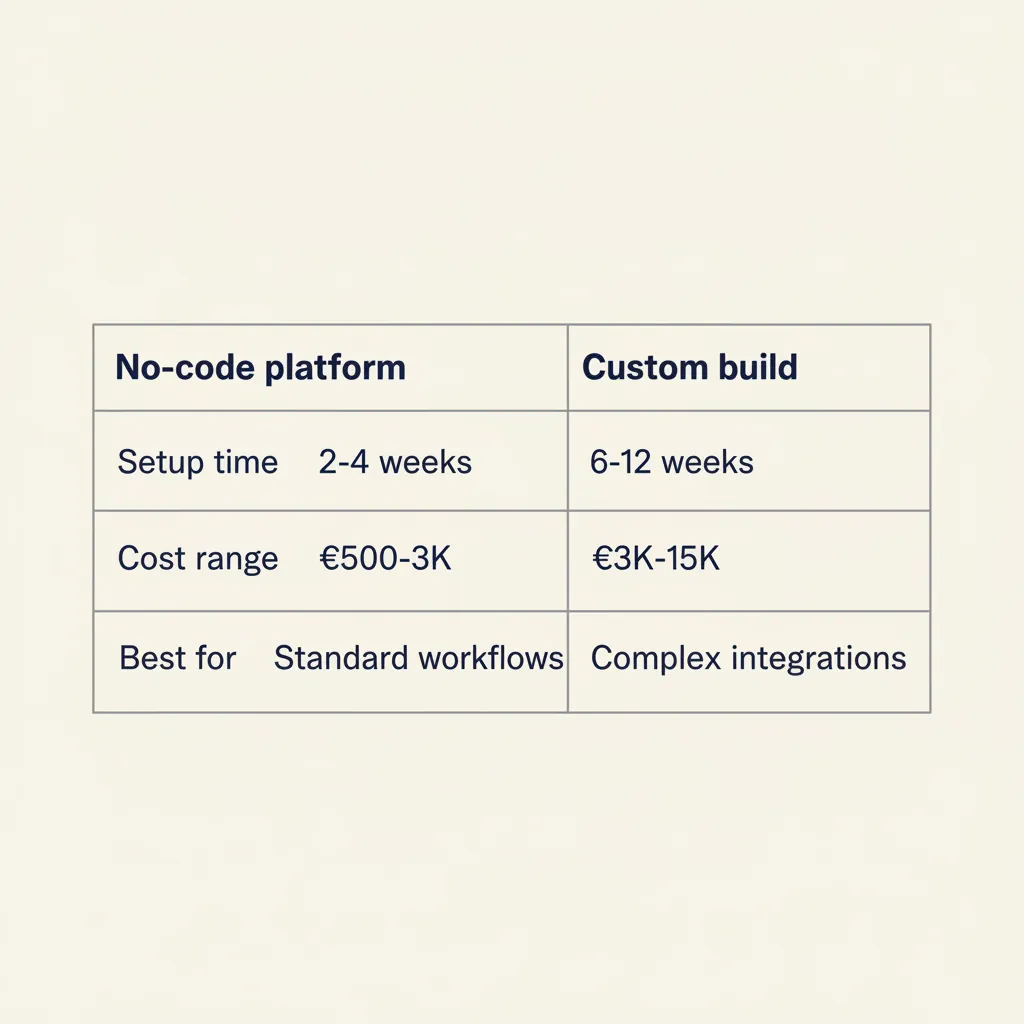
The cost depends on how complex your process is and whether you build it yourself or outsource it. Here is a realistic picture for SMBs.
No-code vs. custom: what fits your business?
No-code platforms like n8n or Make are quick to become productive and suited to standard workflows: lead to CRM, invoice to accounting, email to ticket system. You're not dependent on a single vendor and can make changes yourself. The barrier is low, but building a reliable workflow still takes expertise: error handling, retry logic, edge cases, and monitoring don't come out of the box.
Custom agents are the route when your process is unique, when you need a lot of data processing, or when you want the agent to learn from feedback. The investment in specialist hours is higher, but you get an agent that fits your process exactly, with integrations that account for the pitfalls of AFAS, Exact, and your CRM.
Cost per platform and the compliance choice (self-hosted vs. cloud)
The total cost of an agent consists of four components: the platform subscription, the API costs (OpenAI, Claude), the setup and consulting, and the ongoing maintenance. Setup and consulting cost a one-off €2,000 to €5,000 depending on complexity; maintenance then costs roughly 2 to 4 hours per month for updating workflows and resolving edge cases.
Where you host directly touches your compliance. Self-hosted n8n means all data stays on your own server — the safest option for GDPR and NIS2, because you have full control over where data is stored and who has access to it. You do then have to handle backups, updates, and security yourself. Cloud platforms like Make and Zapier run on servers in the EU or US; both are GDPR-compliant via standard contractual clauses, but you share data with a third party. For companies that fall under NIS2 (critical sectors such as healthcare, energy, and digital infrastructure), self-hosted is often the only option that meets the requirements for logging and incident response.
Calculating ROI: hours saved × hourly rate
The formula is simple: how many hours per week does the process cost now, what is the internal hourly rate of the person doing it, multiply by 52 weeks. Set that against the one-off build cost plus annual maintenance. Tooling costs (n8n, AI API credits) are usually modest; the real investment sits in the specialist hours to set the agent up reliably and maintain it.
Most SMB projects we see pay back within one to two quarters when you automate a process that takes several hours per week. Start with the process that costs you the most time and where the steps are the most predictable.
What this means for you: Calculate what the process costs you now before you invest, and always include maintenance and monitoring in your business case. An agent that stalls after three months delivers no more ROI.
Worked example: 8 hours per week saved
Say you save 8 hours per week by automating invoice processing. At a blended rate of €40 per hour, that's €320 per week, or €1,280 per month in saved time. Set that against the monthly cost per platform choice:
- n8n Business self-hosted: €667/month platform + €100/month hosting + €50/month OpenAI API = €817/month
- Make Pro: €50/month + €100/month API (own key) = €150/month
- Zapier Team: €69/month + €100/month API = €169/month
- Setup and consulting: one-off €2,000 to €5,000 depending on complexity
With Make or Zapier, you recoup the setup within 3 to 4 months. With self-hosted n8n it takes longer (6 to 8 months), but after that you have unlimited executions and no vendor lock-in. For companies that save less than 4 hours per week, the payback period is too long; above 8 hours per week it's a no-brainer. Start with one process, measure the saving after the first month, and only then scale up.
What this means for you: The platform choice mainly shifts the monthly costs and the payback period, not the question of whether it pays off. Calculate with your own hourly rate and actual hours saved — only then do you know which platform fits best financially.
Running into this at your own SMB? We'll happily spend 30 minutes with you for free, no sales pitch. Book a free intro call
Why 92% of SMBs get stuck (and how to avoid it)
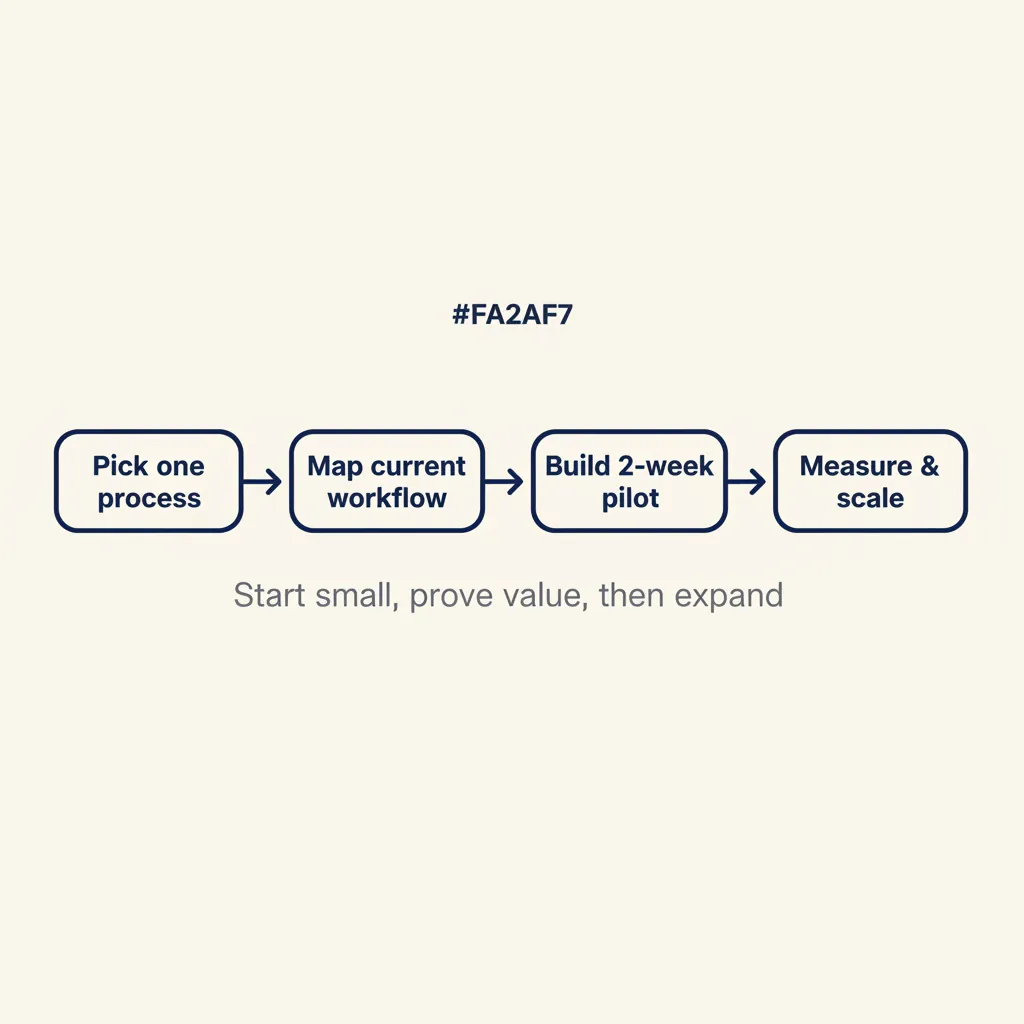
Many Dutch companies want to implement AI agents but stall before they can scale. Most projects run aground on an unclear process or a lack of ownership, not on the technology itself. What goes wrong?
Four common pitfalls:
- Unclear processes: You can't build an agent for a process you haven't written down. If three people run the process differently, the agent doesn't know what to do. First write it down: what's step 1, what's step 2, when do you escalate, what are the exceptions.
- No owner: The project starts with enthusiasm, but no one is responsible for the result. The agent gets built, but it isn't tested, adjusted, or used. Appoint one person who knows the process and will manage the agent.
- Scope too big: You want to automate ten processes at once. That takes months, costs a lot of money, and you see no result. Start with one process, measure the result, adjust, then scale.
- Vendor lock-in: You choose a SaaS tool that promises everything, but your data is stuck in their system and you can't make changes. Choose open platforms (n8n, Make) or custom you can manage yourself.
How do you prevent this? Four steps:
- Choose one process that you now do by hand and where you spend at least 4 hours per week.
- Write out the current workflow: what are the steps, who does what, what are the exceptions.
- Build a 2-week pilot: a simple version that takes over one part of the process. Test with real data.
- Measure the result: how many hours does it save, what goes well, what needs improvement. Adjust and only then scale up.
There's a deeper cause behind these pitfalls. Many agencies sell the tool first and the process second. That leads to projects that run aground because no one has written down who may approve what, where the source data comes from, or what should happen when the agent makes a mistake. With the SMB clients we help with quote automation, we see the same thing every time: the bottleneck is rarely in the tool, and almost always in the fact that the source process was never documented. The right order is: map the current process on paper, identify the decision points a human makes today, test those rules with sample data, and only then build the agent. If you can't explain why a human chooses option A or B today, an agent can't either. The quality of the input data and the clarity of the business rules determine roughly 80% of the success.
This ties into the broader automation advice for Dutch companies: start with the process, not the technology. In our guide to automation for SMBs and the overview AI for business, we work that out step by step.
What this means for you: Starting small and measuring is faster and cheaper than a large implementation project that runs aground. Our AI consultancy helps SMBs walk through exactly this path.
GDPR, NIS2, and data security: what SMBs must watch for
An AI agent often has access to customer data, invoices, and personal information. That means you have to comply with the GDPR and, if your company has more than 50 employees or works in a critical sector, with NIS2 (in force since October 2024).
Three practical requirements:
- Data processing agreement: If you bring in an external party to build or host your agent, put a data processing agreement in place. That's mandatory under the GDPR. The vendor must document how it handles your data and where it is stored.
- Logging: You need to be able to see what the agent does. Which data did it process, which decisions did it make, who had access. The Dutch Data Protection Authority (Autoriteit Persoonsgegevens) expects you to be able to explain how an automated system makes decisions that affect individuals. So keep agent logs: what data went in, which decision came out, and why. That's important for audits and in case something goes wrong.
- Data within the EU: If you process personal data, it must stay within the EU or you must have a valid transfer mechanism. Check where your AI vendor's APIs (OpenAI, Anthropic) host their data. Many SMBs opt for European alternatives or self-hosted solutions to avoid this risk.
If in doubt, start with internal processes that don't involve personal data. For example: inventory management, internal reporting, or data analysis. That gives you time to learn how agents work before you bring customer data into the picture. For more complex implementations, you can turn to our AI agents service, where we build GDPR-compliant solutions.
What this means for you: Ask your vendor about their GDPR compliance and logging before you start. Begin with processes that contain no personal data if the rules aren't fully clear to you yet.
Conclusion
An AI agent is not a science-fiction project. It's a piece of software that takes over tasks you now do by hand, provided you have the process clear and start small. Choose one bottleneck where you spend at least 4 hours per week, write out the workflow, build a two-week pilot, and measure how many hours you save. Then you'll know whether it's worth scaling.
Most SMBs that get stuck do so because they start too big or don't appoint an owner. The companies that succeed start with one process, measure the result, and adjust. That's the difference between an agent that works and a project that disappears into a drawer. Not sure yet which platform fits your stack? Compare n8n, Make, and the compliance trade-off in the n8n vs. Make comparison, or check whether an agent is even the right answer in AI agent vs. chatbot. If you'd rather we handle the build and integration, take a look at our AI agents service.
Frequently asked questions
What is the difference between an AI agent and a chatbot?
A chatbot answers questions and reacts to input. An AI agent independently carries out tasks across multiple steps and tools, makes decisions, and works proactively without you watching. Think of the difference between someone who explains how to do something and someone who just does it.
How do I determine the investment for an AI agent?
The investment depends on three factors: whether you choose a no-code platform (n8n, Make) or a custom build, how many systems the agent has to integrate with (AFAS, Exact, CRM), and how complex the decisions and exceptions are. No-code is faster to deploy; custom fits your process exactly. Alongside build cost, factor in maintenance and monitoring: an agent that stalls after three months has no ROI left. Most SMB projects pay back within one to two quarters when you automate a process that takes several hours per week.
Can an AI agent integrate with AFAS, Exact Online, or Moneybird?
Yes, AI agents can connect to Dutch SMB software via APIs. For AFAS, Exact Online, and Moneybird, standard connectors exist in tools like n8n and Make. For custom agents, we build the integration to measure, so the agent can retrieve data, create invoices, and drive workflows in your existing systems.
How long does it take for an AI agent to pay for itself?
Calculate the payback period by multiplying the number of hours per week the process currently costs by your internal hourly rate, and set that annual figure against build and maintenance costs. Most SMB projects we see are break-even within one to two quarters, provided the agent keeps running reliably in production. An agent that quietly fails after month three has no ROI left, so always factor in maintenance and monitoring.
Do I need a data processing agreement if I use an AI agent?
Yes, if the agent processes personal data and you work with an external party (vendor, cloud host), a data processing agreement is mandatory under the GDPR. The vendor must document how it handles your data and where it is stored. Also check that the data stays within the EU.
Which processes are suitable to automate with an AI agent?
Processes that consist of multiple steps, are predictable, and are currently done by hand. Think of lead qualification, invoice processing, quote automation, ticket routing, and inventory management. Start with a process that costs you at least 4 hours per week and where the steps are clear.
Which AI agent platforms are available for Dutch SMBs?
The four platforms you'll encounter most often are n8n (open source, self-hosted, unlimited executions, and full control over your data), Make.com (visual drag-and-drop builder with a credit model), Zapier (fastest setup but expensive at volume), and Microsoft Copilot (only interesting if you're already fully inside Microsoft 365). Choose n8n for control and scale, Make for visual workflows with AI, Zapier for quick proofs of concept, and Copilot if you lean heavily on Office.
Is a self-hosted AI agent (n8n) safer than a cloud solution?
Yes, if you configure it properly. Self-hosted means all data stays on your own server, giving full control for GDPR and NIS2. Cloud platforms like Make and Zapier are also GDPR-compliant, but you share data with a third party. For companies in critical sectors (healthcare, energy), self-hosted is often the only option that meets compliance requirements.
Sources
Curious what AI can do for your business?
We listen, think along, and quickly deliver something that works. No obligations, no pressure.