

Last updated: May 9, 2026
AI Agents for Business: Platforms, Costs & ROI (2026)
You've heard AI agents can automate customer support, invoicing, and data entry. But which tools actually work for Dutch SMEs, how do they connect to AFAS or Exact Online, and what does it cost when you factor in setup and compliance? According to n8n's documentation, self-hosted workflow automation platforms now offer unlimited executions, while cloud-based alternatives like Zapier charge per task. For Dutch SMEs looking to automate business processes, the choice between self-hosted workflow tools and managed AI agents determines both your monthly spend and your ability to meet GDPR requirements. This guide walks you through the platforms, real use cases, and the numbers that matter for automation in Dutch SMEs.
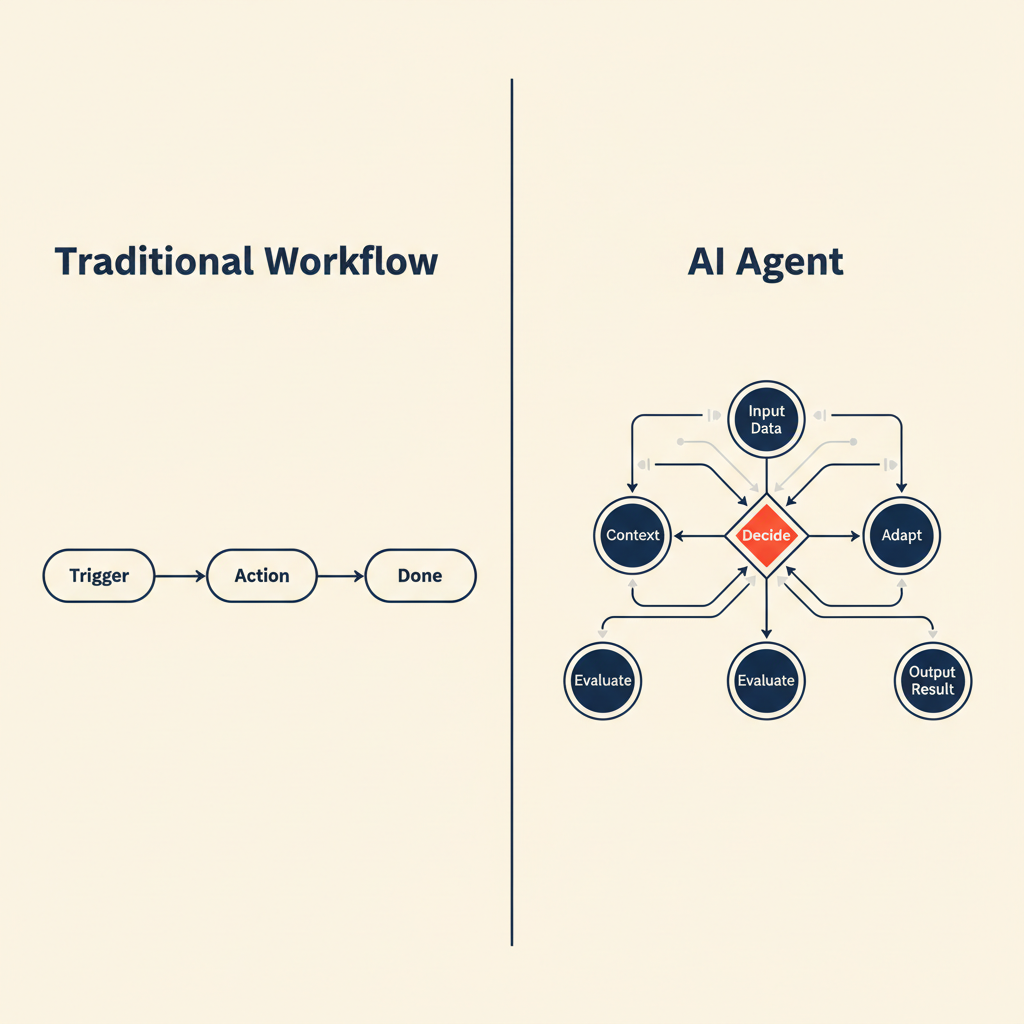
What AI agents are and why they differ from standard automation
An AI agent makes decisions across multiple steps without you writing explicit rules for every scenario. A traditional workflow tool like Zapier runs a fixed sequence: new email arrives, save attachment to Google Drive, post to Slack. If the email has no attachment, the workflow breaks. An AI agent reads the email, decides whether it needs human review, extracts the relevant data even if the format varies, and routes it to the right person or system.
This matters for SMBs because your processes rarely follow a script. An invoice might arrive as a PDF, a photo of a paper receipt, or an email thread. A customer question might be straightforward or require pulling order history from three different tools. Agents handle these exceptions without breaking, where static workflows fail or require constant maintenance.
Difference between workflow automation and autonomous agents
Workflow automation platforms like n8n, Make, and Zapier execute predefined logic: if this happens, do that. You map every branch yourself. An autonomous agent uses a language model (GPT, Claude) to interpret context and choose the next action. For example, a workflow might say "if invoice total exceeds €5,000, send to manager". An agent can read the invoice, recognize that it's a duplicate of last month's bill, and flag it without you having coded that rule.
The trade-off is control versus flexibility. Workflows are predictable and cheap to run. Agents adapt to new situations but cost more per execution because every decision calls an AI model. For Dutch SMBs running Exact Online or Moneybird, the sweet spot is often a hybrid: a workflow handles the structured steps (fetch invoice, parse fields, write to accounting software), and an agent handles the judgment calls (is this invoice legitimate, does it match the purchase order).
When you need an agent (and when a simple workflow is enough)
Use a workflow when the process is the same every time: sync new webshop orders to your inventory system, send a Slack message when a form is submitted, back up files to cloud storage on a schedule. Use an agent when the input varies or requires interpretation: classify support emails by urgency and topic, extract line items from invoices in different formats, draft replies to customer questions based on your knowledge base.
A good rule of thumb: if you can write the process as a checklist with no "it depends" clauses, build a workflow. If you find yourself writing "check whether this looks reasonable" or "decide if this needs escalation", you need an agent. For most MKB businesses, 80% of automation is workflows, 20% is agents.
Which AI agent platforms exist (and which fit Dutch SMBs)
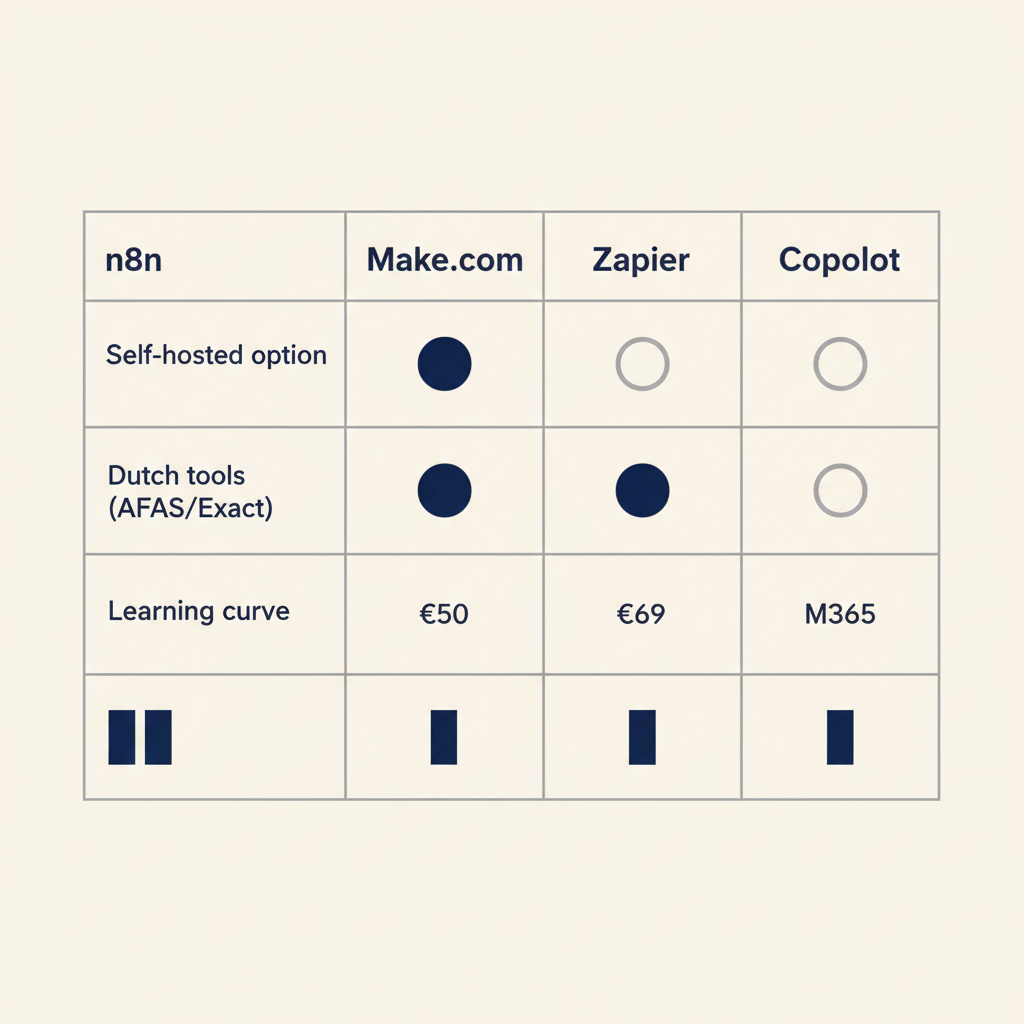
Four platforms dominate the market for SMBs: n8n, Make.com, Zapier, and Microsoft Copilot. Each has a different pricing model, learning curve, and ecosystem of integrations. The right choice depends on whether you want full control (self-hosted), ease of use (cloud-managed), or tight integration with tools you already use.
n8n: self-hosted control and unlimited executions
n8n offers a free community edition you host yourself, with unlimited workflows and executions. You're responsible for the server, updates, and backups, but you own the data and pay nothing per execution. The paid plans add collaboration features: the Starter plan is $20/month (billed annually) with 2,500 executions and 1 shared project, Pro is $50/month with 10,000 executions and 3 shared projects, and Business is $667/month with 40,000 executions, SSO, and Git version control.
For Dutch SMBs concerned about AVG compliance, n8n's self-hosted model means your data never leaves your infrastructure. You can run it on a Dutch hosting provider like TransIP or on-premises. The platform has native nodes for AFAS, and community-built integrations for Exact Online and Moneybird. The learning curve is steeper than Zapier, but you gain flexibility and cost control at scale.
Make.com: visual builder with AI modules (watch credit costs)
Make (formerly Integromat) uses a visual canvas where you drag modules and connect them with lines. It's more intuitive than n8n for non-technical users. Pricing is credit-based: standard modules cost 1 credit per operation, but AI modules (GPT, Claude, image processing) consume multiple credits depending on token count or file size. Using your own OpenAI or Anthropic API key keeps the cost at 1 credit per run, which is the smart move for high-volume AI workflows.
Make has official integrations for Exact Online and Moneybird, and supports webhooks for any tool with an API. The free plan includes 1,000 operations per month. Paid plans start around €9/month for 10,000 operations. For Dutch MKB running e-commerce or project-based services, Make balances power and usability, but watch your credit burn rate if you're calling AI models frequently.
Zapier: fastest setup, highest cost at scale
Zapier is the easiest platform to start with. You pick a trigger app, an action app, and you're done. The free plan includes 100 tasks per month. The Professional plan is $19.99/month (billed annually) with 750 tasks, and the Team plan is $69/month with 2,000 tasks and up to 25 users. At higher volumes, Zapier becomes expensive: 50,000 tasks per month costs several hundred dollars.
Zapier has integrations for most Dutch tools (Exact Online, Moneybird, Mollie), but the two-step limit on the free plan and the per-task pricing make it less attractive for complex workflows. It's ideal for quick wins and non-technical teams, but if you're automating high-frequency processes (order sync, invoice processing), you'll outgrow it fast.
Microsoft Copilot: for businesses already in Microsoft 365
Microsoft Copilot agents run inside the Microsoft 365 ecosystem. If your team already uses Outlook, Teams, SharePoint, and Dynamics, Copilot agents can automate research, data analysis, and workflow orchestration without leaving that environment. Pricing is bundled with Microsoft 365 subscriptions, so there's no separate per-execution fee.
The downside is lock-in: Copilot agents work best with Microsoft tools and struggle with third-party integrations like AFAS or Moneybird. For Dutch SMBs heavily invested in Microsoft, it's a natural fit. For everyone else, n8n or Make offer more flexibility.
| Platform | Starting price | Dutch tool support | AVG posture | Learning curve |
|---|---|---|---|---|
| n8n | Free (self-hosted) or $20/month | AFAS, Exact, Moneybird (community nodes) | Self-hosted = full control | Moderate |
| Make.com | Free (1,000 ops) or €9/month | Exact, Moneybird (official) | EU cloud available | Low |
| Zapier | Free (100 tasks) or $19.99/month | Exact, Moneybird, Mollie (official) | US cloud, DPA available | Very low |
| Microsoft Copilot | Bundled with M365 | Limited third-party | Microsoft compliance framework | Low (if you know M365) |
Pick n8n if you need unlimited executions and full data control. Pick Make if you want a visual builder with strong AI support and don't mind monitoring credits. Pick Zapier for speed and simplicity on low-volume workflows. Pick Copilot if you're locked into Microsoft and don't need external integrations.
Running into this at your own business? We'll spend 30 minutes with you for free, no sales pitch. Book a free intro call
Concrete use cases: where Dutch businesses deploy AI agents now
The best way to understand AI agents is to see them in action. Here are three scenarios we see repeatedly in Dutch SMB projects, with the tools involved and the time saved.
Quote automation and approval flows (construction, professional services)
A construction company receives requests for quotes via email, web form, and phone. The current process: someone reads the request, opens a Word template, fills in the details, emails it to the client, and logs it in a spreadsheet. With an AI agent, the request arrives, the agent extracts project details (location, scope, timeline), pulls pricing from a database or previous quotes, generates a PDF using a template, and sends it to the client. If the quote exceeds €10,000, it routes to a manager for approval first.
We built this for a Dutch project-based services firm using n8n + AFAS. The agent handles 60% of quotes end-to-end, saves 4 hours per week, and ensures every quote follows the same format. The remaining 40% (custom or complex projects) still go to a human, but the agent pre-fills the template so they start halfway done.
Invoice processing and VAT return prep (connection with Exact, Moneybird)
An e-commerce business receives supplier invoices by email, sometimes as PDFs, sometimes as scanned images. The bookkeeper downloads each one, checks it against the purchase order, enters the amounts into Exact Online, and files it. An AI agent can read the email, extract the invoice (even from an image using OCR), match it to the PO in the system, and create the journal entry in Exact or Moneybird. If the amounts don't match or the supplier is new, it flags the invoice for human review.
For Dutch SMBs preparing quarterly BTW returns, this cuts invoice processing time from 8 hours per week to under 2 hours. The agent doesn't eliminate the bookkeeper, it eliminates the data entry so they can focus on exceptions and compliance. You can build this with Make + Exact Online + OpenAI, or n8n + Moneybird + Claude.
Customer service agents: email and chat with knowledge base (custom GPT + n8n)
A software company gets 50 support emails per day, mostly asking the same 20 questions (how do I reset my password, where is my invoice, how do I change my subscription). A custom GPT trained on the company's help docs and past tickets can draft replies. An n8n workflow watches the support inbox, sends new emails to the GPT, and if the confidence score is high enough, sends the reply automatically. If the GPT isn't sure, it drafts a reply and queues it for a human to review.
This setup cuts first-response time from 8 hours to 8 minutes for common questions, and lets the support team focus on the 20% of tickets that need real problem-solving. For Dutch SMBs, the key is training the GPT on your specific knowledge base, not generic documentation. That's where our custom GPT work comes in: we help you structure your docs so the model gives accurate answers, not plausible-sounding nonsense.
What most agencies get wrong with AI agent projects (and how to avoid it)
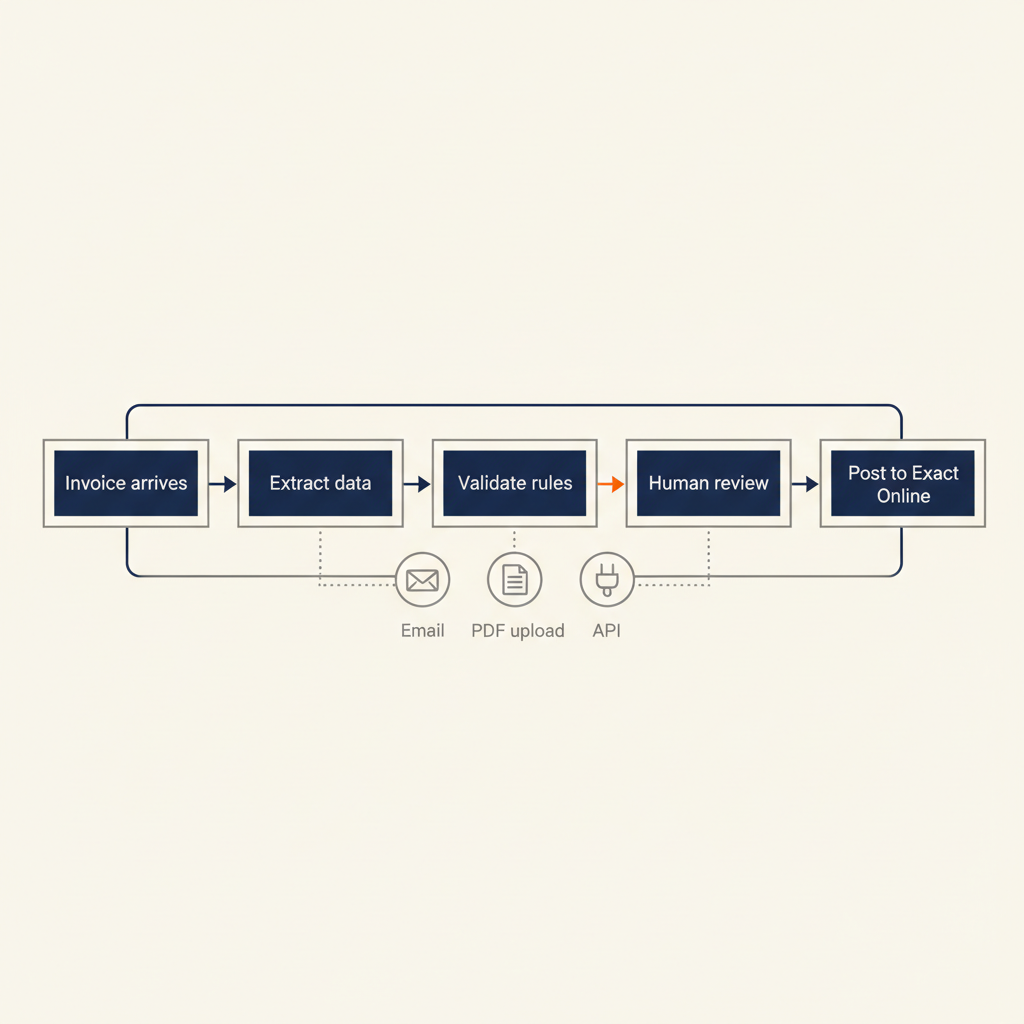
Most AI agent projects fail because the agency sells the tool first and the process second. They demo a slick workflow, the client signs up, and three months later the agent is making mistakes or sitting unused. The problem is rarely the AI model. It's almost always unclear business rules, missing source-of-truth data, or no rollback plan when the agent makes a mistake.
Here's the right sequence. Map the current process on paper: who does what, in what order, with which tools. Identify every decision point where a human makes a judgment call. Write down the rule they're applying, even if it's informal ("if the invoice is from this supplier and under €500, I just approve it"). Test those rules against 20 real examples from the past month. Only then do you build the agent.
In the projects we deliver for Dutch SMBs, we see the same pattern: the bottleneck is never the AI model's capability, it's the fact that the approval rules were never written down. One client told us "we just know when a quote needs manager sign-off", but when we asked for the criteria, it took two meetings to agree. Once the rules were clear, building the agent took a day. That's why our AI agents service starts with process mapping, not platform selection. If you can't explain the rule to a junior employee, you can't explain it to an agent.
Costs, ROI and compliance: what you really need to budget
Total cost of ownership for an AI agent includes the platform subscription, API costs, setup time, and ongoing maintenance. Let's break down a realistic example for a Dutch SMB automating invoice processing.
Platform: n8n Business plan at $667/month (€620/month) or Make Pro at €50/month. API costs: if you're calling OpenAI GPT for 500 invoices per month at $0.01 per call, that's €5/month. Setup: 20-40 hours of consulting to map the process, build the workflows, and test with real data, typically €3,000-€6,000. Maintenance: 2-4 hours per month to handle edge cases and update rules, around €200/month.
If the agent saves 8 hours per week at a blended rate of €40/hour, that's €1,280 per month saved. Payback is roughly 10 weeks at mid-tier pricing (Make + modest API usage + setup). After that, you're saving €1,000+ per month net. For higher-volume processes (order sync, customer support), payback can be as short as 4-6 weeks.
Comparison self-hosted (n8n) vs. cloud (Make, Zapier) for AVG and NIS2
Under AVG (the Dutch implementation of GDPR), you're responsible for where your data is processed and who has access. Self-hosted n8n means your data stays on your server or a Dutch hosting provider, and you control the encryption and access logs. Cloud platforms like Make and Zapier process data on their infrastructure, typically in the EU for European customers, but you're relying on their data processing agreement (DPA).
NIS2, which came into force in October 2024, requires many Dutch SMBs to document their IT security measures, including how automated systems handle sensitive data. If your agent processes customer data or financial records, you need to log what decisions it made and be able to audit them. n8n's self-hosted model makes this straightforward: you control the logs. With cloud platforms, you need to verify that their logging meets NIS2 requirements and that you can export the data if the Autoriteit Persoonsgegevens asks for it.
For most MKB businesses, a cloud platform with a strong DPA (Make, Zapier) is compliant enough. If you're in a regulated sector (finance, healthcare, legal) or handle large volumes of personal data, self-hosted n8n gives you more control and makes audits easier.
Realistic ROI calculation for SMBs (example 8 hours per week saved)
Let's use a concrete example: a Dutch webshop automates order confirmation emails, inventory updates in Exact Online, and shipping label generation. Current process: 8 hours per week of manual work. Automation setup: 30 hours at €100/hour = €3,000. Monthly cost: Make Pro at €50/month + API costs €10/month = €60/month. Hours saved: 8 hours/week × 4 weeks = 32 hours/month at €40/hour = €1,280/month. Net monthly saving after platform cost: €1,220. Payback period: €3,000 ÷ €1,220 = 2.5 months.
After 3 months, you're saving over €1,200 per month. Over a year, that's €14,640 saved, minus the €720 annual platform cost, for a net gain of €13,920. This assumes the process is stable and doesn't require constant tweaking. If your business rules change frequently, budget an extra 2 hours per month for updates.
AI agents work when the process is clear and the data is clean. Pick a platform that connects to the tools you already use (AFAS, Exact Online, Moneybird), budget for setup and API costs on top of the subscription, and make sure you can explain to the Dutch Data Protection Authority how the agent makes decisions. If you want help mapping your process before you build, our AI consultancy service is designed exactly for that: we sit down with your team, document the rules, and show you which parts are worth automating and which aren't. New to AI agents and want the basics with use cases and ROI for SMEs first? Read AI Agents for SMBs for the introduction.
Frequently asked questions
What's the difference between an AI agent and a chatbot?
A chatbot responds to questions in a conversation. An AI agent executes tasks across multiple tools: it reads an email, extracts data, writes it to your CRM, and sends a follow-up, all without you clicking anything. Chatbots are for interaction, agents are for automation.
Can I connect an AI agent to AFAS or Exact Online?
Yes. n8n has community-built nodes for AFAS and Exact Online, and Make has official integrations for Exact. You can read data (customers, invoices, projects) and write back (create journal entries, update records). The integration quality depends on the API the accounting software provides.
How much does it cost to build an AI agent for my business?
Setup typically costs €3,000-€6,000 for 20-40 hours of process mapping, workflow building, and testing. Monthly costs include the platform (€50-€620/month depending on volume and features), API calls to OpenAI or Claude (€5-€50/month for most SMB use cases), and maintenance (€200-€400/month). Total first-year cost is usually €8,000-€15,000.
Is a self-hosted AI agent (n8n) safer than a cloud solution?
Self-hosted n8n gives you full control over where data is stored and who can access it, which simplifies AVG and NIS2 compliance. Cloud platforms like Make and Zapier are also compliant if they have a strong data processing agreement, but you're trusting their infrastructure. For regulated sectors or high-sensitivity data, self-hosted is safer.
How long before an AI agent pays for itself?
If the agent saves 8 hours per week at a blended rate of €40/hour, payback is typically 10-12 weeks after accounting for setup, platform fees, and API costs. High-frequency processes (order sync, support email triage) can pay back in 4-6 weeks. Low-frequency tasks (quarterly reports) may take 6-9 months.
Do I need to follow AVG or NIS2 rules if I deploy an AI agent?
Yes, if the agent processes personal data (customer names, email addresses, financial records). Under AVG, you need a legal basis for processing and must log what the agent does. Under NIS2, you need to document your security measures and be able to audit automated decisions. Both are easier with self-hosted tools, but cloud platforms with strong DPAs can also meet the requirements.
Sources
Curious what AI can do for your business?
We listen, think along, and quickly deliver something that works. No obligations, no pressure.