



Last updated: June 22, 2026
What is n8n? Pricing, explanation and 5 SME use cases
You've heard n8n is cheaper than Zapier and gives you more control, but you're not sure if it fits your SME. This article explains what n8n is, what it costs, and shows how Dutch businesses use it for invoice processing, CRM sync, and customer communication without vendor lock-in. n8n is a no-code automation workflow platform with over 500 integrations, built for SMEs that want to automate repetitive tasks (uitleg: explanation) across their business tools. Use cases for Dutch SMEs (mkb) range from syncing Exact Online invoices to Slack, to routing new HubSpot leads through WhatsApp Business, all without writing code.
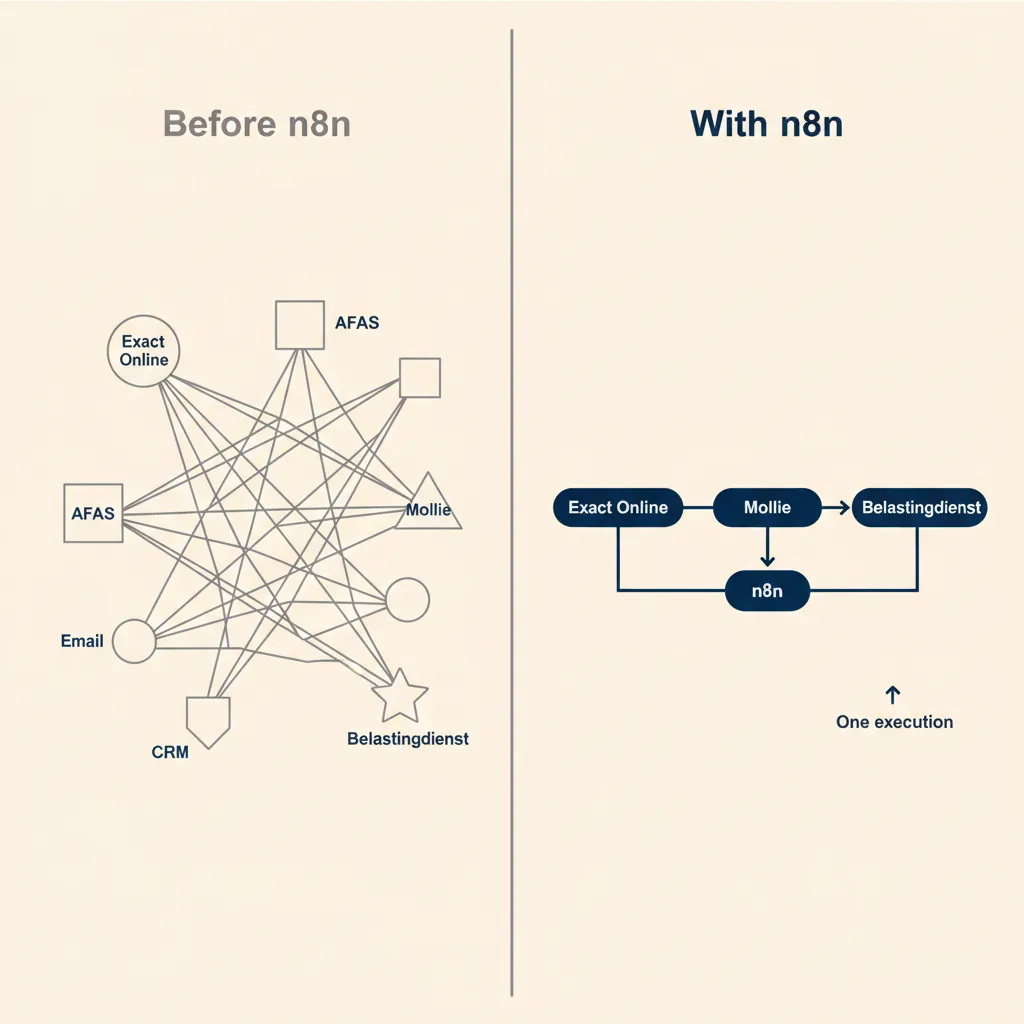
What is n8n and how does it work?
n8n is an open-source automation tool that lets you build workflows between your business tools without writing code. You drag nodes (blocks) onto a canvas, connect them, and n8n executes the steps: trigger (for example, new invoice in Exact Online), action (send email, update CRM), and optionally an AI step (let ChatGPT or an AI model write a summary). It runs on your own server (self-hosted) or in the cloud (EU hosting in Frankfurt).
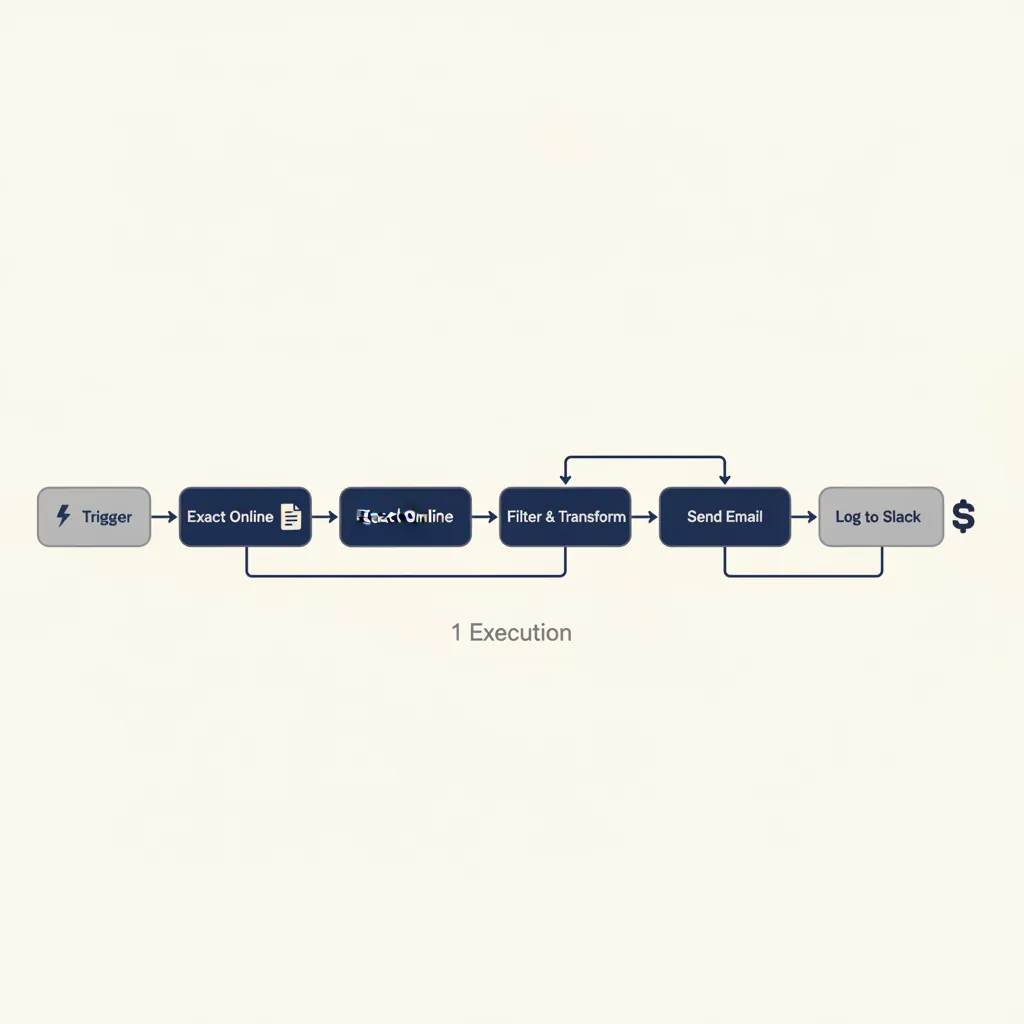
Each workflow is made of nodes. A node is a single step, like "fetch new row from Google Sheets" or "send message via Trengo". You connect nodes with lines to define the sequence. When a trigger fires, n8n runs through the chain and counts that as one execution. A 10-step workflow costs you one execution, not ten, which is why n8n is typically 70-80% cheaper than tools that charge per step.
Nodes, workflows, and executions: the three core concepts
A node is a single action or trigger. n8n ships with 500+ built-in nodes covering tools like AFAS, Exact Online, Moneybird, Snelstart, HubSpot, Pipedrive, Slack, Gmail, and AI platforms (ChatGPT, Claude, Gemini). If a tool has an API, you can connect it with the HTTP Request node or build a custom node.
A workflow is the full chain of nodes you design. Example: when a Mollie payment succeeds (trigger), update stock in WooCommerce (action 1), create a shipping label via SendCloud (action 2), and notify the warehouse in Slack (action 3). That entire sequence is one workflow.
An execution is one run of a workflow from start to finish. If your workflow has 20 steps, it still counts as one execution. This is the key difference from Zapier, which would bill 20 tasks for the same workflow. In the projects we deliver for Dutch SMEs, we see clients save 60-70% on automation costs by switching from task-based to execution-based billing.
Self-hosted vs. cloud: what fits your SME?
n8n offers two deployment models. Self-hosted means you install n8n on your own server or VPS (DigitalOcean, Hetzner, TransIP). You get unlimited executions, full control over your data, and zero monthly fee. The Community Edition includes all 500+ integrations and core features; only enterprise extras (SSO, Git version control, external secrets) are gated to paid tiers.
Cloud means n8n hosts and manages the instance for you in Frankfurt (AWS EU-Central-1). You pay per execution tier: €20/month for 2,500 executions (Starter), €50/month for 10,000 executions (Pro), or €667/month for 40,000 executions plus SSO and Git (Business). Every cloud plan includes unlimited users, unlimited active workflows, and the full integration catalog. Cloud is faster to start, self-hosted is cheaper at scale and keeps your data on-premises.
Most Dutch SMEs start with cloud to test workflows, then move to self-hosted once they hit 10,000+ executions per month. If you're handling privacy-sensitive data (HR, medical, financial), self-hosted keeps you fully GDPR-compliant without relying on a third-party processor.
n8n pricing: free self-hosted, from €20/month cloud, or enterprise
The Community Edition is 100% free, unlimited executions, all 500+ integrations, and you host it yourself (on your own server or VPS). The cloud plans start at €20/month for 2,500 executions (Starter), €50/month for 10,000 executions (Pro), and €667/month for 40,000 executions plus SSO and Git integration (Business). All plans include unlimited active workflows and unlimited users. For an SME running 10,000 executions per month, you pay €50 on n8n versus €300+ on Zapier.
| Plan | Price (monthly) | Executions | Best for |
|---|---|---|---|
| Community Edition | €0 (self-hosted) | Unlimited | SMEs with technical staff or a hosting partner |
| Starter (cloud) | €20 | 2,500/month | Freelancers, small teams testing automation |
| Pro (cloud) | €50 | 10,000/month | Growing SMEs, typical MKB volume |
| Business (cloud) | €667 | 40,000/month | Larger teams needing SSO, Git, advanced security |
| Enterprise | Custom | Unlimited | Multi-site deployments, dedicated support |
When is the free Community Edition enough?
If you can run a Docker container or spin up a VPS, the Community Edition covers 90% of SME automation needs. You get unlimited executions, all integrations (AFAS, Exact Online, Moneybird, Mollie, HubSpot, Trengo, ChatGPT, Claude), and full workflow-building features. Missing features: SSO/SAML, multi-environment support, external secrets management, log streaming, and Git-based version control. For most Dutch SMEs, none of those are deal-breakers.
We build self-hosted n8n instances for clients who want to keep invoice data, customer records, or HR information on their own infrastructure. Hosting on a €10/month VPS at Hetzner or TransIP gives you unlimited automation for less than one Zapier Starter plan. The trade-off: you (or your IT partner) handle updates, backups, and uptime. If that sounds like overhead, cloud is the better fit.
Cloud Starter and Pro: best choice for most SME businesses
The cloud Starter plan (€20/month, 2,500 executions) works for small teams automating one or two high-value workflows: new leads from your website into HubSpot, or daily sales reports from WooCommerce to Slack. The Pro plan (€50/month, 10,000 executions) is the sweet spot for typical Dutch SME volume. That's roughly 330 workflow runs per day, enough to handle invoice sync, order processing, and customer-support routing combined.
Cloud plans include 14-day free trials (no credit card required), so you can build and test workflows before committing. Annual billing saves 17% across every tier. All plans run in Frankfurt (AWS EU-Central-1), which keeps your data inside the EU for GDPR compliance. If you outgrow 10,000 executions, you can either upgrade to Business (40,000 executions, €667/month) or migrate to self-hosted and pay zero per execution.
5 concrete n8n use cases for Dutch SMEs
Here are five workflows Dutch SME businesses run on n8n, with the tools they connect and the hours they save. Each example names the trigger, the steps, and the result. You'll see how n8n integrates with AFAS, Exact Online, Moneybird, Mollie, HubSpot, and Trengo, and how you add AI nodes (ChatGPT, an AI model) for smarter automation.
Invoice processing: from Exact Online to email and Slack
Trigger: New invoice created in Exact Online.
Steps: Fetch invoice PDF, send copy to the client via Gmail, post summary (invoice number, amount, due date) to #finance Slack channel.
Result: Invoices go out within 2 minutes of creation, no manual export or email drafting. Saves ~3 hours per week for a 20-person service business.
In our business automation work, we see this pattern across consultancies, agencies, and professional-services firms. The n8n workflow eliminates the "export PDF, attach to email, remember to notify finance" loop. You can extend it with a reminder node: if the invoice isn't paid 7 days before the due date, send a polite follow-up via Trengo or WhatsApp Business.
Lead follow-up: new HubSpot contact to WhatsApp Business via Trengo
Trigger: New contact added to HubSpot (from website form or chatbot).
Steps: Check if contact has a Dutch mobile number, send personalized WhatsApp message via Trengo ("Hi [Name], thanks for reaching out, here's the info you requested…"), log interaction back to HubSpot.
Result: Leads get a response within 60 seconds, 24/7. Conversion rate on demo requests increased 40% for one e-commerce client.
WhatsApp is the default messaging channel for Dutch consumers. This workflow turns your CRM into a real-time engagement engine. You can add an AI node (ChatGPT or an LLM) to draft the message dynamically based on the lead's form answers, keeping the tone human and relevant.
Quote approval: notification plus AI summary for management
Trigger: Sales rep marks quote as "ready for approval" in Pipedrive or Teamleader.
Steps: Extract quote details (client, amount, margin), pass to an AI model to generate a 3-sentence summary, send email to director with summary and approve/reject buttons (using n8n's webhook + form node).
Result: Directors approve quotes from their phone in under 2 minutes, no need to open the CRM. Approval cycle dropped from 1 day to 2 hours.
This workflow is common in construction and wholesale, where quotes need sign-off before they go out. The AI summary saves the director from reading a 5-page PDF; they see "€45K kitchen refit, 28% margin, standard terms" and click approve. The webhook logs the decision back into the CRM automatically.
E-commerce: Mollie payment to stock update and shipping label
Trigger: Mollie webhook fires on successful payment.
Steps: Update stock level in WooCommerce, create shipping label via SendCloud or PostNL API, send order confirmation email with tracking link, notify warehouse in Slack.
Result: Orders are pick-ready within 5 minutes of payment. Manual order processing time dropped from 15 minutes to zero per order.
For webshops doing 50+ orders per day, this workflow pays for itself in week one. You can extend it with a stock-alert node: if inventory drops below 10 units, send a reorder reminder to your supplier via email or create a purchase order in your ERP.
Time tracking: AFAS hours to invoice in Moneybird
Trigger: End of week (CRON schedule, Friday 5 PM).
Steps: Fetch approved hours from AFAS for each project, group by client, create draft invoice in Moneybird with line items (project name, hours, rate), send preview to project manager for final check.
Result: Invoicing prep time reduced from 4 hours to 10 minutes per week. Project managers approve invoices Monday morning, clients get them by noon.
This is a high-ROI workflow for IT consultancies, agencies, and professional-services firms billing by the hour. The n8n workflow ensures no billable hours are forgotten, and the draft-invoice step catches any rate or scope issues before the invoice goes out.
Running into this at your own business? We'll spend 30 minutes with you for free, no sales pitch. Book a free intro call
n8n vs. Zapier vs. Make: which one for SMEs?
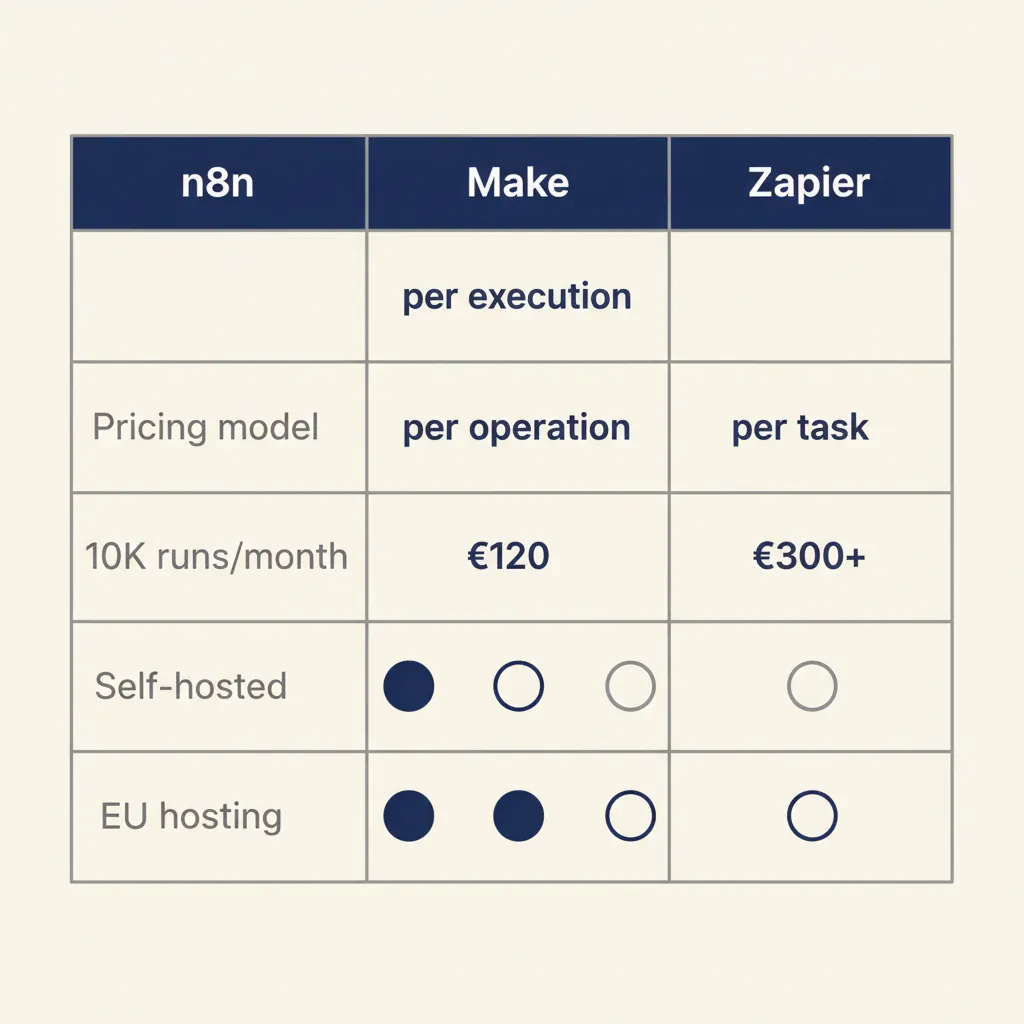
Zapier charges per step (task), Make charges per operation, n8n charges per workflow run (execution). A workflow with 10 steps costs 1 execution on n8n, 10 tasks on Zapier. n8n is 70-80% cheaper at comparable volume. Zapier has the largest app store and the lowest learning curve. Make sits between Zapier and n8n in price, with visual branching. n8n gives you full control (self-hosted), GDPR-proof EU hosting, and no vendor lock-in.
Choose Zapier if you want to start fast and have budget. The interface is polished, the app directory is huge (7,000+ integrations), and support is responsive. At 10,000 tasks per month you'll pay around €300/month. Good for teams that value speed over cost and don't need custom logic.
Choose Make if you need complex branching and mid-tier budget. Make's visual router and filter nodes make it easier to handle "if this, then that, else this other thing" logic than Zapier. Pricing is ~€100/month for 10,000 operations. The interface has a steeper learning curve than Zapier but more flexibility than n8n's linear canvas (though n8n now supports branching via the Switch and IF nodes).
Choose n8n if you want to control costs, keep data in the EU, or run more than 10,000 executions per month. The self-hosted Community Edition is free with unlimited runs. Cloud is €50/month for 10,000 executions. You own the workflows (export as JSON, version-control in Git), and you can extend n8n with custom nodes if a tool isn't in the catalog. In our AI consultancy work, we recommend n8n to clients who want to integrate AI models (ChatGPT, Claude, open-source LLMs) without per-request API markup from the automation platform.
Bottom line: Zapier for ease, Make for logic, n8n for control and cost. Most Dutch SMEs start with Zapier, hit the pricing wall at 10K tasks, and migrate to n8n.
Why most SME businesses get n8n wrong (and how to avoid it)
In the projects we deliver for Dutch SMEs, we see three recurring mistakes. One: they automate a process that hasn't been documented, so the workflow breaks at the first exception. Two: they build everything in one mega-workflow instead of separate, reusable sub-workflows. Three: they skip error handling and logging, so when something fails they don't know where.
Start with one small process (for example, new lead to CRM). Document the exceptions: what happens if the email field is empty? What if the lead is a duplicate? Build the workflow modularly: one sub-workflow fetches the lead, another checks for duplicates, a third writes to the CRM. Set up notifications on errors (Slack message, email to admin). Test with real data before you go live.
The most common failure mode we see: a client automates invoice approval without defining who can approve what amount. The workflow sends every invoice to the director, including €50 office-supply orders. Two weeks in, the director stops opening the emails, and the whole system dies. Fix: build the approval matrix into the workflow (invoices under €500 auto-approve, €500-€5K go to finance manager, above €5K go to director). n8n's IF and Switch nodes make this logic straightforward.
Second mistake: no logging. When a workflow fails silently (API timeout, malformed data), you need to know which step broke and what the input was. n8n's execution history shows every run, but if you're on the free tier or self-hosted, set up a separate logging node (write to Google Sheets, Airtable, or a database) so you can debug without opening the n8n UI. This saves hours when you're troubleshooting a workflow that ran 500 times overnight.
Get started: build your first n8n workflow in under an hour
n8n gives you enterprise automation power for SME budget: free self-hosted or from €20/month cloud, integrations with all Dutch tools, and full control over your data. Start with one workflow that saves you 2-4 hours per week, and scale from there.
Pick a repetitive task you do daily: sending invoices, logging leads, updating inventory, posting reports. Sign up for a 14-day free trial on n8n cloud (no credit card), or spin up the Community Edition on a VPS. Drag a trigger node (webhook, schedule, or app event), add an action node (send email, update CRM), connect them, and click "Execute Workflow". If it works, activate it. If it breaks, check the execution log and adjust.
Most clients we work with see ROI in week two. The first workflow takes an afternoon to build and test. The second takes an hour. By the fifth workflow, you're building them in 20 minutes. The time you save compounds: 3 hours per week is 150 hours per year, roughly one month of full-time work. That's the business case for automation, and n8n makes it accessible without a developer on staff.
For a related angle, see our post on AI for business: a practical guide for Dutch SMEs.
Frequently asked questions
Is n8n really free or are there hidden costs?
The Community Edition is 100% free with unlimited executions and all 500+ integrations if you self-host (you pay only for server hosting, typically €10-€20/month for a VPS). Cloud plans start at €20/month for 2,500 executions. No hidden fees, no per-user charges, and you can export your workflows as JSON and move between self-hosted and cloud anytime.
Which Dutch tools can I connect with n8n?
n8n has native nodes for AFAS, Exact Online, Moneybird, and Mollie, plus 500+ other integrations including Snelstart (via API), HubSpot, Pipedrive, Teamleader, Trengo, Slack, Gmail, and WooCommerce. If a tool has an API or webhook, you can connect it using the HTTP Request node or build a custom node.
Do I need a developer to use n8n?
No. The visual workflow builder is drag-and-drop, and most SME workflows (invoice sync, lead routing, report generation) need zero code. You will need basic logic skills (if this, then that) and the ability to read API documentation if you're connecting a tool that isn't in the catalog. For complex workflows or custom integrations, a technical partner (like us) can build and hand over the workflow in 1 to 2 weeks.
Is n8n GDPR-compliant and where is my data stored?
n8n cloud instances run in Frankfurt (AWS EU-Central-1), which keeps your data inside the EU. Self-hosted deployments store data wherever you host the server (your own data center, a Dutch VPS provider like TransIP or Hetzner). n8n doesn't sell or share your workflow data; you control access and can delete everything at any time. For privacy-sensitive workflows (HR, medical, financial), self-hosted is the safest option.
How many executions does a typical SME need per month?
A small team (5-10 people) running 2 to 3 workflows (invoice sync, lead routing, daily report) typically uses 2,000 to 5,000 executions per month. A growing SME (20-50 people) with 5 to 10 workflows (order processing, CRM sync, support tickets, time tracking) uses 8,000 to 15,000 executions per month. The Pro plan (€50/month, 10,000 executions) fits most Dutch SME volumes; if you go over, n8n charges €10 per additional 1,000 executions, no surprise fees.
Can I combine n8n with ChatGPT or an AI model for AI workflows?
Yes. n8n has native nodes for ChatGPT (OpenAI), Claude (Anthropic), and other AI models. You can pass data (customer email, invoice text, lead form answers) to the AI node, get a response (summary, classification, draft reply), and use that output in the next step (send email, update CRM, create task). This is how we build AI-powered support routing and quote summarization for clients: the AI reads the input, n8n handles the rest of the workflow.
Sources
Curious what AI can do for your business?
We listen, think along, and quickly deliver something that works. No obligations, no pressure.