



Last updated: May 17, 2026
Custom GPT vs ChatGPT: Which Fits Your Workflow?
You've heard Custom GPTs can save time, but you're not sure how they differ from the ChatGPT you already use. A Custom GPT is a configured assistant with instructions, knowledge files, and optional API actions. Base ChatGPT is the conversational interface you type into. The difference matters because one is a workspace, the other is a specialized tool you can share via the GPT Store. For Dutch SMEs running customer support or internal documentation workflows, understanding when a Custom GPT is enough (and when you need a full automation tied to AFAS or Exact Online) determines whether you save 4 hours per week or waste a month configuring the wrong tool. ChatGPT Projects organize your chats and files, Custom GPTs deliver consistent task-specific outputs, and ChatGPT Apps (built with Model Context Protocol) render interactive UI inside the chat. This guide shows you what each tool does, when a Custom GPT fits your workflow, and when you should skip it and build a real automation instead.
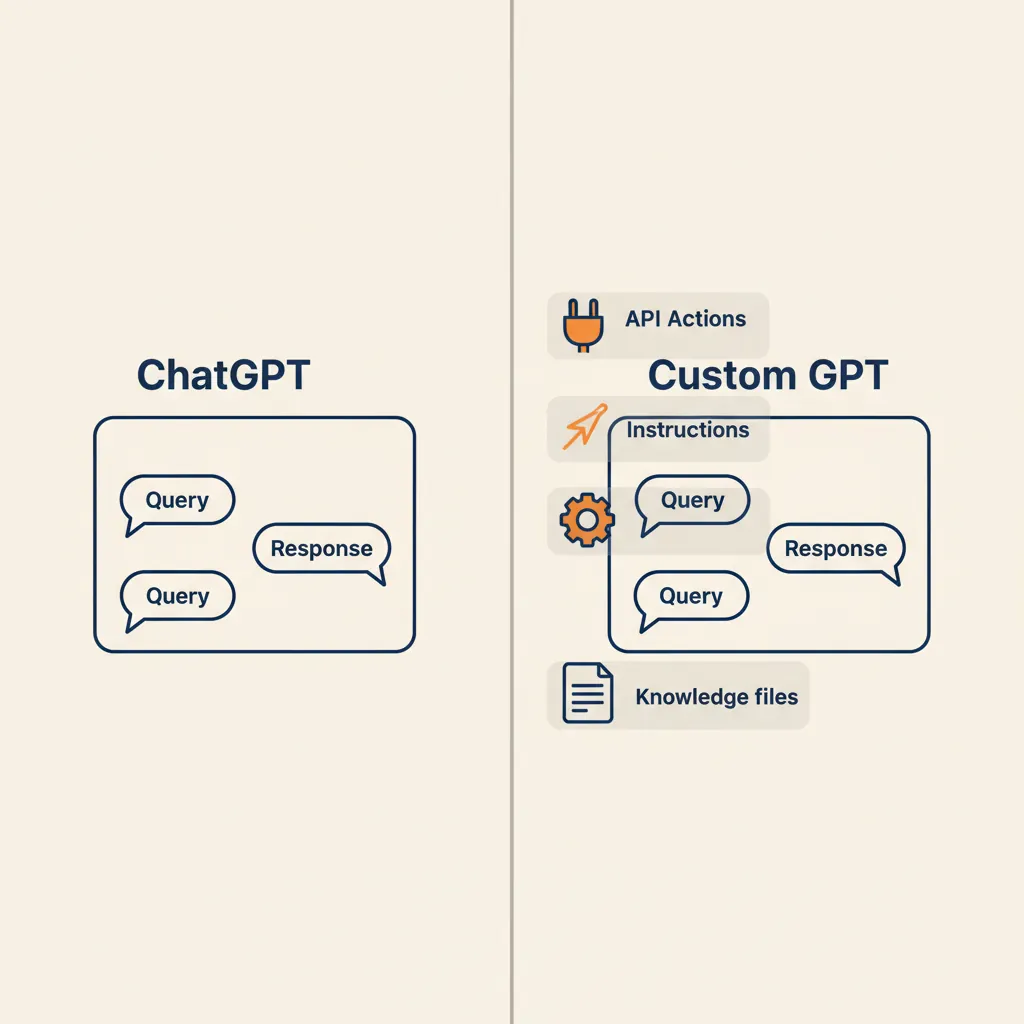
What ChatGPT and Custom GPT Actually Are
Base ChatGPT is the default conversational interface. You type a question, the model replies. Every conversation starts fresh unless you're using Projects to organize context. A Custom GPT is a no-code configuration layer on top of that interface: you write instructions (the system prompt), upload knowledge files (PDFs, spreadsheets, markdown), and optionally connect API actions so the assistant can fetch live data or trigger workflows.
Base ChatGPT: the default interface
The default ChatGPT interface is available at every tier, from Free ($0/month, 10 messages per 5 hours) to Plus ($20/month, 160 messages per 3 hours with advanced models). You type, the model replies, and the conversation history sits in your sidebar. No configuration, no uploaded files unless you attach them per chat. For one-off questions or exploratory work, this is enough. For repeated tasks where you need the same tone, format, or background knowledge every time, you're retyping instructions in every new chat.
Custom GPT: instructions, knowledge files, and actions
A Custom GPT lets you lock in those instructions once. You write a system prompt (e.g., "You are a customer support assistant for a Dutch e-commerce business. Always reply in friendly, concise Dutch. Use the uploaded return policy and FAQ documents to answer questions."), upload up to 80 files (512 MB each, 25 per project on Plus), and optionally connect API actions (Zapier, Make, or a custom endpoint). The assistant then behaves the same way in every conversation. You can keep it private, share it with your team via link, or publish it to the GPT Store for anyone to use. Custom GPTs require ChatGPT Plus ($20/month) or higher. Free-tier users cannot create them.
ChatGPT Projects and Apps: how they fit in
ChatGPT Projects are workspaces that organize chats and files. You set high-level context ("This project is about Q2 financial planning"), upload reference documents, and every chat inside that project has access to those files. Projects support advanced features like Deep Research (10 sessions per month on Plus, 500 on Pro $100) and agent mode. A Custom GPT, by contrast, has no memory of past chats and no workspace organization. It's a single-purpose assistant. ChatGPT Apps are a third category: coded applications built with Model Context Protocol that render interactive UI (charts, forms, tables) inside the chat. Apps require development work; Custom GPTs are no-code. For most SME workflows, the choice is between a Custom GPT (task-specific assistant) and Projects (organized workspace), not Apps.
If your workflow is repeated customer support replies or internal HR policy lookups, a Custom GPT is the right tool. If you need to organize research across multiple chats, use Projects. If you need live data from your accounting system or multi-step logic, you're looking at a full automation instead.
Side-by-Side: Features, Limits, and Use Cases
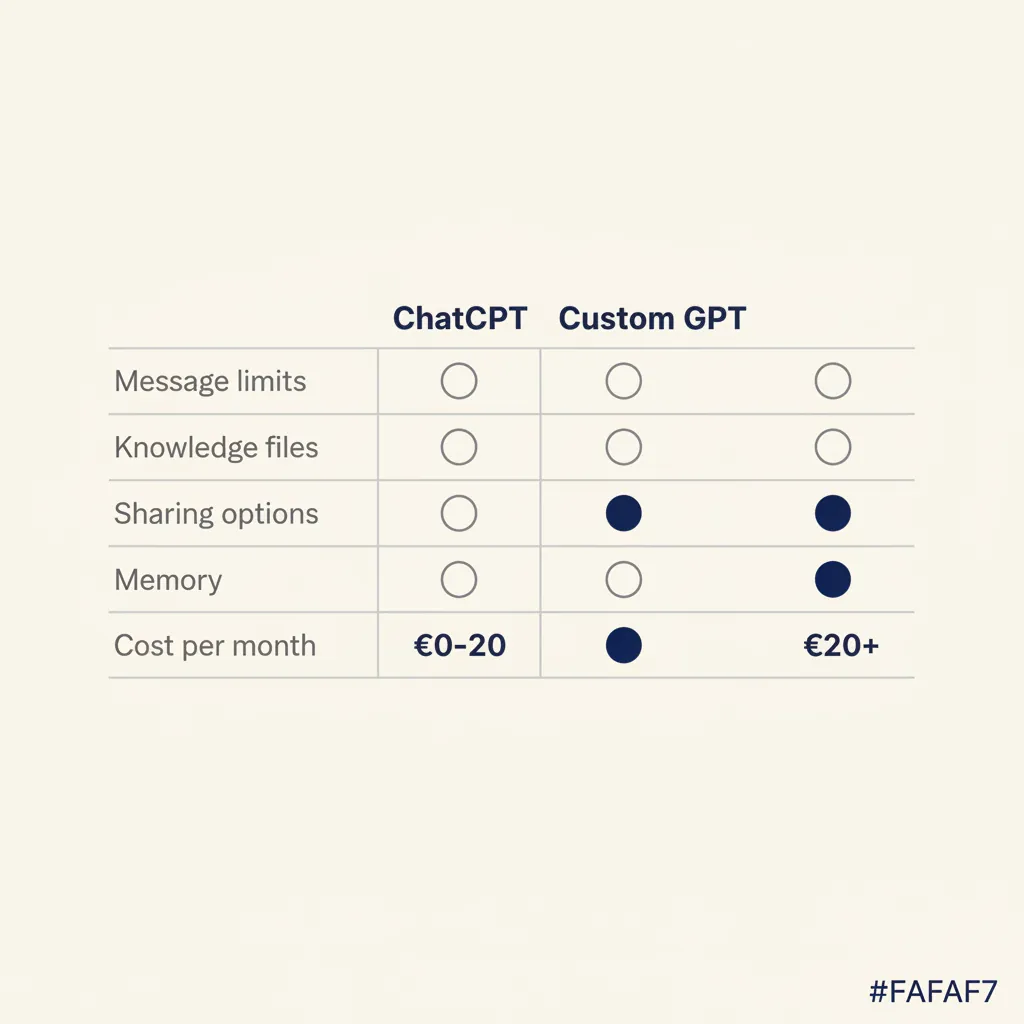
| Feature | Base ChatGPT | Custom GPT | ChatGPT Projects |
|---|---|---|---|
| Price | Free to $200/mo | Plus $20/mo minimum | Plus $20/mo minimum |
| Instructions | Per chat, manual | Locked in system prompt | Project-level context |
| Knowledge files | Attach per chat | 80 files, 512 MB each, 25/project | Shared across chats in project |
| Memory | Chat history only | No memory across chats | Shared context in workspace |
| Sharing | Copy-paste only | Link or GPT Store | Team workspace (Business/Enterprise) |
| API actions | No | Yes (Zapier, Make, custom) | No |
| Best for | One-off questions | Repeated task-specific work | Organized research, team collaboration |
Concrete SME examples where a Custom GPT fits: a customer-support assistant trained on your return policy and FAQ (saves 2-3 hours per week answering repeat questions), an internal HR policy assistant that answers Dutch labor-law questions using your employee handbook (no more forwarding the same PDF), an invoice-processing helper that extracts line items and suggests GL codes based on your chart of accounts. Where it doesn't fit: live invoicing tied to Exact Online (the Custom GPT can't write back to your accounting system), multi-step workflows that need approval logic (e.g., quote generation, approval, then auto-send), or scheduled tasks (a Custom GPT only runs when you start a chat).
For Dutch SMEs, the $20/month Plus tier is the entry point. If you need higher message quotas or Deep Research for market analysis, Pro $100 ($100/month, 500 Deep Research sessions) is the next step. Business ($25-30 per user per month, minimum 2 users) adds team workspaces and SSO. Enterprise (custom pricing, minimum 150 users) adds data residency and SLA. Most 2-10 person teams stay on Plus and share Custom GPT links.
Running into this at your own business? We'll spend 30 minutes with you for free, no sales pitch. Book a free intro call
When a Custom GPT Is Enough (and When It Isn't)
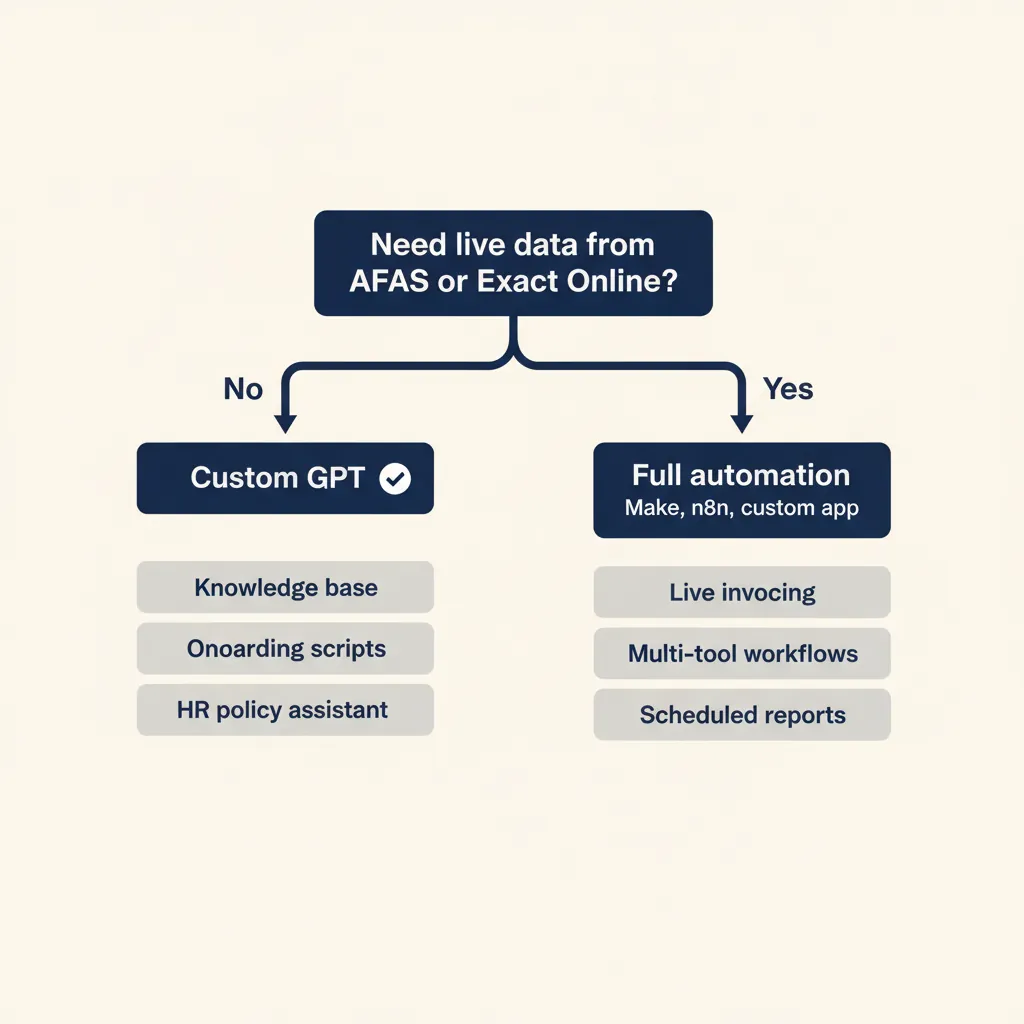
A Custom GPT works when the task is knowledge retrieval, consistent formatting, or tone-of-voice replies. It falls short when you need real-time data from your CRM or accounting system, multi-step logic with human approval gates, or scheduled execution.
Good fit: internal knowledge base, client onboarding scripts, HR policy assistant
Internal knowledge base: upload your product documentation, internal wiki, or process manuals. Team members ask questions in natural language, the Custom GPT retrieves the answer. No more hunting through shared drives. Client onboarding scripts: a Custom GPT trained on your onboarding checklist, contract templates, and FAQ can draft welcome emails, answer common setup questions, and suggest next steps. HR policy assistant: upload your employee handbook, Dutch labor-law summaries, and leave-request policies. Employees ask questions, the assistant replies with the correct policy and cites the page number. For Dutch SMEs, this is especially useful for AVG-compliant documentation (the knowledge files stay inside OpenAI's infrastructure, covered under their data-processing agreement).
Not enough: live invoicing, multi-tool workflows, scheduled reports
Live invoicing: a Custom GPT cannot write back to Exact Online, AFAS, or Moneybird. It can draft an invoice based on your template and pricing rules, but a human still has to copy-paste the data into your accounting system. If you need end-to-end automation (order received, invoice generated, sent, and logged in Exact Online), you need a Make or n8n workflow with API connectors. Multi-tool workflows: quote generation that pulls client data from your CRM, calculates pricing based on rules in a spreadsheet, generates a PDF, sends it for approval, then emails the client. A Custom GPT can handle one step (draft the quote), but it cannot orchestrate the full sequence. Scheduled reports: a Custom GPT only runs when you start a chat. If you need a weekly sales summary emailed every Monday morning, you need a scheduled workflow in an automation platform.
In the business automation work we deliver for Dutch SMEs, the pattern we see is this: a Custom GPT is a great first step for knowledge retrieval and drafting. When clients ask us to connect it to their accounting system or add approval logic, we move the workflow to Make or n8n. The Custom GPT becomes the front-end (the assistant that drafts the output), and the automation platform handles the back-end (writing to AFAS, sending emails, logging to a database).
What Most Consultancies Get Wrong About Custom GPTs for SMEs
Many agencies sell Custom GPTs as plug-and-play solutions without cleaning the knowledge base first, defining approval workflows, or checking AVG compliance. The three mistakes we see most often: assuming the model will fix messy documents, skipping the process map, and ignoring data residency for Dutch clients.
Messy documents: a Custom GPT is only as good as the knowledge files you upload. If your employee handbook is a 200-page PDF with inconsistent formatting, duplicate sections, and outdated policies, the assistant will retrieve contradictory answers. In our custom GPT projects, 8 out of 10 failures trace back to document quality, not the model. Clean your knowledge base first: remove duplicates, update outdated sections, and structure the content with clear headings. Skipping the process map: a Custom GPT can draft an output, but it cannot enforce who approves what or when the next step happens. If your quote workflow requires approval from a project manager before sending to the client, the Custom GPT cannot handle that gate. Define the approval process first, then decide where the Custom GPT fits (usually the drafting step). Ignoring data residency: Custom GPT knowledge files are stored and processed by OpenAI. For Dutch SMEs handling client data, employee records, or financial admin, this raises AVG questions. OpenAI's data-processing agreement covers GDPR compliance, but if your client contract requires EU-hosted infrastructure, a Custom GPT is not compliant. You need an on-premise LLM or an EU-hosted alternative.
The fix: treat a Custom GPT as one component in a workflow, not the entire solution. Map the process, clean the knowledge base, and check compliance before you configure the assistant. If you need end-to-end automation or strict data residency, talk to us about AI consultancy that fits your compliance requirements.
Data Privacy and AVG Compliance: Where Your Files Live
Custom GPT knowledge files are stored and processed by OpenAI's infrastructure. For Dutch SMEs handling client data, employee records, or financial admin, this raises AVG (GDPR) questions. OpenAI's data-processing agreement states that uploaded files are not used to train models and are encrypted at rest and in transit. That covers most AVG requirements for data processors. However, if your client contract or sector regulation requires EU-hosted infrastructure (common in healthcare, finance, and government), a Custom GPT is not compliant because OpenAI's primary infrastructure is US-based.
When a Custom GPT is compliant: internal HR policies (no personal employee data in the files), product documentation (public or internal knowledge), customer-support scripts (no client names or personal data in the uploaded templates). When it's not compliant: client contracts with data-residency clauses, employee records with salary or health data, financial admin tied to the Belastingdienst (Dutch tax authority) that requires audit trails on EU soil. In those cases, you need an on-premise LLM (e.g., a self-hosted model on your own server) or an EU-hosted alternative (e.g., a custom agent built on Azure OpenAI with EU data residency).
For most Dutch SMEs, the practical test is this: would you email this document to an external consultant? If yes, uploading it to a Custom GPT is the same risk level. If no (because it contains personal data or confidential client information), you need a different solution. We help clients navigate this in our AI consultancy work, mapping which workflows can use a Custom GPT and which need on-premise or EU-hosted infrastructure.
If your workflow is mostly knowledge retrieval and you don't need live data from your accounting or CRM system, a Custom GPT can save hours per week for $20 per month. If you need real-time integrations, multi-step logic, or AVG-compliant data handling tied to Dutch tools, you're looking at a full automation or custom agent instead. Start with the simplest tool that solves the problem, then graduate to a full workflow when the Custom GPT hits its limits.
For a related angle, see our post on AI for business: a practical guide for Dutch SMEs.
Frequently asked questions
Can I use a Custom GPT with my AFAS or Exact Online data?
A Custom GPT can read static files (e.g., a CSV export of your chart of accounts), but it cannot write back to AFAS or Exact Online in real time. For end-to-end automation (order received, invoice generated, logged in Exact), you need a Make or n8n workflow with API connectors.
Do I need ChatGPT Plus to create a Custom GPT?
Yes. Custom GPTs require ChatGPT Plus ($20/month minimum). Free-tier users can use Custom GPTs that others have published to the GPT Store, but they cannot create or configure their own.
Is a Custom GPT AVG-compliant for Dutch client data?
Custom GPT knowledge files are covered under OpenAI's GDPR data-processing agreement, which satisfies most AVG requirements. If your client contract requires EU-hosted infrastructure, a Custom GPT is not compliant and you need an on-premise or Azure-based alternative.
What's the difference between a Custom GPT and ChatGPT Projects?
A Custom GPT is a task-specific assistant with locked-in instructions and knowledge files. ChatGPT Projects are workspaces that organize chats and files, with shared context across conversations. Use a Custom GPT for repeated tasks, Projects for organized research.
When should I build a full automation instead of a Custom GPT?
When you need real-time data from your CRM or accounting system, multi-step approval logic, or scheduled execution. A Custom GPT only runs when you start a chat and cannot write back to external tools without API actions.
Can I share a Custom GPT with my team without making it public?
Yes. You can share a Custom GPT via a private link (anyone with the link can use it), or restrict access to your workspace on ChatGPT Business ($25-30 per user per month, minimum 2 users) or Enterprise (custom pricing, minimum 150 users).
Sources
Curious what AI can do for your business?
We listen, think along, and quickly deliver something that works. No obligations, no pressure.