



Last updated: July 1, 2026
Custom GPT examples for SMEs: 8 practical use cases
You've heard that custom GPTs can help your team, but most examples online focus on ChatGPT subscription tiers or generic prompt engineering. This article shows what a custom GPT can actually do in Dutch SME processes: from building quotes to checking invoices, with examples from construction, administration, e-commerce, and customer service. We'll cover what a custom GPT is, eight concrete use cases, how to connect one to AFAS, Exact Online, or Moneybird, and the mistakes most businesses make when they try to build one.
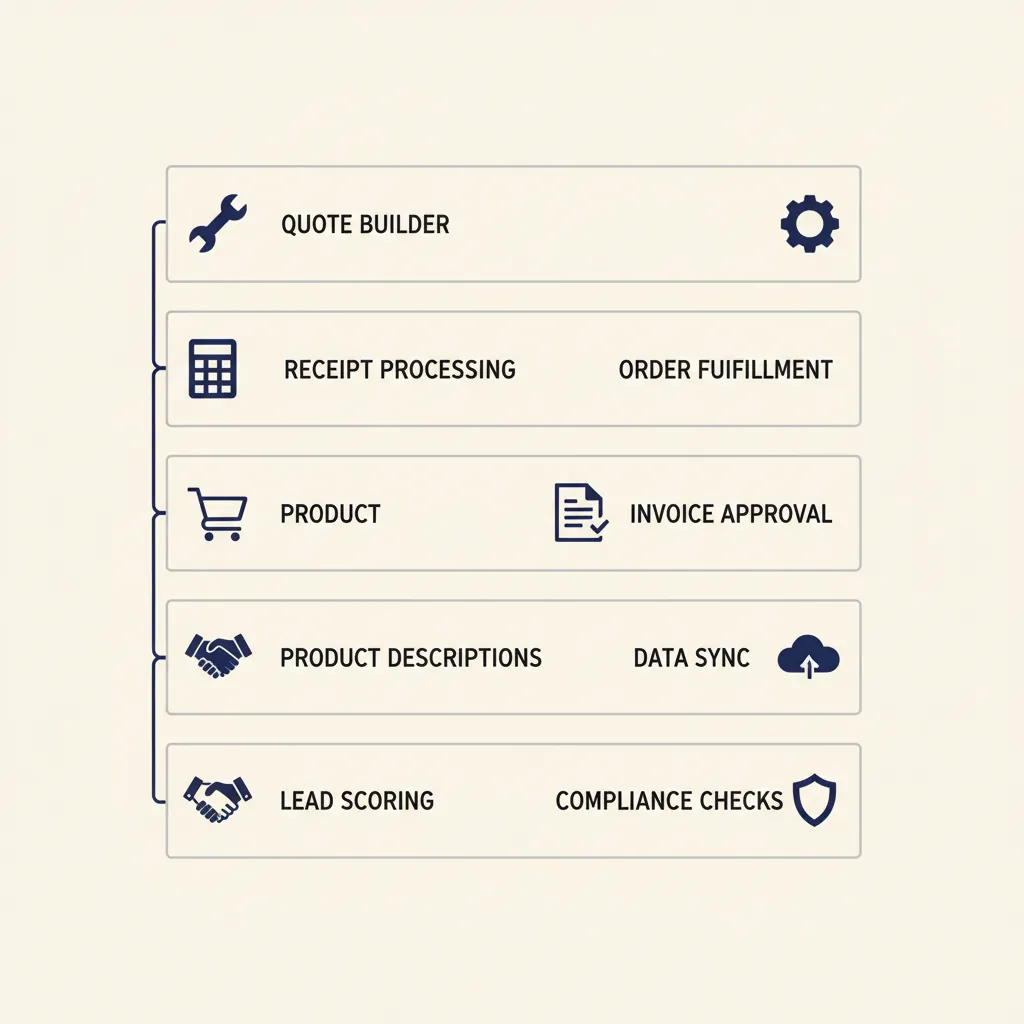
A custom GPT is an AI model trained on your company's instructions and documents using the GPT Builder inside ChatGPT. Unlike typing a one-off prompt into ChatGPT, a custom GPT remembers your business rules, your tone of voice, and the structure of your workflows. For Dutch SMEs running tools like AFAS, Exact Online, or Moneybird, that difference matters: the GPT can generate a quote in your house style, check an invoice against your approval rules, or draft a customer reply that matches how your team actually talks.
The value isn't in the AI model itself. It's in how clearly you define the process and the instructions you give the GPT. You don't need a developer to build a custom GPT, but you do need to write down how your business works. That's where most projects fail: teams skip the process step and expect the GPT to figure it out. In our custom GPT work, we see that the businesses that save the most time are the ones that document their workflows first, then train the GPT on those rules.
What is a custom GPT and why is it different from just using ChatGPT
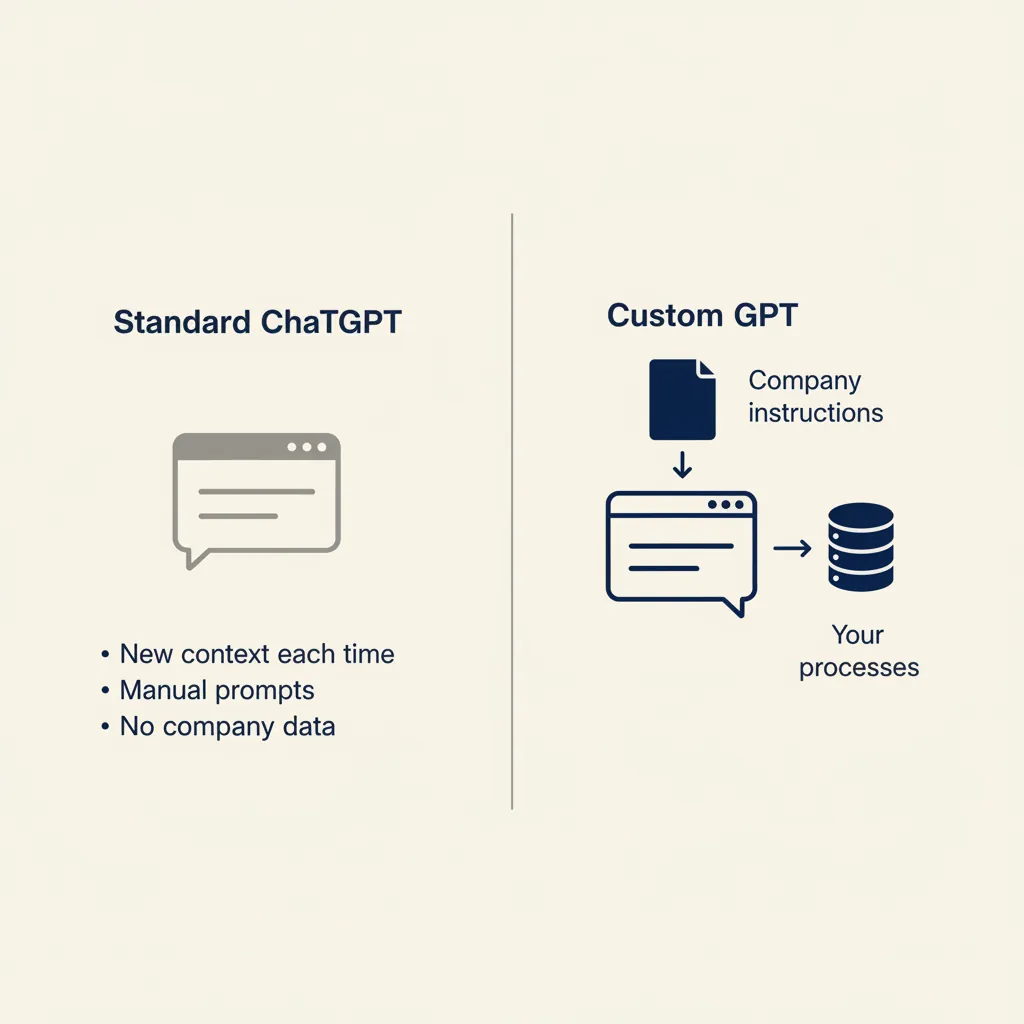
A custom GPT is a GPT model configured with specific instructions, uploaded documents, and optional integrations that you define once and reuse every time. When you type a question into standard ChatGPT, the model has no memory of your previous sessions and no knowledge of your business. Every conversation starts from zero. A custom GPT changes that: you upload your company handbook, your pricing tables, your FAQ documents, and you write a system prompt that tells the GPT how to behave.
Custom GPT vs. standard ChatGPT: what is the difference
Standard ChatGPT is a general-purpose assistant. You give it a prompt, it gives you an answer, and the next time you open a new chat it has forgotten everything. That's fine for one-off questions, but it breaks down when you need the same output format every week. A custom GPT solves that by baking your instructions into the model's configuration. You define the output format once, upload reference documents, and every team member who uses the GPT gets consistent results.
For example, if you run a construction company and you want the GPT to generate quotes, you upload your standard terms, your hourly rates, and a few example quotes. You write a system prompt that says: "Always include VAT at 21%, always list materials separately, always close with payment terms of 30 days." Now every quote the GPT generates follows that structure. With standard ChatGPT, you'd have to paste those instructions into every new chat.
When a custom GPT delivers more value than a one-off prompt
A custom GPT makes sense when you have a process that repeats at least once a week and requires consistent output. If you only need to draft a quote once a month, a standard ChatGPT prompt is fine. But if your team sends ten quotes a week, a custom GPT saves hours because the setup work happens once. The break-even point is usually around four to six uses per month.
We also see custom GPTs work well when multiple people need to use the same process. If three team members all need to draft customer replies, a custom GPT ensures they all use the same tone and structure. Without it, one person writes formal emails, another writes casual ones, and the customer experience is inconsistent. The GPT becomes the shared standard.
What this means for you: if you have a recurring task that your team does the same way every time, and you can write down the steps, a custom GPT will save you time. If the process changes every week or the output is always different, stick with standard prompts.
8 concrete custom GPT examples for Dutch SME sectors
Here are eight use cases we've built or advised on for Dutch SMEs. Each example describes the process before and after, the instructions you give the GPT, and the time it saves. These aren't theoretical: they're patterns we see in the projects we deliver for Dutch SMBs running tools like AFAS, Exact Online, and Moneybird.
Construction and installation: quotes and cost estimates
Before: a project manager receives a customer request, opens a spreadsheet, calculates materials and labor, copies the numbers into a Word template, and spends 30 minutes formatting the quote. After: the project manager pastes the customer request into the custom GPT, which generates a structured quote with itemized costs, VAT, and payment terms in two minutes.
The GPT's instructions include your hourly rates, markup percentages, standard clauses, and output format. You upload a few example quotes so the GPT learns your house style. The time saved per quote is around 25 minutes. If your team sends eight quotes a week, that's three hours per week.
Administration and bookkeeping: receipt processing and invoice checks
Before: an office manager receives a stack of receipts, manually enters each one into the bookkeeping system, and checks whether the expense category is correct. After: the office manager uploads a photo of the receipt to the custom GPT, which extracts the vendor name, amount, VAT, and suggests the correct ledger code based on your chart of accounts.
The GPT's instructions include your expense categories and approval rules. For Dutch SMEs using Moneybird or Snelstart, you can train the GPT on your specific ledger structure so it suggests the right code every time. The time saved per receipt is around two minutes. If you process 40 receipts a week, that's 80 minutes.
E-commerce: product descriptions and customer questions
Before: a webshop owner writes product descriptions manually for each new item, copying specs from the supplier and rewriting them in a consistent tone. After: the owner pastes the supplier's spec sheet into the custom GPT, which generates an SEO-friendly product description in the webshop's tone of voice.
The GPT's instructions include your brand voice, keyword guidelines, and output structure. You upload a few example descriptions so the GPT matches your style. The time saved per product is around ten minutes. If you add 20 products a month, that's three hours per month.
For customer questions, a custom GPT can draft replies based on your FAQ and return policy. The support agent reviews the draft, tweaks it if needed, and sends it. The time saved per reply is around three minutes. If you handle 50 questions a week, that's two and a half hours.
Business services: lead follow-up and time registration
Before: a consultant receives a lead inquiry, reads through the email, and manually drafts a reply explaining the service, pricing, and next steps. After: the consultant pastes the inquiry into the custom GPT, which generates a structured reply with a proposal outline and a calendar link.
The GPT's instructions include your service descriptions, pricing tiers, and qualification questions. You upload a few example replies so the GPT matches your tone. The time saved per lead is around eight minutes. If you handle 15 leads a week, that's two hours.
For time registration, a custom GPT can read a project update email and suggest the correct time entries for your invoicing system. The consultant reviews the entries, adjusts if needed, and logs them. The time saved per project is around five minutes. If you track time for ten projects a week, that's 50 minutes.
What this means for you: pick one of these processes that your team does at least once a week, write down the steps, and build a custom GPT around it. Start with the process that takes the most time or causes the most inconsistency.
Running into this at your own business? We'll spend 30 minutes with you for free, no sales pitch. Book a free intro call
How to build a custom GPT that integrates with AFAS, Exact Online, or Moneybird
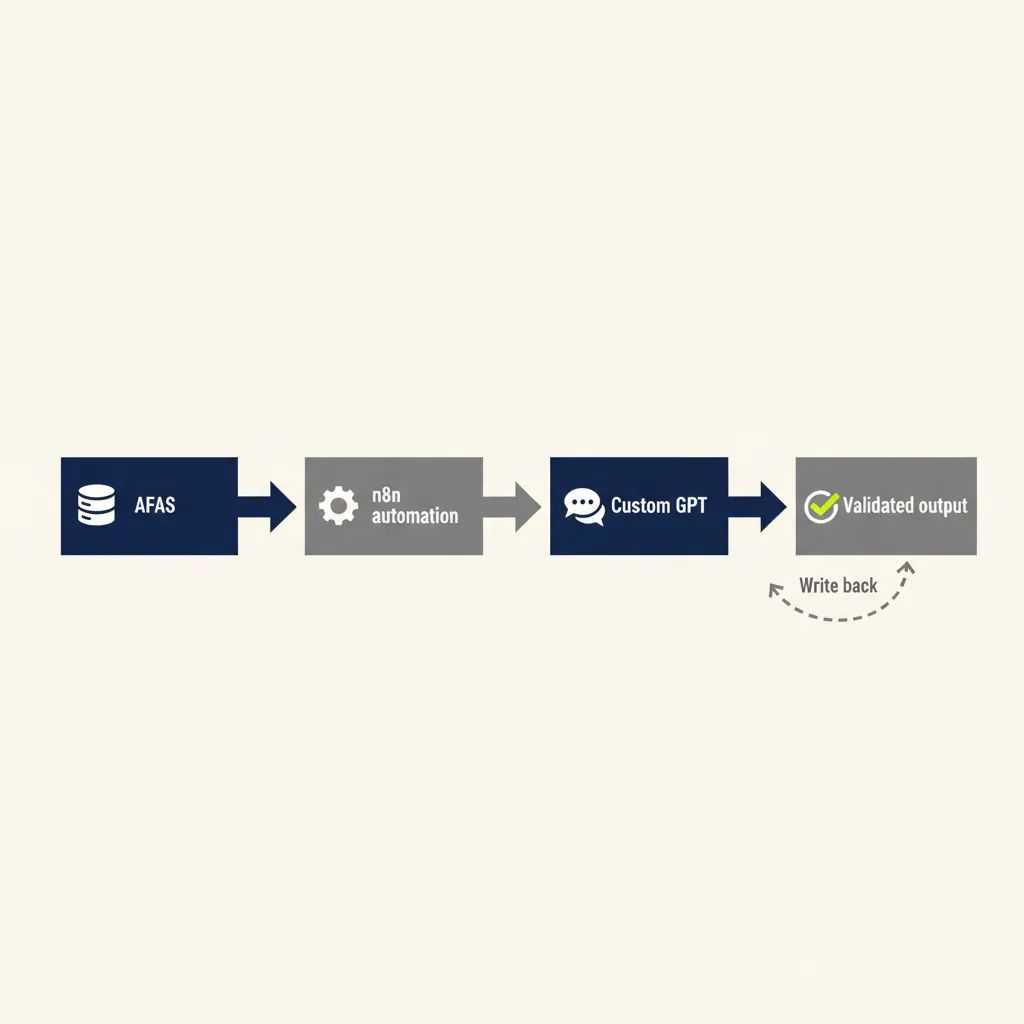
A custom GPT inside ChatGPT doesn't have direct API access to your business tools. It can read and write text, but it can't pull data from AFAS or push invoices to Exact Online on its own. To connect a custom GPT to your bookkeeping or CRM system, you need an automation platform like Make or n8n that sits between the GPT and your tools.
Step 1: define which data you need from your bookkeeping system
Before you build anything, write down exactly what data the GPT needs to do its job. For example, if you're building a quote assistant, the GPT needs your product catalog, pricing tiers, and customer discount rules. If you're building an invoice checker, the GPT needs your approval matrix and ledger codes.
Most Dutch SMEs store this data in AFAS, Exact Online, Moneybird, or Snelstart. The first step is to export a sample dataset and check whether the structure is clean. If your product catalog has inconsistent naming or your ledger codes are missing descriptions, fix that first. A custom GPT can't fix messy data; it will just amplify the mess.
Step 2: build the connection with Make or n8n
Once you know what data you need, you build a workflow in Make or n8n that fetches the data from your bookkeeping system, sends it to the custom GPT via the OpenAI API, and writes the GPT's output back to your system. For example, a quote workflow might look like this: a customer fills out a form on your website, Make pulls the product details from Exact Online, sends them to the custom GPT with your quote template, and the GPT generates a PDF that Make emails to the customer.
In our business automation work, we build these workflows end-to-end for Dutch SMEs. The technical setup usually takes two to four days, but the real work is defining the business rules and testing the output. Most projects go live within two weeks.
Step 3: train the custom GPT on your business rules
After the workflow is connected, you train the custom GPT by uploading your business documents and writing a detailed system prompt. The system prompt is the instruction manual the GPT follows every time it runs. For a quote assistant, the system prompt might say: "Always include VAT at 21%. Always list materials separately from labor. Always close with payment terms of 30 days. If the customer is a repeat client, apply a 5% discount."
You also upload example quotes, pricing tables, and any other documents the GPT should reference. The more specific your instructions, the better the output. Generic instructions like "write a professional quote" produce generic results. Specific instructions like "use the tone from the uploaded examples and always include the project timeline" produce consistent results.
GDPR checklist: what you can and cannot send through ChatGPT
Under GDPR (known as AVG in the Netherlands), you need a data processing agreement with any vendor that processes personal data on your behalf. OpenAI offers a DPA for ChatGPT Team and Enterprise plans, but not for the free or Plus plans. That means if you're using a custom GPT on the free or Plus plan, you should not send personal data like customer names, email addresses, or phone numbers through it.
For Dutch SMEs, the safe approach is to anonymize or tokenize personal data before it reaches the GPT. For example, instead of sending "Quote for Jan de Vries, jan@example.com", you send "Quote for customer ID 12345". The automation platform (Make or n8n) stores the mapping between the ID and the real customer data, and the GPT never sees the personal information.
If you need to process personal data through a custom GPT, upgrade to ChatGPT Team or Enterprise and sign the DPA. That gives you the legal cover you need under GDPR. For more on compliance, the Dutch Data Protection Authority publishes guidance on AI and data processing.
What this means for you: if your custom GPT needs to connect to AFAS, Exact, or Moneybird, plan for a two-step setup: first build the automation workflow, then train the GPT. And if you're processing customer data, check your ChatGPT plan and make sure you have a DPA in place.
What most businesses get wrong with custom GPTs (and how we approach it)
The most common mistake we see is treating a custom GPT like a magic box: teams expect it to understand their business without clear instructions, and they skip the step of documenting the process. The result is a GPT that generates plausible-sounding text that doesn't match how the business actually works. Here are three mistakes we see repeatedly, and how we fix them in the projects we deliver for Dutch SMBs.
First mistake: instructions that are too generic. A system prompt that says "write professional quotes" doesn't tell the GPT anything useful. It doesn't know your pricing structure, your tone of voice, or your approval rules. The GPT will generate quotes that look professional but don't follow your business logic. The fix is to write a detailed system prompt that includes every decision rule the GPT needs to follow. If you can't write it down, the GPT can't do it.
Second mistake: no validation of output. Teams build a custom GPT, use it a few times, and assume the output is always correct. But GPT models sometimes hallucinate details or misinterpret instructions. The fix is to always keep a human in the loop. The GPT generates a draft, a team member reviews it, and only then does it go to the customer. We build this review step into every workflow we deliver.
Third mistake: automating the wrong process. Some processes are too messy to automate until you clean them up first. For example, if your approval rules for expenses are "it depends who asks", a custom GPT can't help because there's no consistent rule to follow. The fix is to document the process first, agree on the rules, and then automate. In our AI consultancy work, we help Dutch SMEs figure out which processes are ready to automate and which ones need to be cleaned up first.
What this means for you: don't expect a custom GPT to fix a broken process. Fix the process first, write down the rules, and then build the GPT around those rules. And always review the output before it reaches your customer.
A custom GPT is not a magic solution, but it's a powerful tool when you apply it to a clear, repeating process. Start small: pick one task that costs your team hours every week, write down the steps, and build a custom GPT that supports that process. If you want help figuring out which process will save you the most time, or if you need to connect a custom GPT to AFAS, Exact, or Moneybird, book a free consultation with us. We'll walk through your workflows, show you what's possible, and give you a concrete plan to get started.
For a related angle, see our post on Top 10 Workflow Automation Examples for Dutch SMEs.
Frequently asked questions
What does it cost to build a custom GPT for my business?
The custom GPT itself is free to create inside ChatGPT Plus (€20/month) or Team (€25/user/month). The cost comes from the time to document your process, write the system prompt, and connect it to your tools via Make or n8n if you need integrations. For a straightforward use case like quote generation, expect two to four days of setup work. We offer a free consultation to scope your specific needs and give you a concrete estimate.
Can I connect a custom GPT to my CRM or bookkeeping system?
Yes, but not directly. A custom GPT inside ChatGPT cannot call APIs on its own. You need an automation platform like Make or n8n to fetch data from your CRM or bookkeeping system (AFAS, Exact Online, Moneybird, HubSpot, Pipedrive), send it to the custom GPT via the OpenAI API, and write the GPT's output back to your system. We build these workflows end-to-end for Dutch SMEs, typically live within two to four weeks.
Is a custom GPT GDPR-compliant and can I send customer data through it?
It depends on your ChatGPT plan. OpenAI offers a data processing agreement (DPA) for ChatGPT Team and Enterprise, but not for the free or Plus plans. Under GDPR (AVG in the Netherlands), you need a DPA to process personal data. If you're on the free or Plus plan, anonymize customer data before sending it to the GPT. If you need to process names, emails, or phone numbers, upgrade to Team or Enterprise and sign the DPA.
What is the difference between a custom GPT and an AI Agent?
A custom GPT is a configured AI model that generates text based on your instructions and uploaded documents. It runs inside ChatGPT and requires a human to trigger it and review the output. An AI Agent is a more autonomous system that can execute multi-step workflows across multiple tools without human intervention. For example, a custom GPT drafts a quote when you ask it to; an AI Agent monitors your inbox, detects a quote request, drafts the quote, sends it to the customer, and logs it in your CRM automatically. If you need end-to-end automation, an AI Agent is the better fit.
Do I need ChatGPT Plus or Team to use a custom GPT?
Yes. Custom GPTs are only available on ChatGPT Plus (€20/month for one user), Team (€25/user/month for 2-149 users), or Enterprise (custom pricing for 150+ users). The free plan does not support custom GPTs. If you want your team to share the same custom GPT, you need the Team or Enterprise plan.
How long does it take to train a custom GPT on my business processes?
The training itself takes a few hours: you write the system prompt, upload your documents, and test the output. The real time investment is documenting your process and agreeing on the business rules the GPT should follow. For a straightforward use case like quote generation or customer replies, expect one to two days of process documentation plus half a day of GPT configuration. More complex workflows (multi-step approvals, integrations with multiple tools) can take one to two weeks. We help Dutch SMEs scope this upfront so you know exactly what to expect.
Curious what AI can do for your business?
We listen, think along, and quickly deliver something that works. No obligations, no pressure.