



Last updated: July 1, 2026
Build a custom GPT for your business: practical guide
You've heard that a custom GPT can save your team hours every week, but most articles only tell you what it costs or how the API works. This piece shows you what you really need to build a custom GPT that fits how your business runs, from knowledge base to go-live. A custom GPT is an AI assistant trained on your company knowledge, using your tone of voice and following your workflows. For Dutch SMEs running systems like AFAS or Exact Online, we build these end-to-end: first workflow live in 2 to 4 weeks, GDPR-compliant. The difference between a generic chatbot and a custom GPT is that the latter knows your products, your pricing, and your internal processes. It can draft quotes in your house style, answer customer questions using your FAQ, or guide new employees through onboarding documents without you typing the same instructions twice.
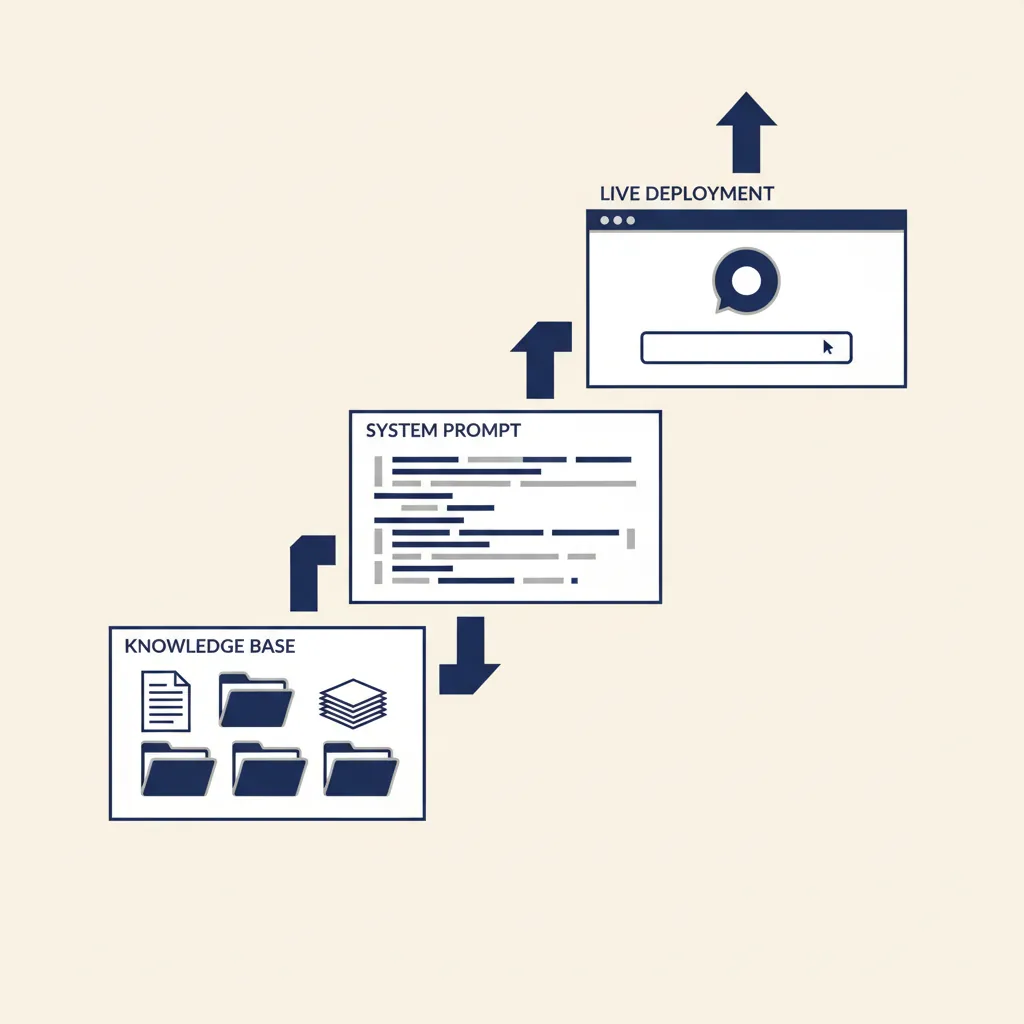
What is a custom GPT and when does your business need one?
A custom GPT is a GPT model configured with your business data, instructions, and tone of voice. Unlike the standard ChatGPT interface, a custom GPT has access to your knowledge base: product catalogs, pricing sheets, support FAQs, onboarding guides, or project templates. When a user asks a question, the model retrieves the relevant documents and generates an answer that matches your company's style and rules.
Common use cases for Dutch SMEs include:
- Drafting quotes and proposals based on customer input and your pricing logic
- Answering customer support questions 24/7 using your help documentation
- Onboarding new employees by surfacing internal procedures and policies
- Summarizing meeting notes or project briefs into action lists
In the projects we deliver for Dutch SMBs, the pattern we see is that the bottleneck is rarely the AI model itself. It's the quality of the source material. If your knowledge base is a mess of outdated PDFs and contradictory spreadsheets, the custom GPT will reflect that. Clean your documents first, then build the assistant.
Custom GPT versus standard ChatGPT
Standard ChatGPT is a general-purpose assistant. It knows a lot about the world, but nothing about your business. A custom GPT is configured with your specific data and rules. You control what it can access, how it responds, and who can use it.
For example, a standard ChatGPT session might generate a generic quote template. A custom GPT connected to your pricing database can pull the correct product codes, apply your discount rules, and format the output in your house style, all in one step.
When a custom GPT is NOT the right choice
A custom GPT is not the answer if your process involves multiple tools and approval steps. If you need an assistant that can create a quote in your CRM, email it to the customer, and log the interaction in your support system, you need an AI agent or workflow automation, not a standalone custom GPT. We cover that in our AI agents work.
Also skip the custom GPT if your knowledge base is under 20 pages and rarely changes. A simple FAQ page or a shared document might serve you better. Custom GPTs shine when you have hundreds of documents, frequent updates, or multiple teams needing the same information in different formats.
What this means for you: a custom GPT is a knowledge-retrieval tool, not a workflow engine. If your bottleneck is finding the right answer in a pile of documents, build a custom GPT. If your bottleneck is moving data between systems, automate the workflow instead.
How to build a custom GPT: from knowledge base to deployment
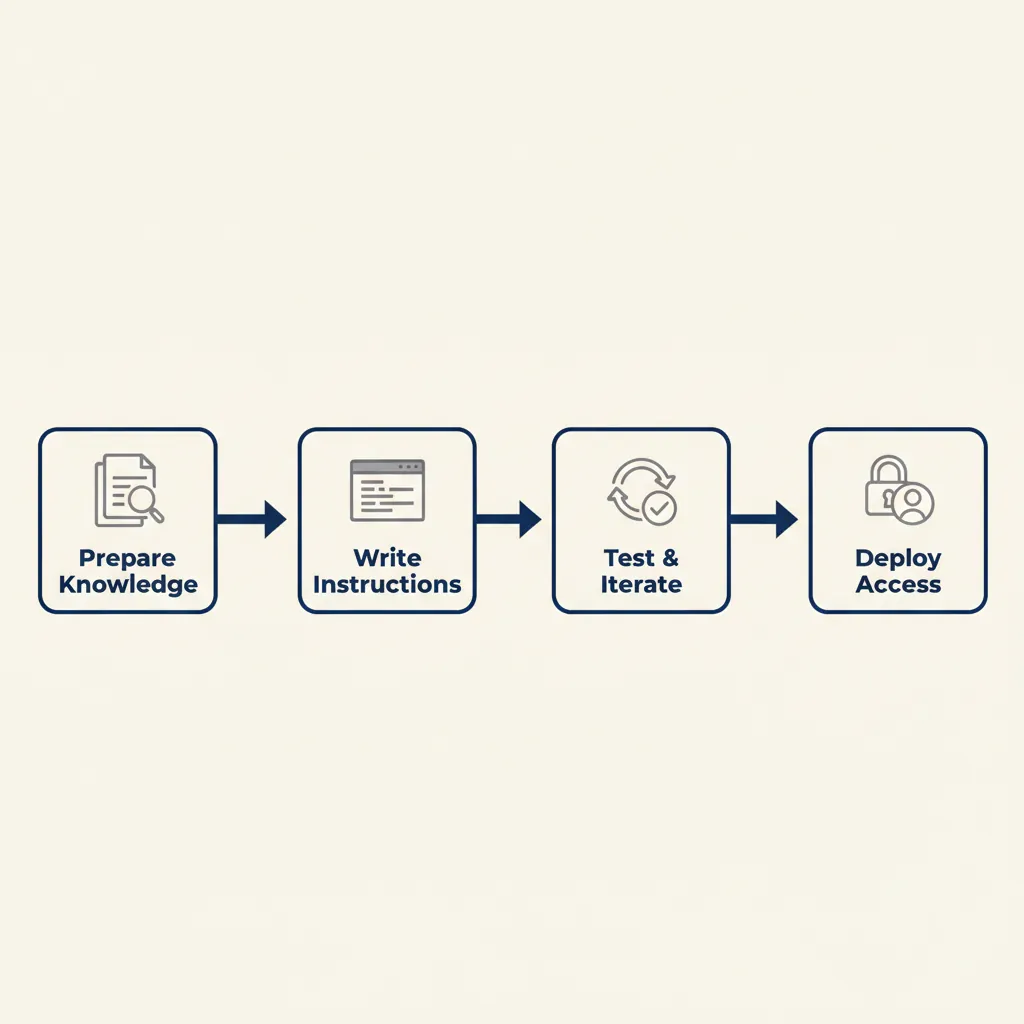
Building a custom GPT involves four steps: preparing your knowledge base, writing prompts and instructions, testing the output, and deploying access for your team or customers. Each step has specific technical requirements and common mistakes to avoid.
Step 1: Prepare your knowledge base (documents, FAQ, tone of voice)
Start by collecting every document the assistant should reference: product sheets, pricing tables, support FAQs, internal procedures, email templates. Export them as clean text, markdown, or PDF. Remove outdated versions, merge duplicates, and fix formatting errors. The model can only retrieve what you give it, so incomplete or messy documents produce incomplete or messy answers.
For Dutch SMBs running Exact Online or Moneybird, we often pull data exports directly from the accounting system: product catalogs, customer lists, invoice templates. This keeps the knowledge base in sync with your live data without manual updates.
Also define your tone of voice in writing. Do you address customers formally or casually? Do you use technical jargon or plain language? Write a one-page style guide and include it in the knowledge base. The model will follow it consistently, which human agents sometimes don't.
Step 2: Write prompts and instructions
The system prompt is the instruction set that tells the model how to behave. It should specify:
- What role the assistant plays (e.g. "You are a customer support agent for a Dutch e-commerce company")
- What sources it can reference (e.g. "Only use information from the uploaded knowledge base; do not make up product details")
- How to handle missing information (e.g. "If you cannot find the answer, say 'I don't have that information' and suggest contacting support")
- Output format (e.g. "Format quotes as a table with product name, quantity, unit price, and total")
Test the prompt with edge cases: what happens if a user asks about a product you don't sell, or requests a discount you don't offer? The prompt should guide the model to a safe fallback, not improvise an answer.
Step 3: Test and iterate
Run at least 20 test queries before you go live. Include common questions, tricky edge cases, and deliberately vague inputs. Check that the model retrieves the correct documents, applies your rules, and formats the output as expected. If it hallucinates details or ignores your tone of voice, revise the system prompt and re-test.
For customer-facing assistants, test with real customer language. People don't type "What is your return policy?" They type "can i send this back if it doesnt fit". Your test queries should match that reality.
Step 4: Deployment and access control
Once testing is done, deploy the custom GPT to your team or customers. OpenAI offers three deployment options: ChatGPT Plus (individual access), ChatGPT Team (shared team access with admin controls), and ChatGPT Enterprise (custom deployment with data residency and SLA). For Dutch SMEs, Team is usually the right tier: $20 to $25 per user per month, with shared workspaces and basic governance.
If you need the assistant hosted on Dutch servers for GDPR compliance, IntraGPT offers a private-hosted alternative with ISO 27001 certification and integration with Dutch business systems. We cover the compliance angle in the next section.
What this means for you: deployment is not a one-time event. Plan to update the knowledge base monthly, review the model's answers weekly, and adjust the system prompt as your business changes.
Running into this at your own business? We'll spend 30 minutes with you for free, no sales pitch. Book a free intro call
GDPR, data processing, and compliance: what you need to arrange
When you feed customer data or personal information into a custom GPT, GDPR (known as AVG in the Netherlands) applies. You are the data controller, and the platform hosting the model (OpenAI, IntraGPT, or another provider) is the data processor. That means you need a data processing agreement (DPA) in place before you go live.
OpenAI provides a standard DPA for ChatGPT Team and Enterprise customers. It covers the basics: data retention, sub-processors, breach notification. For most Dutch SMEs, that DPA is sufficient if you're not processing special categories of personal data (health, biometric, or criminal records). If you are, you need a Data Protection Impact Assessment (DPIA) before deployment, and you may need to notify the Dutch DPA (Autoriteit Persoonsgegevens).
Under NIS2, which took effect for Dutch SMBs in late 2024, many businesses now have to document their access controls and incident response procedures. If your custom GPT handles customer data, include it in your NIS2 documentation: who has access, where the data is stored, and what happens if the system is breached.
Data processing agreement and DPIA
A DPA is a contract that specifies how the processor handles your data. It must cover: purpose of processing, data retention period, sub-processors, and breach notification timelines. OpenAI's standard DPA is available in their legal documentation. Read it before you sign up.
A DPIA is required when processing presents a high risk to individuals' rights. Examples: processing health data, automated decision-making that affects legal rights, or large-scale monitoring. If your custom GPT only answers product questions using a public FAQ, you don't need a DPIA. If it generates medical advice or credit decisions, you do.
Dutch hosting and data sovereignty
If your contract with customers or your internal policy requires data to stay in the Netherlands, OpenAI's standard service won't meet that requirement. OpenAI processes data in the US and EU, but does not offer per-country data residency for Team or Plus plans. Enterprise customers can request regional processing, but that requires a minimum of 150 users.
For smaller Dutch SMEs, IntraGPT offers an alternative: AI models hosted on Dutch servers, with ISO 27001 certification and integration with AFAS, Exact Online, and other Dutch business systems. The trade-off is cost: private hosting is more expensive than OpenAI's shared infrastructure. We help clients evaluate that trade-off in our AI consultancy work.
What this means for you: GDPR compliance is not optional. If you skip the DPA or ignore the DPIA requirement, you're exposed to fines and liability. Budget time for legal review before you deploy.
What most agencies get wrong with custom GPT projects
In the projects we deliver for Dutch SMBs, we see the same mistakes repeated. The most common: expecting the model to compensate for a messy knowledge base. If your source documents are outdated, contradictory, or incomplete, the custom GPT will surface those problems, not fix them. Clean your knowledge base first.
Second mistake: leaving tone of voice to improvisation. Some teams assume the model will "just know" how to sound professional or friendly. It won't. Tone of voice must be explicit in the system prompt. Write down your style rules, include examples, and test that the model follows them consistently.
Third mistake: no test plan before go-live. Teams deploy the assistant to customers without running edge-case tests. Then a customer asks a tricky question, the model hallucinates an answer, and trust is lost. Test with at least 20 real-world queries, including vague inputs and questions the model can't answer. Document what happens in each case.
Fourth mistake: treating deployment as the finish line. A custom GPT is not a static tool. Your products change, your pricing changes, your procedures change. If you don't update the knowledge base monthly, the assistant becomes outdated and users stop trusting it. Plan for ongoing maintenance from day one.
What this means for you: the technical part of building a custom GPT is straightforward. The hard part is the organizational work: cleaning documents, writing clear instructions, and committing to regular updates. If you can't do that work, the custom GPT won't deliver value.
Connecting a custom GPT to AFAS, Exact Online, or other business software
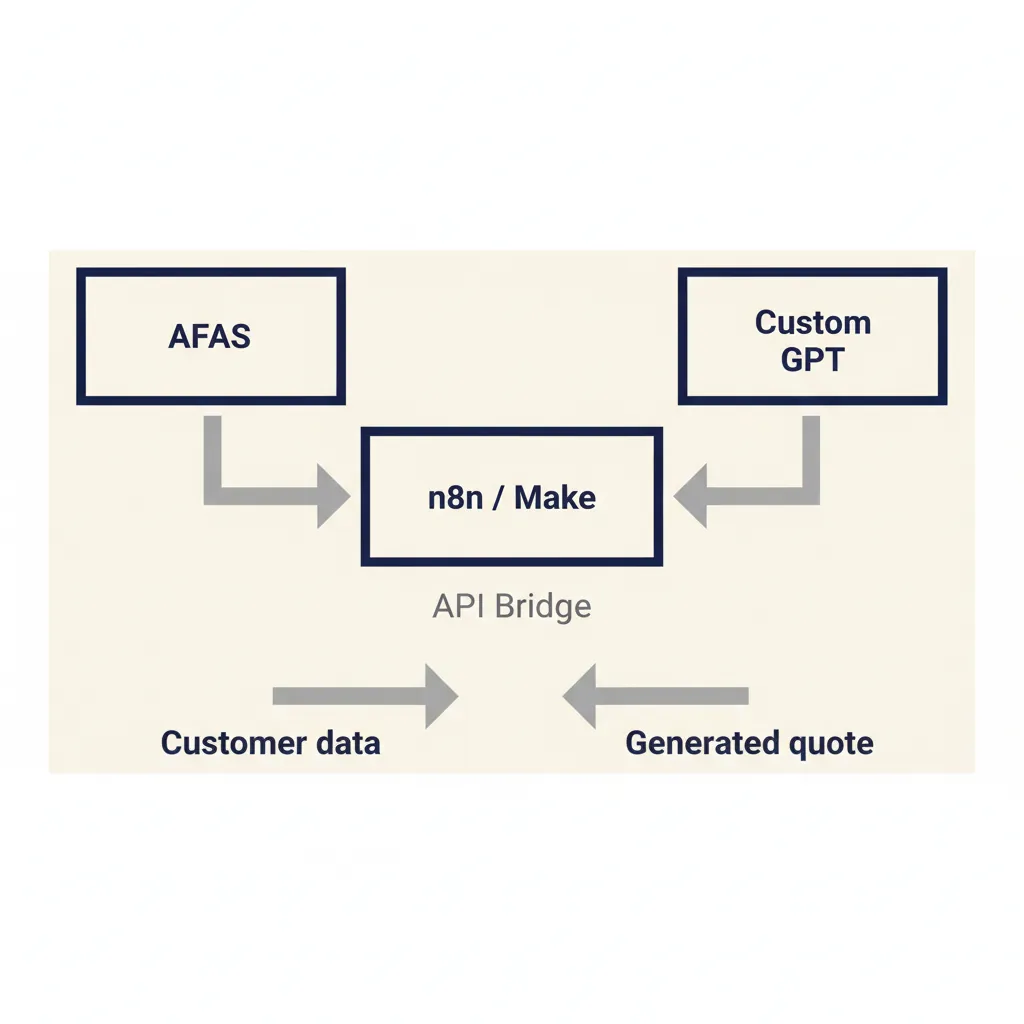
A custom GPT on its own can only retrieve information from the documents you upload. To pull live data from AFAS, Exact Online, or Moneybird, you need an API integration. That means building a middleware layer that fetches data from your business system, formats it for the model, and sends the response back.
Concrete example: a Dutch SME wants the custom GPT to generate quotes based on customer data in AFAS. The workflow is: user asks for a quote, the custom GPT calls an API endpoint, the endpoint queries AFAS for the customer's pricing tier and product catalog, the endpoint formats the data and sends it back to the model, the model generates the quote in the correct format. That middleware layer is typically built with n8n, Make, or a custom API.
We build these integrations end-to-end in our business automation work. For Dutch SMEs on Exact Online, the most common pattern is: custom GPT for customer-facing questions, n8n workflow for backend data retrieval, and a webhook to trigger the workflow when the model needs live data. The customer sees a seamless assistant; behind the scenes, three systems are talking to each other.
Why not connect the custom GPT directly to AFAS or Exact? Because most business systems don't expose a read-only API that's safe for an AI model to query. You need a controlled interface that validates inputs, enforces access rules, and logs every request. That's what the middleware layer does.
What this means for you: a custom GPT that pulls live data from your business systems is more powerful than a static document assistant, but it requires integration work. Budget for that work upfront, and plan for ongoing maintenance as your API endpoints or data schemas change.
A custom GPT that actually works starts not with the technology, but with cleaning your knowledge base and documenting your processes. If you want to know whether a custom GPT fits your business, or need help with GDPR checks and deployment, get in touch for a no-obligation consultation.
For a related angle, see our post on Custom GPT vs ChatGPT: Which Fits Your Workflow?.
Frequently asked questions
What does it cost to build a custom GPT for my business?
Cost depends on the scope: knowledge base size, integration complexity, and deployment tier. ChatGPT Team starts at $20 to $25 per user per month for shared access. Custom builds with API integration to your business systems require development work. Contact us for a no-obligation consultation and tailored quote.
Do I need a ChatGPT Team or Enterprise subscription?
ChatGPT Plus ($20/month) works for individual use with basic file uploads. ChatGPT Team ($20 to $25/user/month) adds shared workspaces and admin controls, suitable for most Dutch SMEs. Enterprise (custom pricing, minimum 150 users) offers data residency and SLA, required only if you have strict compliance or scale needs.
Can I put customer data into a custom GPT under GDPR?
Yes, if you have a data processing agreement with your provider and conduct a DPIA when required. OpenAI provides a standard DPA for Team and Enterprise customers. If your contract or policy requires data to stay in the Netherlands, consider a Dutch-hosted alternative like IntraGPT.
Can I connect a custom GPT to AFAS or Exact Online?
Yes, but not directly. You need a middleware API that fetches data from your business system, validates inputs, and sends formatted responses to the model. We build these integrations with n8n or custom APIs in our business automation work.
How long does it take to get a custom GPT live?
For a basic document-based assistant with no external integrations, 1 to 2 weeks from knowledge base prep to deployment. For integrations with AFAS, Exact Online, or other business systems, 3 to 4 weeks including API development and testing.
What is the difference between a custom GPT and an AI agent?
A custom GPT retrieves information and generates text based on your knowledge base. An AI agent can execute multi-step tasks across multiple tools: create a quote in your CRM, email it to the customer, and log the interaction in your support system. If your workflow involves more than one system, you need an AI agent, not a standalone custom GPT.
Sources
Curious what AI can do for your business?
We listen, think along, and quickly deliver something that works. No obligations, no pressure.