



Last updated: May 9, 2026
AI Quick Wins for SMBs: 5 Automations That Pay Back in Weeks
You've heard AI can save time, but most advice is either too vague or too enterprise-scale for a team of 15. Here are five concrete automations Dutch SMEs are running right now, each saving 4 to 15 hours per week, with payback in weeks, not months. These AI quick wins focus on process automation, customer-service chatbots, and workflows that connect the tools you already use. No six-month projects, no consultant-speak, just tasks your team can stop doing manually.
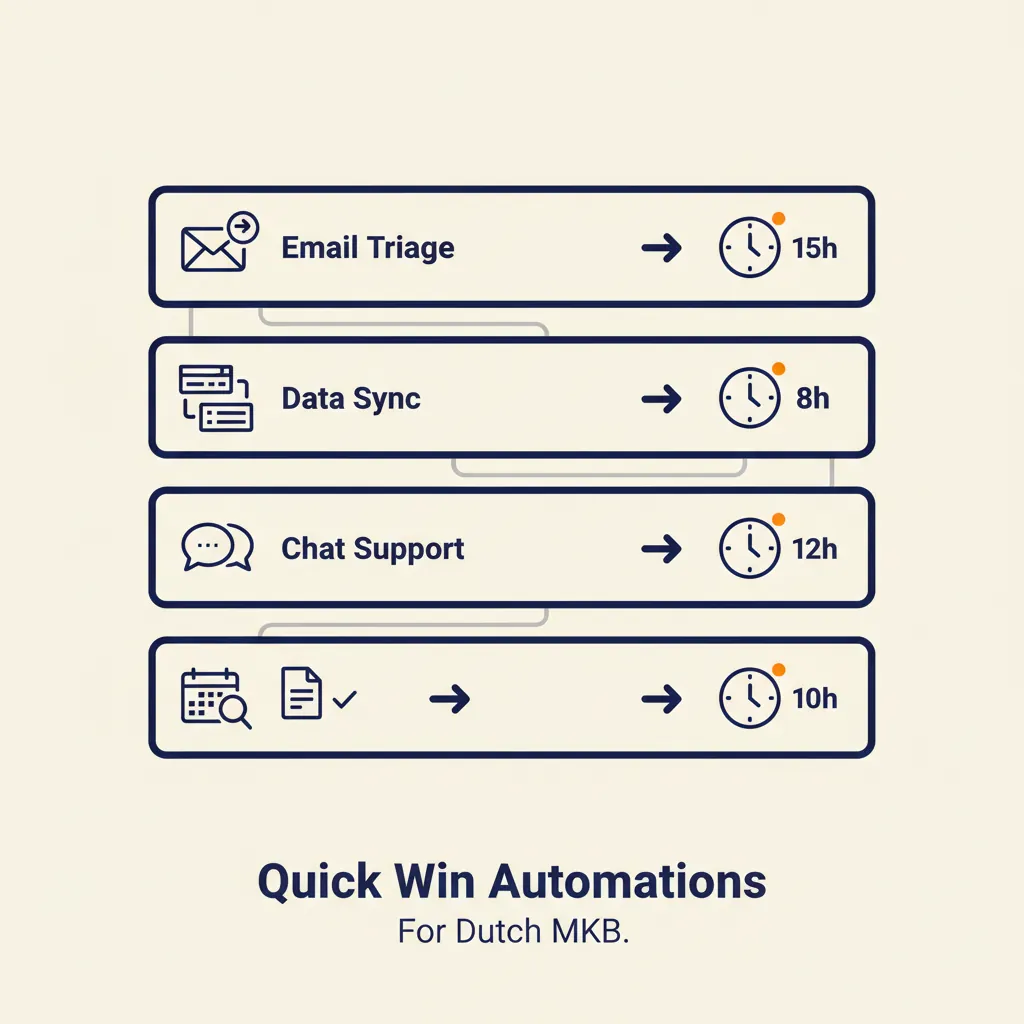
Why Dutch SMEs Are Picking AI Quick Wins Over Big Projects
Most Dutch SME owners don't have six months or a full-time developer to wait for an AI strategy. You need results this quarter, ideally this month. The current generation of tools like n8n, Make, and the latest GPT models finally makes that possible. You can automate one repetitive process, measure the hours saved, and decide whether to do another one — the same step-by-step logic behind automation for SMEs. No all-or-nothing commitment.
The pattern we see: companies that start small (one inbox, one data-sync, one customer-service flow) get ROI in four to eight weeks and build confidence. Companies that wait for a perfect enterprise AI roadmap are still waiting a year later. Pick one task that wastes four hours of your team's week, automate it, and move on. That's the quick-win approach, and it works because you can prove value before you scale. We design and build these workflows end-to-end through our business automation service — first workflow live in 2 to 4 weeks.
| Quick win | Tools | Savings | Payback |
|---|---|---|---|
| Inbox triage & draft replies | n8n or Make + GPT model | ~6 hours per week | 1 week |
| CRM ↔ accounting sync | n8n/Make + AFAS, Exact Online or Moneybird API | ~3 hours per week + fewer errors | 2 to 6 weeks |
| AI customer service (WhatsApp/web chat) | Custom GPT + WhatsApp Business + Mollie | 50-70% of first-line support | 2 to 4 weeks |
| Social-media posting from project photos | n8n/Make + GPT vision + LinkedIn/Instagram/Facebook APIs | 60-90 minutes per month | Instant |
| Lead scoring & follow-up | CRM (Pipedrive/HubSpot) + GPT + email tool | ~3 hours per week | 1 to 2 weeks |
Quick Win 1: Inbox Zero Automation (Email Triage and Routing)
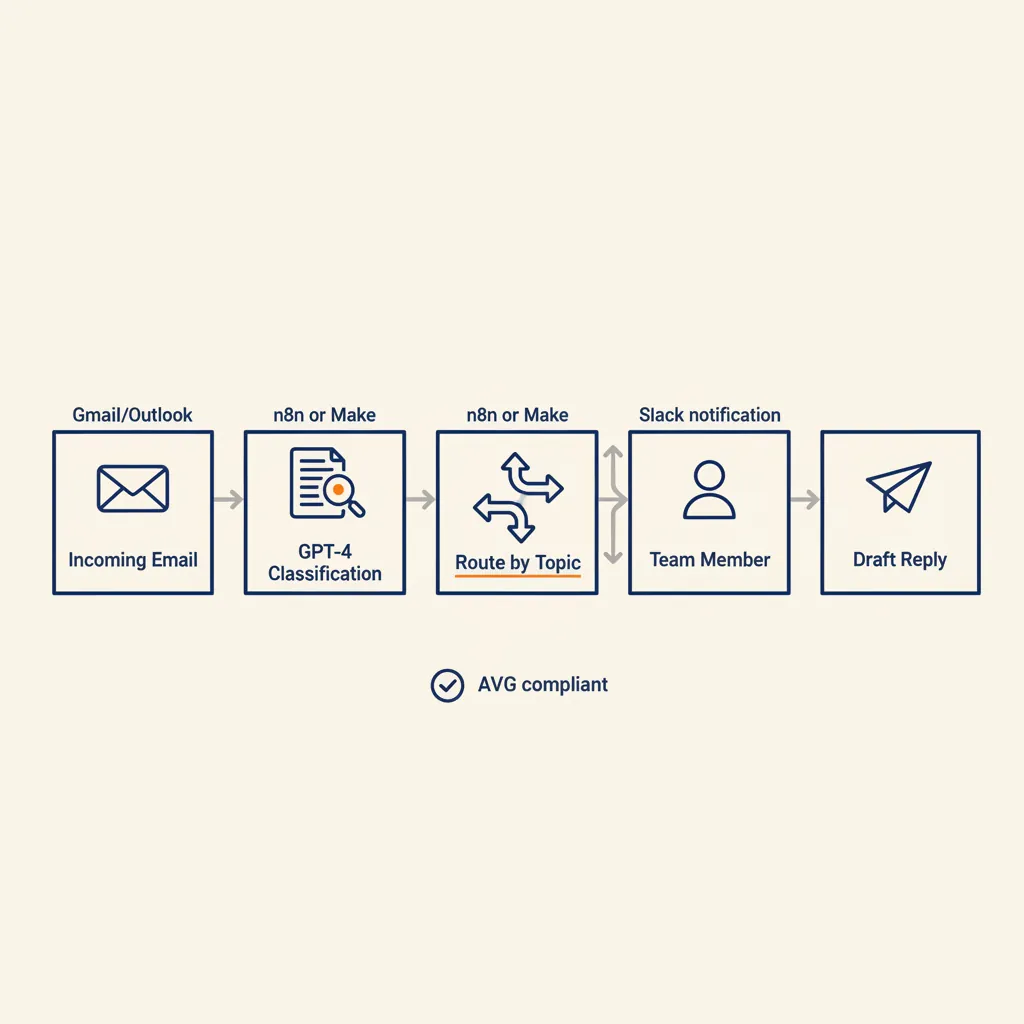
Your customer-service inbox gets 50 emails a day. Half are simple (order status, opening hours, invoice requests), a quarter need a human decision, and the rest sit unread because no one has time to sort them. An AI agent can read every incoming email, tag it by urgency and topic, route it to the right team member, and draft a reply for the simple ones. You review the draft, click send, done.
How the Workflow Works
Here's the typical setup we build for Dutch SMEs:
- Gmail or Outlook forwards new emails to n8n or Make every five minutes.
- A GPT model reads the subject and body, classifies the email (order question, complaint, sales inquiry, spam), and assigns an urgency score.
- The workflow routes high-urgency emails to Slack or Microsoft Teams with a notification. Low-urgency emails get a draft reply generated by the same prompt, saved in your CRM or sent back to your inbox for one-click approval.
- Simple questions ("What are your opening hours?", "Where is my order?") get an instant auto-reply if you enable that step.
Under GDPR (known as AVG in the Netherlands), the AI reads email metadata and message content but doesn't store personal data outside your existing mail server. The workflow logs which emails were processed and when, so your audit trail stays intact. If you're syncing to a CRM like Pipedrive or Teamleader, make sure your processor agreement covers the AI step.
What It Saves (and What It Costs)
A team spending 10 hours per week sorting and answering routine emails can cut that to 3 hours. That's 7 hours saved, or roughly €300 per week at typical Dutch SME hourly rates. The workflow itself costs you the n8n or Make subscription (€10 to €30 per month for this volume) plus GPT API calls (around €5 to €15 per month for 1,000 emails). Payback in two to three weeks. Our business automation work often starts here because the ROI is immediate and the process is easy to document.
Quick Win 2: Automated Data Entry Between Dutch Accounting Tools
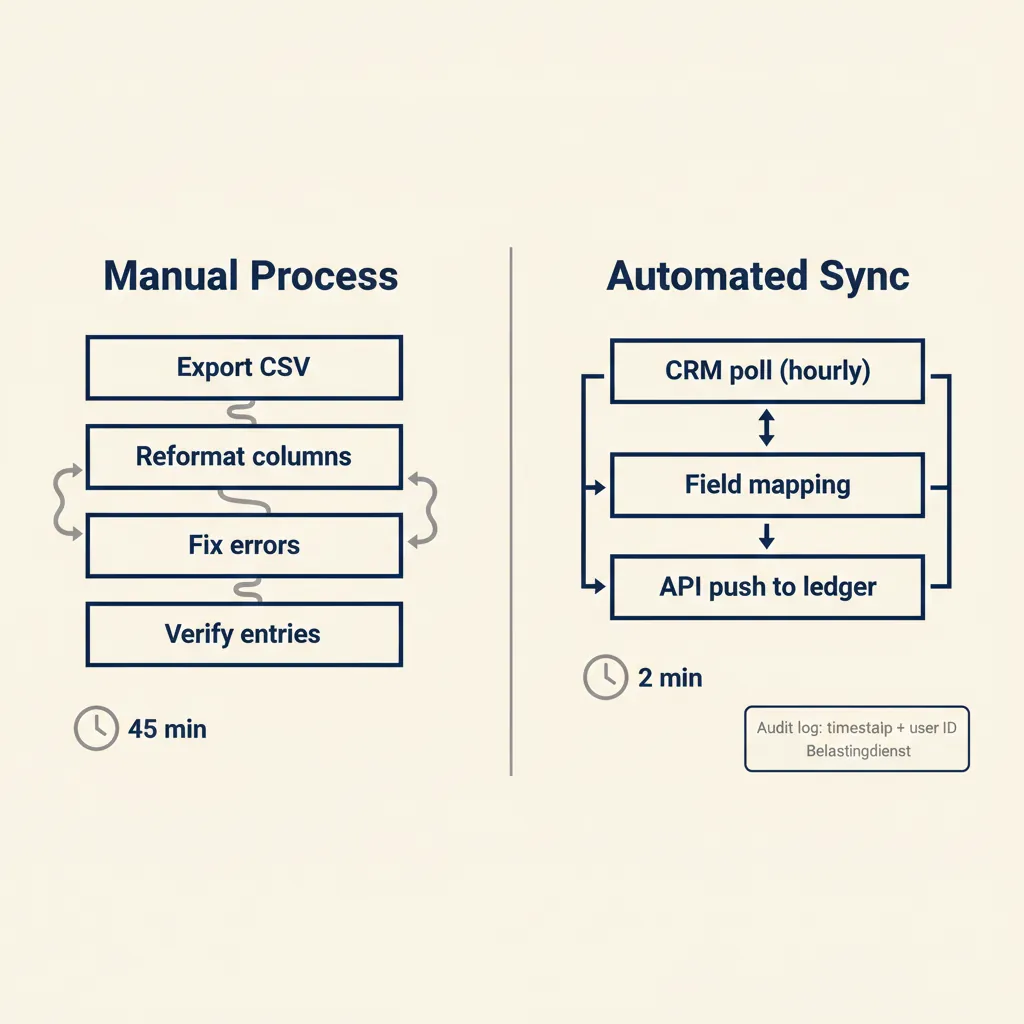
You close a deal in Pipedrive or Teamleader, then someone exports a CSV, reformats the columns, imports it into AFAS or Exact Online, fixes the errors, and repeats the process every Friday. It takes 90 minutes and introduces mistakes every third time. An automated sync does the same job in seconds, with no manual reformatting.
Common Tool Pairs We See
For Dutch SMEs, the most frequent integrations are:
- Pipedrive or Teamleader (CRM) to Exact Online or AFAS (accounting): sync won deals as invoices, push payment status back to the CRM.
- WooCommerce or Shopify (webshop) to Moneybird or Snelstart: create invoices automatically when an order is paid via Mollie or iDEAL.
- Simplicate or Gripp (project management) to Exact Online: sync logged hours and expenses for client invoicing.
The workflow polls the CRM or webshop API every hour (or gets a webhook when something changes), maps the fields (customer name, amount, VAT rate, product codes), and pushes a new record to the accounting API. If a field is missing or doesn't match, the workflow sends a Slack alert instead of creating a broken entry.
Compliance: What the Belastingdienst Expects
The Dutch tax authority requires your digital administration to show who approved what and when. When you automate data entry, log every sync with a timestamp, the user who triggered it (or "system" if it's automatic), and the source record ID. Store those logs in your accounting tool's notes field or in a separate audit table. Most modern APIs (Exact Online, AFAS, Moneybird) support adding metadata to each transaction, so this is straightforward to implement. If you ever face an audit, you can prove the chain from CRM deal to invoice without manual screenshots.
This type of sync saves 60 to 90 minutes per week for a typical Dutch SME with 20 to 40 transactions. At €50 per hour, that's €200 to €300 per month. The automation itself costs €20 to €40 per month in tool subscriptions, so payback is two to four weeks.
Quick Win 3: AI Customer Service on WhatsApp or Web Chat
Your customers ask the same 15 questions over and over: order status, return policy, opening hours, product availability. A human answers them during business hours, and after 6 PM the questions pile up until tomorrow. A custom GPT trained on your FAQ, product catalog, and past support tickets can answer those questions 24/7, escalating to a human only when the question is complex or the customer is frustrated.
When to Use AI vs. When to Escalate
The decision tree we recommend:
- AI handles: order lookups ("Where is my package?"), policy questions ("Can I return after 30 days?"), simple product specs ("Does this come in blue?"), appointment booking if you have a calendar API.
- Escalate to human: complaints, refund requests, technical troubleshooting that needs back-and-forth, anything where the customer types "I want to speak to a person."
A hybrid setup (AI for volume, human for complexity) cuts first-line support costs by 50 to 70 percent while keeping a human fallback for the 20 percent of cases that need judgment or empathy. The bot doesn't replace your team, it filters out the repetitive work so your team can focus on the cases that actually need a human touch.
Integration with WhatsApp Business and Mollie
For Dutch SMEs, WhatsApp Business is often the preferred channel because your customers are already there. You can connect a custom GPT to the WhatsApp Business API (via n8n, Make, or a service like Twilio), so the bot responds in the same thread your team uses. If a customer asks "Can I pay now?", the bot can generate a Mollie payment link and send it directly in WhatsApp. Once the payment clears, the bot confirms the order and updates your CRM or accounting tool.
A chatbot handling 100 simple questions per week saves roughly 5 hours of support time. At €45 per hour, that's €225 per week, or €900 per month. The cost is typically €50 to €150 per month (WhatsApp API fees, GPT API calls, n8n or Make subscription), so payback is two to six weeks. Our custom GPT work for SME support teams usually starts with a two-week pilot: we train the bot on your top 20 FAQ answers, connect it to one channel, and measure deflection rate before scaling.
Running into this at your own business? We'll spend 30 minutes with you for free, no sales pitch. Book a free intro call
Quick Win 4: Social Media Posting from Project Photos
You finish a project, take photos on site, and someone on your team is supposed to post them to LinkedIn, Instagram, and Facebook with a caption. It takes 20 minutes per project, and half the time it doesn't happen because everyone is busy. An AI agent can watch a shared folder (Google Drive, Dropbox), pick the best photo, write a caption in your brand voice, and schedule the post across all three platforms.
The workflow: when a new photo lands in the "Finished Projects" folder, n8n or Make triggers. A GPT vision model reads the image, generates a short caption ("Just wrapped up a new office fit-out in Rotterdam, check out the custom lighting"), and posts it via the LinkedIn, Instagram, and Facebook APIs. You can set it to auto-post or send you a Slack preview first. Either way, your social media stays active without manual effort.
This saves 60 to 90 minutes per month for a company finishing three to five projects. Not a huge number, but it's the difference between posting consistently and posting never. The cost is minimal (the APIs are free for basic posting, you're just paying for n8n or Make), and the workflow takes an hour to set up. Payback is instant if posting was already on your to-do list and not happening.
Quick Win 5: Lead Scoring and Follow-Up Automation
You get 30 leads per week from your website form, LinkedIn, and trade shows. Some are ready to buy, some are tire-kickers, and you don't know which is which until someone calls them all. An AI agent can score each lead based on company size, industry, and the questions they asked, then route hot leads to your sales team immediately and nurture cold leads with an email sequence.
The workflow pulls new leads from your CRM or form tool (Typeform, HubSpot, Pipedrive), sends the lead data to a GPT model with a scoring prompt ("Score this lead 1 to 10 based on budget signals and urgency"), and tags the lead in your CRM. Leads scoring 7 or higher trigger a Slack notification to your sales team. Leads scoring 4 to 6 get added to a nurture sequence in your email tool (Mailchimp, ActiveCampaign). Leads below 4 get archived.
A sales team spending 5 hours per week calling unqualified leads can cut that to 2 hours by focusing only on the high-score group. That's 3 hours saved, or €150 to €200 per week. The workflow costs €10 to €20 per month in API calls and subscriptions, so payback is one to two weeks. The bigger win is closing deals faster because your team calls the hot leads the same day instead of three days later.
What Most Automation Agencies Get Wrong (and How to Avoid It)
The most common mistake we see: agencies sell you a Zapier premium plan or a Make enterprise subscription before they map your actual process. The result is a workflow that automates the wrong steps or breaks after two weeks because no one documented who approves what, which fields are required, or what happens when data is missing.
Our rule: write down the current process before you pick a tool. Draw it on one page: who does what, in what order, with which data, and what are the exceptions. If you can't fit it on one page, the process is too complex to automate without breaking it into smaller pieces first. Once you have the map, the tool choice is obvious, and the workflow takes a few hours to build instead of a few weeks of trial and error.
This is why our AI consultancy starts with a process audit, not a tool demo. We ask: what task wastes the most time? Who does it now? What data do they need? Where does that data live? What happens if it's wrong? Once we know that, we can tell you whether n8n, Make, a custom GPT, or a simple Zapier flow is the right fit. And we can estimate payback in weeks, not months, because we're automating a process you already understand.
If you're not sure where to start or want a second pair of eyes on the process, that's exactly what our consultancy is for. We help you pick the one task that will save the most time with the least complexity, build the workflow, and hand it over so your team can maintain it.
Frequently asked questions
How much does it cost to implement an AI quick win?
Most quick wins cost €10 to €50 per month in tool subscriptions (n8n, Make, GPT API) and pay back in two to eight weeks by saving 4 to 15 hours of manual work per week. Setup takes a few hours if the process is already documented.
Does AI automation comply with GDPR (AVG) and Dutch tax authority requirements?
Yes, if you log every automated action with a timestamp and user ID, and keep personal data inside your existing systems (email server, CRM, accounting tool). The AI reads data but doesn't store it outside your control. Make sure your processor agreement with the automation platform covers AI steps.
Can I maintain AI automation myself or do I need a developer?
Tools like n8n and Make are visual, so you can edit workflows without coding once they're built. We hand over documentation and train your team to tweak triggers, add steps, or fix errors. For complex changes (new API integrations, multi-step logic), you may want a consultant for an hour or two.
Which Dutch SMB tools integrate well with AI workflows?
AFAS, Exact Online, Moneybird, Snelstart, Pipedrive, Teamleader, Simplicate, Mollie, and WhatsApp Business all have APIs that work with n8n, Make, and Zapier. Most Dutch accounting and CRM tools are automation-friendly because they're built for the Dutch SME market.
How long before an AI quick win pays for itself?
Typical payback is two to eight weeks. Inbox automation and CRM-to-accounting syncs usually hit breakeven in two to four weeks because they save hours every single week. Chatbots and lead scoring take four to eight weeks because the time savings are more variable.
What happens if my AI tool makes a mistake in the bookkeeping?
Build a review step into the workflow: the AI creates a draft invoice or transaction, sends it to Slack or email for approval, and only pushes it to your accounting tool after a human clicks OK. For low-risk tasks (order confirmations, FAQ answers), you can auto-approve. For high-risk tasks (invoices, payments), always review first.
Sources
Curious what AI can do for your business?
We listen, think along, and quickly deliver something that works. No obligations, no pressure.