



Last updated: May 22, 2026
AI agent vs chatbot: the difference explained for SMBs
You've probably seen a chatbot that answers questions on a website. An AI agent goes further: it executes tasks, makes decisions, and works autonomously in your systems. The difference is autonomy and task execution. A chatbot follows a script and stops when you need action. An AI agent connects to your tools, processes data, and completes multi-step workflows without human intervention. For Dutch SMEs juggling AFAS, Exact Online, or Moneybird, that difference translates to hours saved every week. Here's what you need to know about chatbots versus AI agents and when each makes sense.
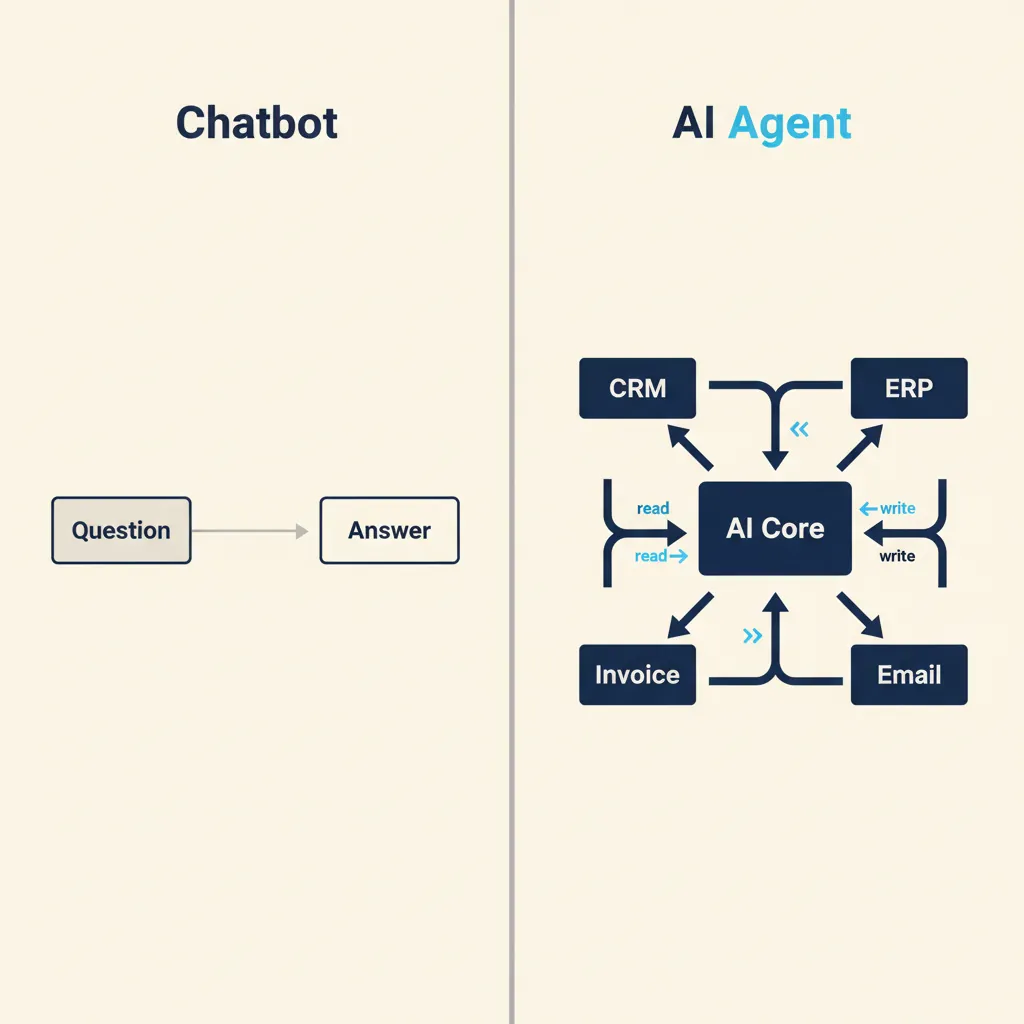
What is a chatbot and where do you hit a wall?
A chatbot follows a decision tree. You ask a question, it matches keywords, and it returns a pre-written answer. This works well for FAQs: "What are your opening hours?" or "Where is my order?" The bot retrieves the answer from a database or knowledge base and displays it. No reasoning, no context beyond the current question.
The limitation shows up the moment someone wants to do something. A customer asks, "Can I change my delivery address?" The chatbot can tell them how, but it can't log into your order system and update the record. An employee asks, "What's the status of invoice 2024-0347?" The bot can explain where to find invoices, but it can't open Exact Online, search the ledger, and return the payment date.
Chatbots are read-only. They surface information but don't write to systems, trigger workflows, or make decisions based on business rules. For simple customer support or internal FAQ lookups, that's often enough. For anything that involves multiple steps or system access, you hit the wall fast.
What is an AI agent and what can it do?
An AI agent understands intent, makes choices, and executes actions across your tools. It doesn't just answer "How do I process a return?" It logs into your webshop, finds the order, checks your return policy, creates a return label, updates inventory, and books the refund in your accounting system. All from a single customer request.
Under the hood, an AI agent combines a large language model with integrations to your business systems. The LLM interprets the request and decides what steps are needed. The integrations let the agent read and write data in tools like AFAS, Exact Online, Moneybird, your CRM, and your webshop. The agent follows rules you define: approval thresholds, which fields to update, when to escalate to a human.
How an AI agent makes decisions
An AI agent doesn't follow a fixed script. It reasons about the task. If a customer asks for a refund, the agent checks the order date, the product category, and your refund policy. If the request falls within the rules, it processes the refund. If not, it escalates to your support team with context: order details, customer history, and the reason for escalation. You configure the boundaries, the agent operates within them.
Integration with your existing tools
The value of an AI agent depends on what it can connect to. For Dutch SMEs, that typically means accounting software (Exact Online, Moneybird, Snelstart), ERP systems (AFAS, Unit4), CRM platforms (Pipedrive, HubSpot), and payment providers (Mollie, iDEAL). In our AI agent work, we build these integrations end-to-end so the agent can read customer records, write invoices, update project hours, and trigger approval workflows without manual data entry.
If your tools don't talk to each other today, an AI agent won't magically fix that. The integration work comes first. Once the connections exist, the agent automates the steps your team does manually every day.
Running into this at your own business? We'll spend 30 minutes with you for free, no sales pitch. Book a free intro call
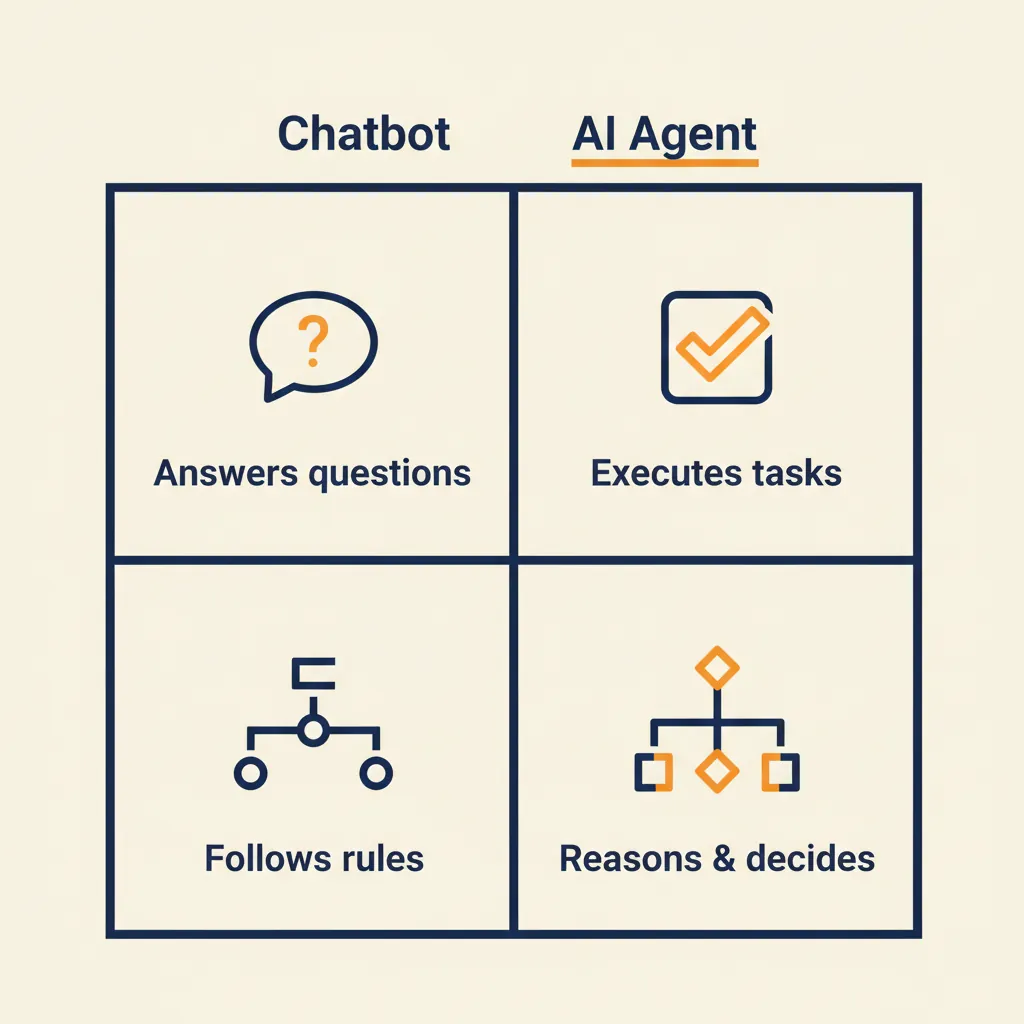
The four key differences between chatbots and AI agents
| Capability | Chatbot | AI agent |
|---|---|---|
| Task scope | Answers questions | Executes multi-step workflows |
| Decision-making | Follows fixed rules | Reasons based on context and business logic |
| System access | Read-only (retrieves data) | Read and write (updates records, triggers actions) |
| Integration | One channel (website, WhatsApp) | Multiple systems (CRM, ERP, accounting, webshop) |
Chatbots answer, AI agents act. A chatbot tells a customer how to submit a quote request. An AI agent reads the request, pulls product specs from your inventory system, calculates pricing based on volume rules, generates the quote in your CRM, and emails it to the customer. The customer gets an answer in minutes instead of waiting for your sales team to process it manually.
Chatbots follow scripts, AI agents reason. A chatbot matches keywords to responses. If the question doesn't fit the script, it says "I don't understand" or hands off to a human. An AI agent interprets intent even when the phrasing is new. It understands "I need last quarter's VAT breakdown" and "Show me Q4 tax data" as the same request, then fetches the report from your accounting system.
Chatbots read, AI agents write. A chatbot can look up an invoice status in Exact Online if you've built a read-only integration. An AI agent can create the invoice, send it to the customer, book the payment when it arrives, and update your cash-flow forecast. The difference is write access and the logic to use it correctly.
Chatbots live in one channel, AI agents work across tools. A chatbot handles customer questions on your website or in WhatsApp. An AI agent connects your webshop, your accounting system, your CRM, and your email. When an order comes in, the agent updates inventory, creates an invoice, logs the sale in your CRM, and triggers a follow-up sequence. One event, multiple systems, no manual steps.
When do you choose a chatbot and when an AI agent?
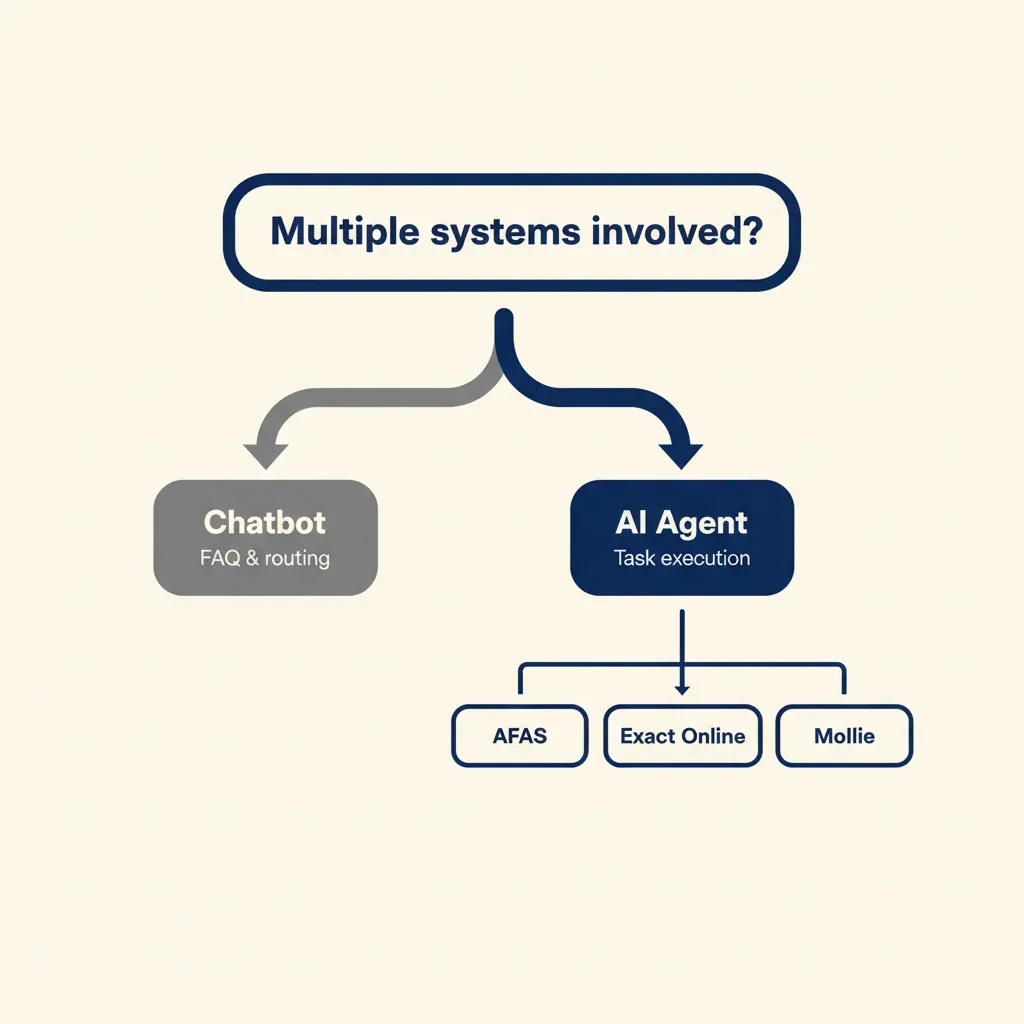
A chatbot is enough when you only need to answer questions or guide people to the right page. If your support team spends time on the same ten FAQs every day, a chatbot handles that. If your website visitors need help finding product specs or opening hours, a chatbot works. The return on investment is fast because the scope is narrow and the integration is simple.
An AI agent makes sense when you spend hours per week on repetitive tasks that touch multiple systems. Creating quotes from customer requests. Processing invoices and booking them in your accounting system. Following up on orders that haven't been paid. Updating project hours in your ERP and syncing them to your invoicing tool. These workflows involve reading data from one system, applying business rules, and writing results to another system. That's where an AI agent pays off.
Signals that a chatbot is enough
- Your support team answers the same questions repeatedly, and the answers don't change.
- You want to reduce email volume or phone calls for simple lookups (order status, opening hours, return policy).
- The information customers need is already documented; you just need to surface it faster.
- You don't need the bot to do anything, only to tell people where to go or what to expect.
Signals that you need an AI agent
- Your team spends hours every week copying data between systems (CRM to accounting, webshop to ERP, email to project tracker).
- You have processes that require multiple steps and system lookups: creating quotes, processing returns, approving invoices, onboarding customers.
- Errors happen because someone forgets a step or updates the wrong field.
- You want customers or employees to trigger actions (submit a quote request, file an expense, change a subscription) without waiting for someone to process it manually.
Start with the process, not the technology. Map out the steps your team does manually today. If those steps involve reading from one tool, applying a rule, and writing to another tool, an AI agent can automate it. If the steps are just "look up the answer and tell the customer," a chatbot is the simpler choice.
What most agencies miss when they build AI agents for SMEs
Most vendors start with the technology instead of the workflow. They demo an agent that integrates with ten tools, but they don't ask which manual steps you're doing today or why those steps exist. The result is an agent that can do a lot in theory but doesn't fit how your business actually runs.
The first question isn't "What can the agent do?" It's "What are you spending time on that shouldn't require a human?" Write that process down: who does what, in which tool, and what happens next. If you can't describe the workflow in plain language, the agent won't know what to automate. In our AI consultancy work, we spend the first session mapping the process before we touch any code.
The second mistake is trying to automate everything at once. You have five broken workflows, so you want an agent that fixes all five. That takes months, costs more than you budgeted, and introduces five points of failure. Start with one workflow. Pick the one that wastes the most time or causes the most errors. Build the agent for that process, test it, and let your team use it for a few weeks. Then add the next workflow. Small steps, fast feedback, measurable ROI.
The third gap is compliance and data ownership. For Dutch SMEs, that means GDPR (known in the Netherlands as AVG) and, since October 2024, NIS2 for many sectors. An AI agent processes customer data, writes to your accounting system, and stores conversation logs. Where does that data live? Who owns it? What happens if the vendor shuts down or changes terms? These questions need answers before you go live, not after. We build agents that store data in your infrastructure or in GDPR-compliant EU hosting, and you own the code and the integrations.
If an agency can't explain where your data goes and how you stay compliant, walk away. The technology is easy. The process design and compliance work is what separates a working agent from a liability.
A chatbot answers questions. An AI agent executes tasks. If your team spends hours on manual steps that span multiple systems, an AI agent is worth the investment. Start with one workflow, make sure your data and approval rules are documented, and build from there. The ROI shows up in weeks, not months, when you pick the right process and design the agent around how your business actually works.
For a related angle, see our post on AI Agents for SMBs: Cost, ROI, and Practical Use Cases.
Frequently asked questions
Can an AI agent understand and write in Dutch?
Yes. Modern AI models handle Dutch fluently, both for understanding customer requests and generating responses or documents. In practice, Dutch-language performance is strong for business communication (emails, quotes, invoices, support replies). The quality depends more on how you configure the agent's tone and business rules than on the language itself.
What does an AI agent cost compared to a chatbot?
A chatbot typically costs a few hundred euros per month for a hosted service or a one-time build fee of €2,000 to €5,000 for a custom setup. An AI agent involves more integration work and ongoing LLM costs, so expect €5,000 to €15,000 for the initial build and €200 to €800 per month for hosting and API usage, depending on volume. The ROI calculation is simple: if the agent saves your team ten hours per week at an average hourly cost of €40, that's €1,600 per month in saved labor, so payback happens in the first few months.
How does GDPR work when an AI agent accesses my systems?
The agent processes personal data on your behalf, so you need a data processing agreement with the vendor and clear documentation of what data flows where. For Dutch SMEs, that means ensuring the agent stores data in the EU, logs all actions for audit purposes, and respects your retention policies. We build agents that run on EU-hosted infrastructure and give you full control over data storage and access logs, so you stay compliant with AVG requirements.
Can I upgrade a chatbot to an AI agent later?
Technically yes, but in practice it's often easier to rebuild. A chatbot is designed to retrieve and display information; an AI agent needs write access to your systems, business-rule logic, and error handling. If your chatbot is already integrated with your knowledge base and CRM, you can reuse those connections, but the core logic and system integrations will need to be redesigned to handle task execution, not just question answering.
Which Dutch tools can an AI agent connect to?
Most agents can integrate with AFAS, Exact Online, Moneybird, Snelstart, and other tools that offer an API. Payment providers like Mollie, CRM systems like Pipedrive and HubSpot, and webshop platforms like Shopify and WooCommerce are also common. The integration work depends on how well the tool's API is documented and whether it supports the actions you need (read customer data, create invoices, update orders). We handle the integration build as part of the agent project.
How long does it take to get an AI agent live?
For a single workflow (e.g. processing quote requests or booking invoices), expect two to four weeks from kickoff to production. The first week is process mapping and integration setup. The second and third weeks are building the agent logic, testing edge cases, and training your team. The fourth week is live monitoring and adjustments. More complex workflows or multiple system integrations can take six to eight weeks, but the first useful workflow is usually live within a month.
Curious what AI can do for your business?
We listen, think along, and quickly deliver something that works. No obligations, no pressure.